
 Skip to main content

This article shows how to use FTDI API to interact with the devices, which have FTDI chip within. The basic API set necessary for common operations is described. The article also touches upon topic of FTDI chips EEPROM programming.
Contents:
What is FTDI chip?
FTDI chips are the chips which are developed by Future Technology Devices International (FTDI). FTDI chips are used in USB adapters to connect to RS232 and parallel FIFO hardware interfaces. The most frequent usage is USB-2-COM interface.
They are used in:
- Mobile phone cables.
The mobile phones have RS232 or UART output, and PC may have USB only, the chip converts RS232 into USB. And the driver installed on PC creates the virtual device (usually, virtual COM port), which is used for communication. - Service Boxes
These are service tools used by Phone repair centers and Car repair service. These are the devices which are connected to PC via USB, and – on the other side – to the various hardware. - Hardware Debuggers (JTAG)
- Any other device that needs to be USB-connected to PC, and has the RS232 port on the other side.
Looking for software developers with diverse expertise?
Fulfill your project need for rare skills with Apriorit’s expertise in system programming, driver development, embedded solutions, and more!
How to find out if the device is FTDI-based?
Well, you may disassemble it and read the labels on the chips, but it’s not the way you want it. There’s more humane method.
There are original drivers on FTDI site. If you look at the files which are included into the driver package there will be such set of files:
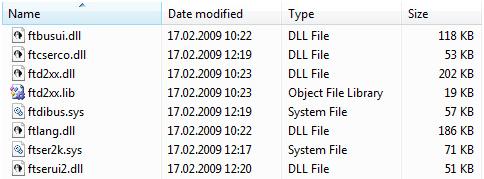
So if your device has any of these files in the driver list it’s FTDI-based.
To see the drivers for the device:
- Go to Device Manager
- Select the device
- Open context menu and select Properties
- Switch to Driver and click Driver Details button.
For example:
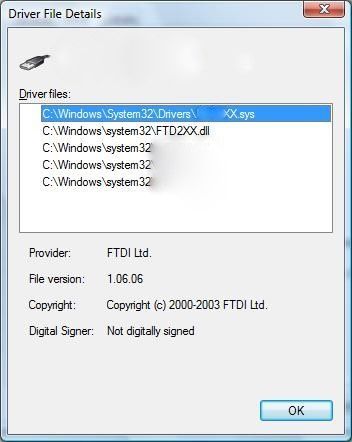
This device has FTD2XX.dll in the driver files list. And the provided name is FTDI. This device is FTDI-based. Some manufacturers may rename the driver (.sys), but the copyright information will reveal the real driver manufacturer.
How to interact with it?
Fortunately, FTDI provides the API. There’s a generic API set which can be used with all FTDI chips.
API is provided via FTD2XX.dll. It’s a DLL which interacts with FTD2XX.SYS driver.
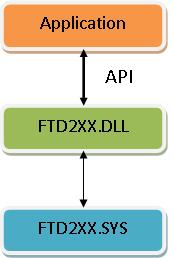
There’s a header file and library file within FTDI driver package: ftd2xx.h and ftd2xx.lib files.
The .lib file is COFF format, so it can be used in Visual Studio without any problem.
Related project
Improving a SaaS Cybersecurity Platform with Competitive Features and Quality Maintenance
Discover the insights of a successful SaaS platform development and support project. Find out how Apriorit’s team assisted our client with implementing new features in a low-level vulnerability detection engine, allowing them to make their platform more stable and competitive.

FTDI API usage
The API set has two interfaces “classical” (functions with “FT_” prefix) and “Win32 API” (functions with “FT_W32_” prefix).
“Classical” is cross-platform interface.
“Win32 API” is a set of Windows-only functions. It’s much alike Windows API, which is used to work with serial ports. So porting the code to FTDI functions is quite simple.
The main functions are:
FT_W32_CreateFile() / FT_OpenEx()
Opens the handle to the specified FTDI chip connection
FT_W32_WriteFile() / FT_Write()
Sends data over virtual COM port.
FT_W32_ReadFile() / FT_Read()
Reads data from virtual COM port
FT_W32_CloseHandle() / FT_Close()
Closes connection handle.
There are functions that allow to set up the port:
FT_SetBaudRate()
Sets the baud rate for the connection
FT_SetDataCharacteristics()
Sets the number of bits in the byte, parity, etc
FT_ClrDtr()
Clears DTR signal on the virtual COM port
FT_SetDtr()
Sets DTR signal on the virtual COM port
FT_ClrRts()
Clears RTS signal on the virtual COM port
FT_SetRts()
Sets RTS signal on the virtual COM port
etc.
For Windows there’s no limitation about using the functions of Classical and Win32 API interfaces together. So you may combine it.
Opening the virtual serial port
There are multiple ways to open FTDI device: by index, by description, by serial number, by location. These types of information may be used to open the device via FT_W32_CreateFile();.
To obtain the information about the connected devices FT_ListDevices() should be used.
Example:
ftStatus = FT_ListDevices(
        0,
        Buf,
        FT_LIST_BY_INDEX | FT_OPEN_BY_SERIAL_NUMBER
    );
    if (ftStatus!=FT_OK) //Get first device serial number
    {
        printf("Couldn't get FTDI device name");
        return 0;
    }
    ftHandle = FT_W32_CreateFile(
        Buf,
        GENERIC_READ|GENERIC_WRITE,
        0,
        0,
        OPEN_EXISTING,
        FILE_ATTRIBUTE_NORMAL | FILE_FLAG_OVERLAPPED |  FT_OPEN_BY_SERIAL_NUMBER,
        0
    );
// Open device by serial numberThere are several functions, which can provide the additional information about the connected devices:
FT_GetDeviceInfoList(),FT_CreateDeviceInfoList(), FT_GetDeviceInfoDetail(), etc.
Setting up the port
The code for setting the typical serial port settings to 115200 Bps, 8 bit per byte, 1 stop bit and no parity will look like this:
ftStatus=FT_SetBaudRate(ftHandle, FT_BAUD_115200);
    ftStatus=FT_SetDataCharacteristics(
        ftHandle,
        FT_BITS_8,
        FT_STOP_BITS_1,
        FT_PARITY_NONE
    );
    ftStatus=FT_ClrDtr(ftHandle);
ftStatus=FT_SetDtr(ftHandle);Also there are functions to setup the port in Windows style:
FT_W32_GetCommState(),FT_W32_SetCommState(),FT_W32_SetupComm(), etc.
Reading and Writing
Usage of FT_W32_WriteFile() and FT_W32_ReadFile() functions is similar to WriteFile() and ReadFile(). If the handle is opened in OVERLAPPED mode, the functions are asynchronous, otherwise they are synchronous. So reading and writing can be made in standard way:
DWORD Written=0;
unsigned char cmd[]={'A','T','\r','\n'};
ftStatus=FT_W32_WriteFile(ftHandle,cmd,sizeof(cmd),&Written,&Ovl);
if (WaitForSingleObject(Ovl.hEvent,INFINITE)!=WAIT_OBJECT_0)
  throw std::exception("Error waiting write to complete");
unsigned char Buf[250];
ftStatus=FT_W32_ReadFile(ftHandle,Buf,sizeof(Buf),&TotalRead,&Ovl);
if (WaitForSingleObject(Ovl.hEvent,1000)!=WAIT_OBJECT_0)
throw std::exception("Error waiting read operation");EEPROM programming
There are also APIs that allow to program FTDI chip. FTDI chip has EEPROM within it. EEPROM contains the chip settings block and the user area block. It’s possible to read and write both of these blocks.
Warning! Programming EEPROM is dangerous operation. Writing the invalid data may cause improper work of the device. You are doing it at your own risk.
APIs
The APIs to manage user area block:
FT_EE_UASize()
Gets the size of User Area.
FT_EE_UAWrite()
Write data to User Area.
FT_EE_UARead()
Read User Area Data
Reading the area is quite simple:
DWORD UASize=0;
    FT_EE_UASize(ftHandle,&UASize);

    UCHAR * pUAData=new UCHAR[UASize];
    DWORD SizeRead=0;
ftStatus=FT_EE_UARead(ftHandle,pUAData,UASize,&SizeRead);The APIs to manage whole EEPROM:
FT_EE_Program()
Writes to EEPROM special structure (FT_PROGRAM_DATA), which contains chip settings
FT_EE_ProgramEx()
Writes to EEPROM special structure (FT_PROGRAM_DATA), which contains chip settings, but the USB String descriptors are passed separately from FT_PROGRAM_DATA structure
FT_WriteEE()
Writes data to EEPROM directly.
FT_EE_Read()
Reads FT_PROGRAM_DATA structure from EEPROM data.
FT_EE_ReadEx()
Reads FT_PROGRAM_DATA structure from EEPROM data and USB String descriptors are passed separately
FT_ReadEE()
Reads EEPROM data directly
FT_EraseEE()
Erases EEPROM contents
Read also
Reverse Engineering IoT Firmware: Where to Start
Mitigate IoT-related risks by researching the way particular devices are built and performing further analysis of a device and its firmware. Explore a practical example of reverse engineering firmware for a smart air purifier.
Dumping EEPROM
Dumping EEPROM is a bit tricky, because some chips have the internal EEPROM, and some may have external one.
Quote:
The FT2232C supports 93C46 (64 x 16 bit), 93C56 (128 x 16 bit), and 93C66 (256 x 16 bit) EEPROMs.
So there can be various sizes.
Here’s the example of EEPROM dumping for 64 x 16 bit:
WORD EEPromData[0x40]={0};
    DWORD Offset=0;
    while (Offset < (sizeof(EEPromData) / sizeof (WORD)) )
    {
      WORD DataChunk=0;
        ftStatus=FT_ReadEE(ftHandle,Offset,&EEPromData[Offset]);
        if (ftStatus!=FT_OK)
            break;
    Offset++;
}Here’s a second trick. If you look at the function declaration for FT_ReadEE:
FTD2XX_API
    FT_STATUS WINAPI FT_ReadEE(
        FT_HANDLE ftHandle,
        DWORD dwWordOffset,
        LPWORD lpwValue
);dwWordOffset argument is actually index of the word value in EEPROM, not the offset in the meaning of “data offset”.
Data in the settings block
The settings block contains VID and PID of USB device, so if it’s changed, the device will be treated like some other device. Default values of VID and PID for FTDI chip are 0x0403 and 0x6001 accordingly, but these values are overwritten by the device manufacturers.
The settings block contains the product description strings (USB String descriptors): Manufacturer, Manufacturer ID and Description. Also there’s device serial number, which can be changed by EEPROM programming.
Warning one more time! Changing the EEPROM setting may also cause the software failures if the invalid data is written to EEPROM.
Download sample FTDI source code.
Conclusion
FTDI chips are widely used in various software development projects that require interaction with USB and serial communication. Common examples of use cases requiring interactions with these chips are microcontroller programming and debugging, industrial automation, and custom software development.
At Apriorit, we have dedicated teams with experience working on USB-related projects, as well as delivering embedded software solutions.
Receive efficient and relevant software for your project!
Deliver a robust and reliable solution by outsourcing even the most challenging tasks to Apriorit’s experienced engineers.
Have a question?
Ask our expert!

Program Manager



