
 Skip to main content

Quality assurance (QA) specialists often have to perform a large number of tests on a product in a short amount of time. The active development of test automation today is a direct consequence of the acceleration of testing processes and the need to ensure high product quality under time constraints. How to implement autotests in a project quickly and efficiently?
In this article, we share our experience and tips of autotests implementation and creation. We describe the autotest development lifecycle, the main test development principles, and implementation requirements that are useful to consider in test automation processes. This article will be useful for QA specialists who want to improve their autotesting routines.
Contents:
1. Choosing the right tools
Any testing process starts with picking the best QA automation tools. Before you use any tool, make sure it can perform all necessary functions, such as identifying all needed graphical user interface (GUI) elements. When you know each tool’s capabilities, you can choose the most appropriate tool for each situation. For example, it’s inconvenient to test the installation of a program that needs to reboot with Microsoft Test Manager, as it simply doesn’t provide such a function. In this case, it’s convenient to use AutoIt.
Some test automation tools like TestComplete and Microsoft Test Manager have a client–server architecture in which the test script can only be executed by the client. Сonsider this before you implement such a tool because you’ll need to install clients on every computer where your script is executed.
Other tools, such as AutoIt, can compile executable files, which greatly simplifies the use of scripts. However, in this case there will be no distributed system that runs scripts on the computer, controls the execution, and captures final information about the task and system statuses. As a result, scripts created with AutoIt have to be organized manually.
You will also need an environment where you can run autotests. Depending on the task at hand, you may use a physical computer or a virtual machine (VM) installed on your server or in the cloud. If you don’t need to test software on a device connected to the test computer, it’s preferable to use a VM. Of course, you can use a VM to test software on a connected device, but then you may need to use specific tools, which increases testing costs and the possibility of errors caused by third-party tools. Using a VM allows you to set up the environment once and then use it repeatedly. You can roll back the VM to a clean state at any time so the results of previous tests won’t affect new ones.
2. The lifecycle of autotests
Developing autotests is no different from developing software. Therefore, it’s vital to approach it with the same amount of attention and diligence.
Although you can use any software development model for autotesting, we find the iterative model to be the most efficient. In this model, tests are created step by step, increasing in number with each development stage (see Figure 1).
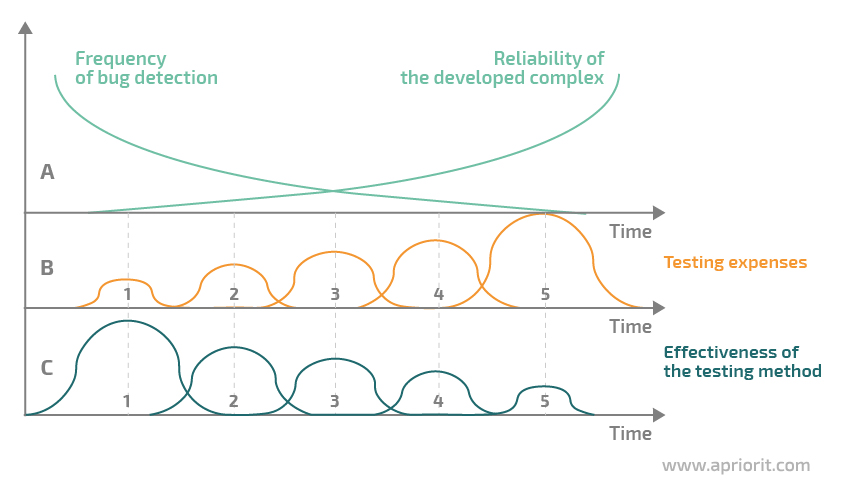
Figure 1. Stages of autotest development
You can see an example of an autotesting system structure in Figure 2. The system contains the following:
- A test suite that’s sufficient for covering the application under test according to the defined test criteria
- A log file with the expected results of the test suite that contains traces, or “protocols” (records in the log about the states of variables at specified points during program execution)
- Test cycle statistics that contain:
1) The results of each test run and a comparison with reference values
2) The reason for test failure or success
3) Test coverage criteria and to what extent they were satisfied during the test cycle
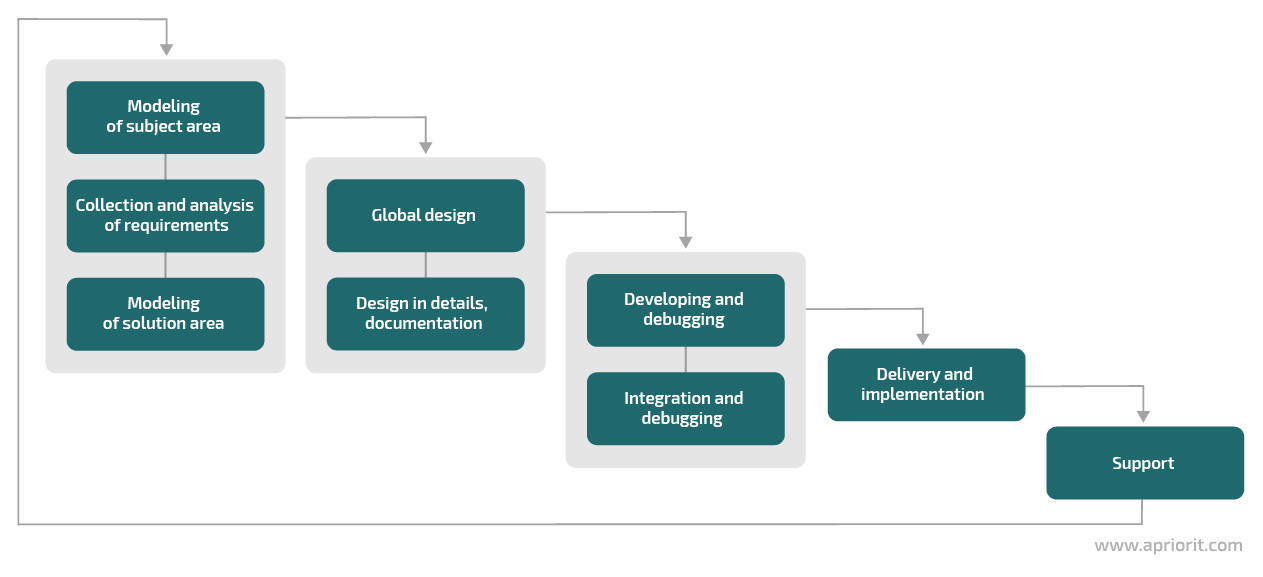
Figure 2. The generalized structure of an autotesting system
After each test run, the system forms a list of issues (bugs and errors) and saves it to the application for storing information aka “project development base.” Every detected bug is identified, attributed to the corresponding module, prioritized, and tracked. This guarantees issues will be solved in future builds.
After all of the above mentioned steps you can fix the bugs and then the new product version goes to the next testing cycle. This process repeats until the expected quality is achieved. In this iterative process, autotesting tools provide quick control of bugfixes and fast product quality checks.
The frequency of bug detection per unit of testing cost and software reliability depend on the testing time and the effectiveness of the testing method (see Figure 3). The more person-hours are put into testing, the fewer bugs remain undetected in the product and the more secure the product becomes. However, perfection in software programming has its own limits associated primarily with exceeding the development costs along with unnecessary polishing of the product. It is a tester’s and project manager’s task to find the optimal balance.
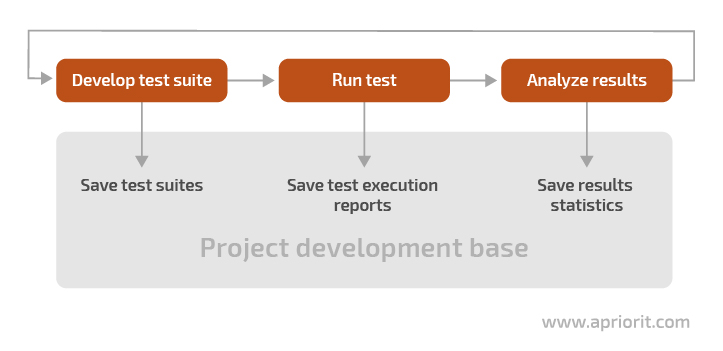
Figure 3. Testing time vs effectiveness and costs
You should combine different debugging and testing methods to ensure the desired software quality when your budget is limited (Figure 3). You can reach the desired quality using software quality management.
3. Main principles of autotest development
When planning the development of autotests, it’s necessary to understand the basic principles of their design. The general scheme of an autotesting system looks as follows:
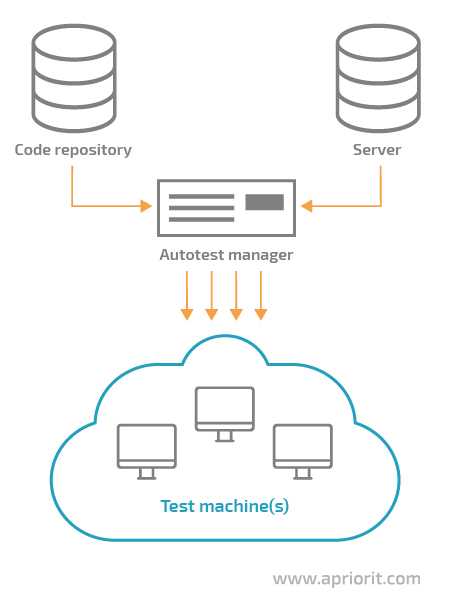
Figure 4. The general scheme of an autotesting system
As you can see, the system basically consists of four components:
- Code repository — an external repository for software versions (for example, a Git repository)
- Server — an external data source for storing software versions and testing results
- Autotest Manager — an application that distributes tasks to test agents and is responsible for running tests at specified intervals (daily, by request, after each measurement, etc.)
- Test Machine — a hardware device or virtual machine where software testing is performed
To develop easy-to-use and manageable autotests, adhere to development principles. Let’s take a look at them below with examples given in the AutoIt language.
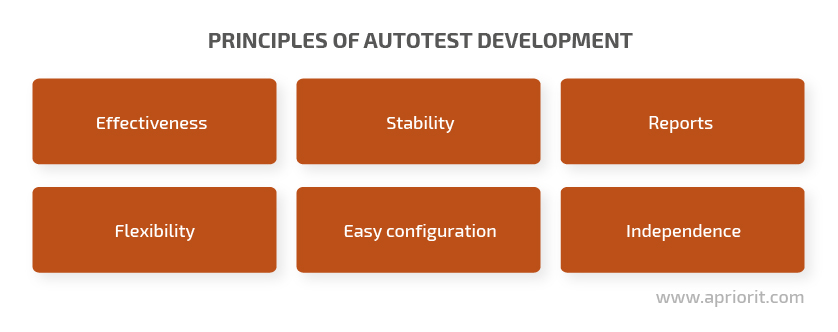
3.1 Effectiveness
Autotests should serve a specific purpose that benefits the project. For example, they can save time on regression testing or implement tests that are impossible or difficult to do manually (load testing, performance testing, stress testing). Automated tests allow you to get an efficiency boost as you can get more results in the same time.
Note: Don’t try to create one autotest for all purposes. Develop a specific autotest for each case. You may use the same approaches, methods, and data, but the autotests themselves must be different.
3.2 Stability
One of the best practices of implementing autotests is to make an autotesting system stable and respond to any failure or error. Even if one test fails to execute, it must not prevent the execution of other tests that don’t depend on it. Try to make test suites independent if possible.
How can you make scripts stable? Here are a handful of techniques:
- Use timeouts
There are two types of timeouts:
- A global timeout is applied to the whole script. It’s used when local checks don’t work or the tested program freezes. The script checks the value of the global timeout from time to time. If it reaches a critical level, the script aborts with an error code and executes the necessary actions (for example, recording to the log, saving information, and executing system cleanup from the temporary files/registry keys created by the script).
- A local timeout is used for such functions as WebDriverWait in Selenium or WaitForControlExist in .Net (functions that receive the timeout as a parameter). A local timeout means that a function cancels a particular element’s waiting as soon as the element is shown on the page. Otherwise, the function terminates itself with an error code if the element doesn’t appear.
- Get the controls
The right way for autotests implementation is to get the information about the UI elements (also called controls) which will be used in the autotest before performing any operations. Some controls can change their state after you’ve taken actions on the page, and you’ll automatically get an error when trying to address them as autotest will try to get control using the old address. The controls you get after loading the page and the controls that the autotest will try to access after you’ve taken some actions on the page will be two completely different controls.
- Keep it clean
Clear all fields in any search you work with. Only then may you fill in new data for the search. In this way, you can assure that previously entered data won’t violate the purity of the test.
- Check the control state
Check the state of a control before selecting or deselecting it. For example, a checkbox that was always selected by default before may not be selected. When an error caused by the change of checkbox state is found not on the screen with this control but a couple of screens later, it seriously complicates the testing process.
3.3 Reports
A report is the result of autotest execution. If a test passes successfully, you may proceed with testing other elements. However, if the tested program freezes in the middle of the script or, for example, causes the operating system to crash, you’ll get a negative result or no result at all. That’s why it’s necessary to record all actions, or at least the main ones. Reports can provide both general and detailed information about test results.
Reports must contain:
- Timestamps
- Test progress
- Information about any errors
- Results of script execution (passed or failed)
- Explanation of results (no files were found, the test failed/all required files exist, the test passed, etc.)
Besides a report, you can save such information as:
- System screenshots at the moment of error detection
- Part of the event log created during script execution
- A list of services working in the system
- The presence or absence of files and registry keys
A report will help you locate errors found during tests. Also, keep in mind that some errors may be context-dependent and it may take much time to reproduce them without additional information.
3.4 Flexibility
Autotests must be easy to correct because projects are constantly developing and changing. Also, autotests should not contain hardcoded input data. Store all input data in an external data source in the corresponding network file or database.
To provide for flexible input data, it’s enough to send an absolute parameter to the script. This parameter will specify where autotests take their input data from and means that changing values in the source data will not cause code changes (see Figure 5).
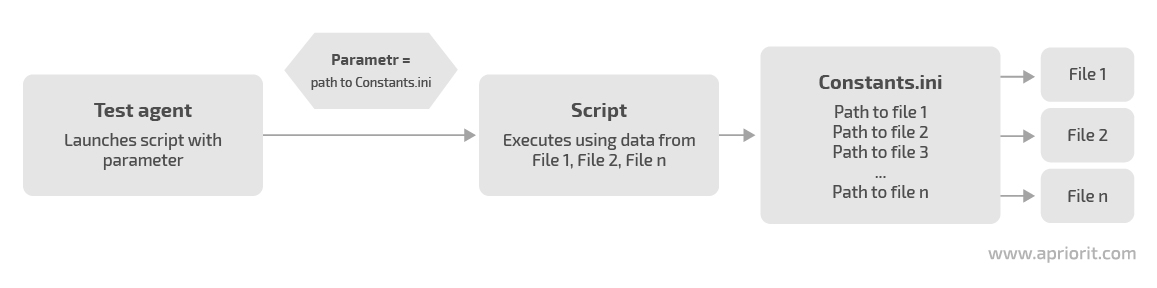
Figure 5. Providing flexible input data for tests
Also, it’s possible to distinguish the flexibility of your autotests according to different test properties, such as:
- Flexibility of the platform (cross-platform)
- Flexibility of input data (parameterization)
- Flexibility of changing code (modularity, manageability)
3.5 Easy configuration
1. Preconditions
Every test has its preconditions that must be set before running. When setting them up, try to stay somewhere between preparing everything and doing everything in a minimum number of steps. Sometimes it takes longer to prepare preconditions than it does to run the test itself. Nevertheless, you should take their preparation seriously. Preconditions are used for the initial preparation of the operating system, test program, browser, etc on the test machine. A test scenario executed before defining the preconditions either will not start or will show incorrect results.
Also, try not to use one autotest to prepare data for another test. In the future, this may lead to frequent false negatives. Your main autotests may fail because of problems in autotests that were used to prepare the test data. Even when you test a GUI, you should use efficient approaches for data preparation such as direct database queries.
2. Use external data sources
All data used and created during test execution (scripts, configuration files, reports) should be stored on a network source. This means there has to be one computer that doesn’t take part in the testing process but has a shared folder with all the autotesting information or the database. 90% of tests run and execute on the network, so consider copying scripts and data to every computer where they’re run to eliminate possible issues that may appear on the network.
Imagine that your test environment contains a large number of virtual machines and you roll back to clear snapshots before each autotest run. First, you’ll spend additional time copying and controlling file versions. Second, if most of your data is static, there’s a risk of losing or damaging it when relocating it. While using external data sources you can minimize these risks.
3.6 Independence
During test execution, all decisions to be made by a user (for example, selecting a menu item, entering private data or passwords) should be saved to the configuration file. The script will get this information when it’s necessary. It’s unacceptable for a test to require user actions during execution because this conflicts with automation, which is our main goal.
The configuration file should be placed on a network drive so that any autotest can access it from any test machine.
4. Script requirements
There are some generally accepted requirements to follow while developing scripts. They can make it easier for you to use and change your scripts and increase the overall effectiveness of your work.
4.1 Error handling
Note: Everything below is about errors (not bugs) and about main program errors (not script errors).
One of the tips of how to implement autotests is to perform error handling, as it’s one of the main testing automation goals. With error handling, we know beforehand what errors can appear because we’ve already checked specific test cases. But unexpected errors can also appear, and they have to be described in the report with autotest results. This requirement has something in common with the stability principle, as all stability providing methods check the system behavior with the expected result, i.e. handle errors.
For example, say you need to test a page where some buttons are supposedly missing due to developer’s mistake or problem in the system. Before you take any actions on that page, open it and make sure that some button is actually missing. In this case, when you check if the button is displayed, you’ll get the expected error that the button is missing. Autotest should process this (and only this) error and then proceed.
Depending on the nature of the detected error, we can follow one of two scenarios:
Error 1: An unexpected window opens or an expected window has an unexpected look.
Solution: Use local timeouts for specific functions and global timeouts for the whole script. If the system behavior is predictable, add the error processing.
Error 2: The actual result doesn’t correspond to the expected result.
Solution: This is an error in the autotesting script. Cancel the script and report the error. Look into the problem deeper and make an assumption about the reason for the mismatch and whether it’s really a bug. If you’re testing a newer version of the software, it’s possible that the expected result has already changed.
4.2 Manageability
Your autotests should be easy to manage, as discussed in the Flexibility principle section. Scripts should have a handy structure, consist of functions, follow coding standards, and use generally accepted methods. If a large number of scripts are developed using the same scheme, you can quickly find script or block which contains cause of issue in the code you see for the first time and change it if necessary.
The code structure should be intuitive. Name variables and functions simply and according to their purposes. At the initial development stages, it’s reasonable to involve developers in code reviews. This will help you work out the coding style and avoid standard errors that may harm code optimization or refactoring later.
4.3 Modularity
Continuing the list of best practices for autotests implementation let’s take a closer look at modularity. Modularity is the ability to replace individual components in a project without touching the rest of the code. You can achieve this by splitting the autotest code into different sections, or modules. One module should describe only similar functionality. Try to avoid strong interdependence between modules. Describe each module in a separate file. Use layers and don’t mix program logic and data handling.
Modularity gives you the following advantages:
- Nonredundancy ensures the absence of repeating code
- Reusability allows you to use the same program components for different purposes
- Refactoring has a positive effect on all autotests which use the refactored module
Pay attention to the modularity of test suites. The right testing framework will allow you to make changes in working test suites. For instance, the NUnit environment offers several ways to implement a test suite. One of them allows you to use a file with the names of the tests to run. While using this approach, you can run different test suites by simply changing the file name.
4.4 Parameterization
Consider including parameters in your tests. You can perform testing with different levels of detail, so, there should be some flexibility for running the autotests in the different modes. For example, run the autotest only for testing one feature or only one user story. You can shorten or extend the testing area by changing the value of testing parameters. You may use parameters for paths, file names, constant values, element names, etc.
4.5 Cross-platform
Make autotests platform independent if possible. This doesn’t mean that a test will work the same everywhere. Your task is to predict the environmental features and perform elementary checks at the beginning of script execution.
It’s generally a good practice to make autotests independent from:
- Equipment
- System versions and updates
- System capacity
- Third-party software
- Browsers (if it’s a web project)
For example, you should check for the presence of any files after project installation. .Net has a File.Exists() function for precisely this. For this function to work correctly in systems with different bitrates, you need to create a method that takes into account the bitrate of the system when forming the path to the checked file (see Figure 6).
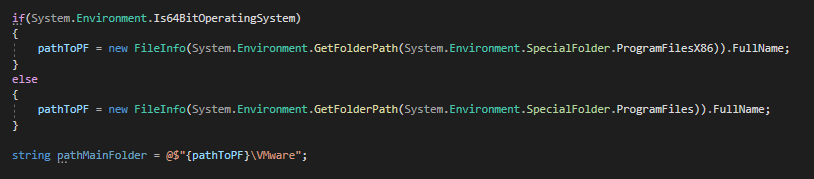
Figure 6. Checking system capacity
4.6 Logging
Test results should be logged. Logging is one of the most important parts of the reporting process. A log file must contain information about the failure or success of a test. This will help you localize errors found during tests and compose accurate product state reports.
Minimal information on autotest results can be provided by the development environment itself (error text, its location in code, etc.), but sometimes it isn’t enough. If autotests are to handle variable data (data that changes from launch to launch), it would be logical to add the output of this data to the log file. This information won’t take much disk space, but if necessary, it will reduce the time for finding the cause of an error.
4.7 System cleaning
Clean the system after executing autotests. If you’re using VMs, cleaning them just means rolling back to a prepared snapshot. If you’re using a physical PC, you’ll need to create and use a script that will delete all changes made.
Also, make sure to delete data created on network drives and databases in the process of preparing and running autotests. If you continuously write data to a database without cleaning it from time to time, the database can become extremely large.
4.8 Multithreading
When designing and planning tests, consider the need for parallel or multithreaded autotest execution that may appear with the growth of the project. Multithreading can be implemented either on a single or on several test computers.
You can use multithreading when the execution time of autotests becomes excessive (more than 10 to 12 hours) or when you need to speed up the process of getting feedback on the current build state. Therefore, consider using multithreading when developing autotests, as some solutions and approaches may cause errors. For example, your framework may not allow for one user to log in to the software under test from several computers at once.
Correcting such errors can be very time-consuming and may even require reconfiguring the entire autotest framework.
Conclusion
Implementing an autotesting system takes a lot of time and effort. The key to success in this task is to prepare a detailed action plan, create the necessary documentation, develop autotests, and validate them. The lifecycle of autotests is not fundamentally different from the lifecycle of any other software, and therefore their development passes the same stages.
It’s also important to study all capabilities and limitations of the tools used to avoid possible issues in the future as this is considered to be one of autotests implementation best practices. Clarify the common code structure and code interaction with the testing control system before developing scripts and define the necessary principles and requirements for each test. Finally, analyze the results of the autotesting system, as sometimes its implementation only increases the budget and postpones the terms of project delivery. Test automation results analysis will help you reduce the time and resources spent on test runs, and still deliver quality results.
Our QA specialists actively apply both manual and autotesting to ensure the high quality of our products. Contact Apriorit to order top-notch QA services.
Have a question?
Ask our expert!

VP of Engineering



