
 Skip to main content


Key takeaways:
- Hardware Lab Kit (HLK) testing is vital both for obtaining WHQL certification and ensuring your driver’s quality, security, and compatibility with the Windows operating system.
- HLK testing is the most unpredictable part of WHQL certification and can be hard to estimate outright, especially for complex or time-sensitive driver releases.
- Legacy and kernel-mode drivers are the most likely to fail HLK tests on new Windows versions.
- Preparing for HLK testing early and working with experienced engineers can help you reduce time spent on retesting and debugging.
When you need WHQL certification for your driver but aren’t sure how long the process will take, Windows Hardware Lab Kit (HLK) testing is usually the main source of uncertainty. While the testing itself is usually predictable, additional debugging, fixes, and retesting can extend the overall schedule depending on the driver’s readiness.
In this article, we focus on the question: How long does HLK testing actually take? You’ll learn the typical HLK testing timeline, which factors influence that timeline, and practical ways to speed up the process without compromising quality.
If you’re a CTO, engineering manager, or technical leader seeking a realistic understanding of Windows HLK driver testing timelines to plan resources and ensure smooth WHQL certification, keep reading.
Contents:
- Why HLK testing is critical for modern Windows drivers
- What HLK testing typically reveals: common driver failure scenarios
- Key factors that influence the duration of HLK testing
- Typical timeline for HLK testing with Apriorit
- What you can do to speed up HLK testing: Apriorit’s tips
- Speed up HLK testing and WHQL certification with Apriorit
Why HLK testing is critical for modern Windows drivers
On paper, HLK is mandatory for obtaining WHQL certification. And without this certification, it’s impossible to distribute your driver via Windows Update or have it recognized as trusted by Windows.
But beyond allowing you to obtain WHQL certification, passing HLK tests brings additional benefits, such as:
- Compliance with Microsoft standards. HLK tests confirm that your driver adheres to Microsoft’s strict hardware and software standards. This ensures seamless operation with Windows features such as Secure Boot, Device Guard, and Windows Update.
- Stability and reliability. HLK tests stress drivers under different conditions to uncover crashes, BSODs, and other reliability issues. Tests usually cover edge cases, power states, and resource management.
- Security. Windows places heavy emphasis on security. HLK testing verifies that your driver meets Windows Hardware Security requirements, reducing the risk of vulnerabilities and potential exploits.
- Future-proofing. Windows evolves quickly, and each time you make changes to your driver, you need to once again conduct HLK testing. By passing these tests, you can be confident that your driver works properly on the latest Windows versions. Windows also encourages companies to retest their drivers alongside every major Windows release.
Even if WHQL certification isn’t a strict requirement for your project, HLK testing plays a critical role in validating driver quality, stability, and compliance with Windows requirements. HLK helps ensure that a driver behaves predictably across supported Windows versions and system configurations.
In some cases, you may not need WHQL certification — for example, if you plan to use your driver only in a small, controlled environment, and you don’t intend to distribute or update it. However, skipping HLK testing is risky. Without it, you can’t guarantee your driver’s stability, security, and long-term compatibility in Windows environments.
Passing HLK tests isn’t easy, as HLK requirements evolve with each Windows release, introducing new security and compatibility checks. In the next section, we look at which parts of HLK tests are typically the most challenging – and may require extra time to pass for some drivers.
Need to get WHQL certification for your driver?
Contact us today to explore how our engineers can HLK-test your driver and prepare it for successful certification!
What HLK testing typically reveals: common driver failure scenarios
While HLK testing covers a broad range of scenarios, some areas are particularly challenging and often have the biggest impact on driver stability, reliability, and certification timelines.
Here are some of the most common and critical issues, though many others can arise:
- Plug-and-play states. When a device is installed, Windows searches for the appropriate driver, registers it, and configures all operational states. Some drivers may mishandle system messages, returning incorrect status or data — or nothing at all. In other words, a driver may not fully support all necessary plug-and-play states, or it may implement them incorrectly, which can cause failures during HLK testing.
- Synchronization issues. HLK tests often interact with devices in different states simultaneously, such as by triggering multiple plug-and-play events. If a driver has synchronization problems, locks can be captured incorrectly across several functions, leading to hangs or deadlocks during testing.
- Memory use. HLK tests cover almost all driver functionality, which can reveal memory allocation or leak issues that ordinary QA testing might not catch. The tests may trigger certain functions that allocate memory but fail to release it properly, which the HLK framework detects.
- Incorrect IRP handling. Input/output request packets (IRPs) are used to process I/O operations, such as reading from or writing to a flash drive. Drivers must handle multiple IRP requests correctly, coordinating data transfer with the system. Mistakes in IRP handling can cause incorrect behavior, crashes, or system instability.
- INF file problems. The INF file provides the system with driver information, installation instructions, dependencies, and supported features. Legacy drivers often use outdated INF files, which can result in incorrect installation, missing functionality, or failures during HLK tests.
These areas are often the most complex to test and fix, especially for legacy drivers. To address these challenges, make sure that your team has extensive driver debugging experience, or look for outside expertise to deliver a high-quality driver in the shortest possible time.
Next, we’ll look at factors that influence HLK testing duration and how they affect your driver’s path to WHQL certification.
Key factors that influence the duration of HLK testing
The time required for HLK testing can vary significantly depending on several technical and organizational factors. The most important include:
- System configuration complexity (32-bit vs 64-bit). The scope of testing depends on the target system architectures. The more operating systems and Windows versions a driver must support (for example, both Windows 10 and Windows 11), the more HLK test scenarios must be executed — and the longer testing will take.
- Driver type. The way a device is installed matters. Some devices rely on multiple drivers, and each driver requires its own HLK test scenarios, which increases overall testing time. In addition, drivers for complex devices that depend on GPUs or NICs typically require more extensive testing.
- Number of defects. Before HLK testing can begin, developers must address existing driver issues identified during preliminary analysis, such as with Driver Verifier. Otherwise, HLK tests may fail, and testing cannot proceed successfully.
- Driver age. Older codebases often require modernization before HLK testing, including updating INF or DCH packages, fixing power management and Plug and Play (PnP) issues, replacing deprecated APIs, and implementing security hardening measures such as HVCI compliance. This takes additional time.
- Team’s experience with HLK testing. Familiarity with HLK playlists, lab setup, and debugging workflows has a direct impact on testing efficiency. Inexperienced teams typically spend more time interpreting failures and stabilizing the test environment.
As you can see, many factors influence the overall duration and cost of HLK driver testing.
Based on Apriorit’s experience testing hundreds of drivers, we estimate realistic timelines by relying on HLK’s own execution time estimates for each test set and adjusting them based on real-world conditions.
While Windows HLK provides expected durations up front, additional time is often needed to reconfigure the system or stabilize the environment when certain tests fail.
In the next section, we walk you through a typical Windows HLK testing process and explain how long each stage usually takes in practice.
Read also
How to Develop a Virtual Disk Driver for Windows: A Practical Example
Explore how to build a reliable driver for virtualizing your system and securely storing your critical business data.

Typical timeline for HLK testing with Apriorit
Windows HLK testing is a multi-phase process. Below is a typical breakdown of how HLK testing is structured at Apriorit and what each phase includes.
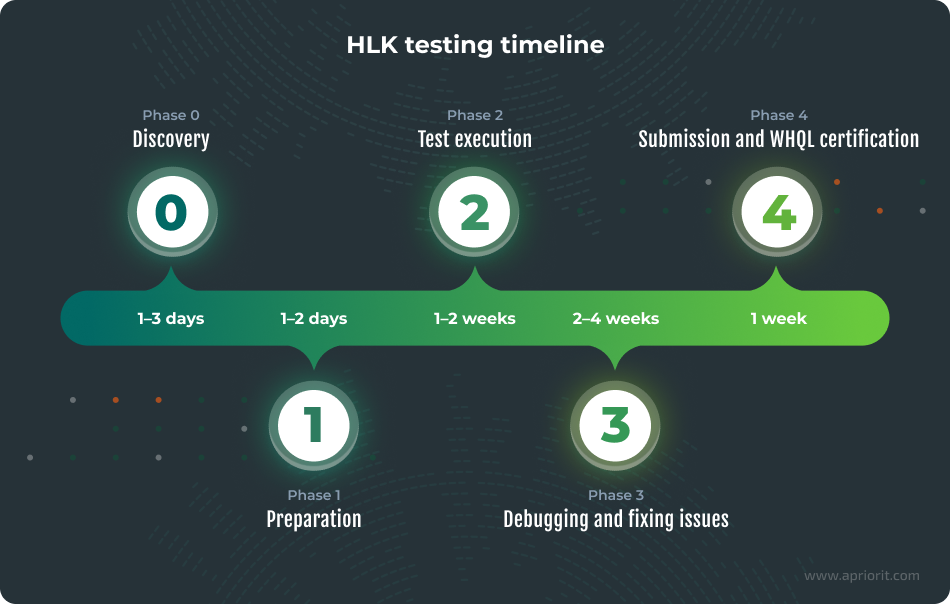
Phase 0 (Optional): Discovery
If you don’t have documented driver requirements, we recommend starting with a discovery phase as a separate service. It typically takes one to two days, or up to three in some cases.
During this phase, we clarify and document what your driver is expected to do, which Windows versions and system configurations it must support, and what functionality we’ll cover with HLK tests.
The discovery phase is especially useful for legacy drivers or projects where requirements have evolved over time, as unclear or incomplete requirements can significantly extend later testing and debugging.
Phase 1: Preparation
This phase focuses on getting the driver and test environment ready for HLK execution. It includes analyzing driver requirements and defining expected behavior.
If you already have documented requirements, during this phase, we will typically receive the physical device and set up the HLK lab environment.
The preparation phase requires clarifying hardware setup, connection scenarios, and usage specifics. The whole process typically takes another one or two days. Factors that play into the duration include the complexity of the system configuration, the type of driver, and the age of your driver’s codebase.
Phase 2: Test execution
During this phase, we execute HLK tests across the required Windows versions and system architectures. Testing for compatibility with each Windows version requires a separate test run. Testing for all OS versions usually takes one to three days.
So, the total test duration depends primarily on the number of operating systems and configurations that must be covered, as well as the type of driver being tested. For example, complex drivers or those that rely on GPUs, NICs, or multiple driver components typically require broader test coverage, which increases execution time.
Phase 3: Debugging and fixing issues
This phase involves analyzing HLK test failures, identifying root causes, and fixing issues in the driver code. The timeline depends on the driver’s maturity, code quality, and the number of defects found. This is the hardest phase to predict when it comes to passing HLK tests.
In our experience, HLK tests need to be re-run in about 50% of projects, often due to issues such as incompatibility with the current Windows version or system-level requirements. If the driver is already released and in use, HLK testing typically uncovers compatibility issues rather than functional bugs. Fixing these takes around two weeks on average.
For drivers not yet in production, we recommend manual QA testing before HLK to catch issues early and reduce costs. For drivers like this, timelines are harder to predict, but thorough pre-HLK testing often eliminates the need to re-run tests.
Legacy drivers may also require updates to INF or DCH packages, Plug and Play or power management fixes, API updates, and security compliance work such as HVCI support.
Phase 4: Submission and certification
In the final phase, we help you prepare everything required for WHQL submission, including validated HLK test reports, fix descriptions, and all supporting documentation requested by Microsoft. As the final result, we deliver a certification-ready driver along with a complete submission package.
The actual WHQL submission is sent by you using your own Microsoft account. Once the submission is sent, the approval timeline largely depends on Microsoft’s review process and is typically one to two weeks.
During this period, we don’t do any active development. However, we still provide short consultations if questions arise, which typically takes a few hours in total.
If Microsoft requests changes or additional clarification, we step back in to address them. If driver components or versions change, we re-run the required HLK tests, as such updates usually require modifications to the INF file and refreshed test results.
Note: There are many variables that affect the cost and duration of HLK driver testing, making it impossible to provide a more detailed timeline. While most projects fall within the ranges described above, testing large or highly outdated legacy drivers can take several months due to extended debugging and rework cycles.
Read also
How to Develop a Windows File System Minifilter Driver: Complete Tutorial
Explore best practices for Windows driver development in our comprehensive tutorial. Learn how to implement minifilter drivers to speed up the development process and increase your code quality!

What you can do to speed up HLK testing: Apriorit’s tips
As discussed above, HLK testing timelines largely depend on the driver’s current state and the experience of the team performing the tests.
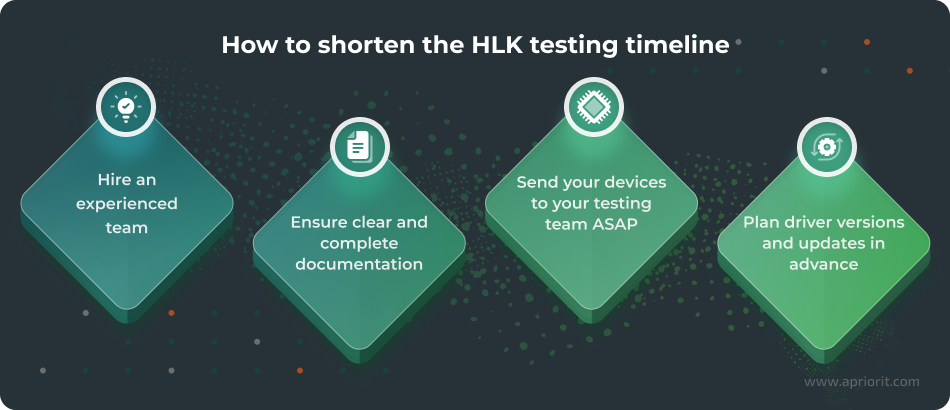
The most important step you can take is to hire an experienced HLK testing team that knows common HLK pitfalls and can configure the test environment — which is especially important for complex or kernel-mode drivers and GPU- or NIC-based devices.
However, even when you’re trusting your HLK testing process to top-level professionals, there are still things you can do to help the testing team work more efficiently and, thus, accelerate delivery.
Based on Apriorit’s experience testing and certifying lots of Windows drivers for our clients, here are the steps that minimize delays without risking test failures or rework.
- Send devices as early as possible
HLK testing depends on physical access to the target device and driver. Delays in device delivery often postpone lab setup, environment validation, and issue discovery.
When you provide your hardware device and EV-certified driver to your testing team up front, it allows them to start testing immediately and reduces idle time between preparation and execution phases.
Note: The driver you provide to your HLK testing team must be properly EV-signed before testing can begin. This is required because HLK tests validate installation, security, and execution behavior under real Windows trust policies, and unsigned or improperly signed drivers will fail tests — or cannot be installed in the HLK environment at all.
- Ensure clear and complete documentation
You have to either provide documentation or create it during the discovery phase. No matter which route you take, the quality of your documentation directly affects how fast your testing team is able to set up the test environment.
Good documentation should include things like installation instructions, supported scenarios, device dependencies, power states, behavior requirements, and known limitations. With this information, we avoid trial and error during setup and get to test execution early.
Michael Teslia, Program Manager at Apriorit
- Plan driver versions and your update strategy in advance
HLK testing is tightly coupled to the driver version and INF configuration. If changes are made to driver components, the driver code, or the INF file, you always have to retest the driver.
Defining how the driver will be deployed in production — including update scenarios and supported Windows versions — helps avoid unnecessary test re-runs and keeps the certification process predictable.
By following this advice, you can help an HLK testing team significantly reduce HLK testing time while maintaining compliance with Microsoft’s requirements and ensuring a smooth path to WHQL certification.
Related project
Improving a Windows Audio Driver to Obtain a WHQL Release Signature
Learn how Apriorit streamlined the WHQL release signature acquisition process for a client’s audio driver, ensuring compliance and stability. We explore how our expertise in driver development led to smoother performance and increased user satisfaction.

Speed up HLK testing and WHQL certification with Apriorit
With 20+ years of experience in driver development and testing under our belt, we know what it takes to get a driver ready. By outsourcing HLK driver testing and WHQL certification support to us, you will:
- Enhance your team’s expertise. If you don’t have in-house expertise in HLK testing and kernel-mode debugging, Apriorit can provide you with specialists who have years of experience in exactly that. Our experts quickly identify the reasons for HLK failures and efficiently address them, supporting you all the way to getting your driver certified.
- Modernize your legacy drivers. Legacy drivers aren’t the easiest to get certified. Our team can analyze your legacy driver and give you a clear picture of how much time and effort it will take to modernize, test, and certify it.
- Get end-to-end HLK lab management. We handle the full HLK workflow, including lab setup, controller and client configuration, playlist selection, test execution, and results analysis. Our team can also assist you during the WHQL submission process.
- Resolve HLK failures fast. Our engineers specialize in kernel-level troubleshooting, including WinDbg analysis, Driver Verifier configuration, IRQL and DMA issues, and power and PnP stabilization. This expertise shortens debug cycles and reduces the risk of repeated test failures.
- Collaborate when and how it’s convenient for you. We offer flexible engagement models for HLK testing. You can be confident that the process will go smoothly, with clear milestones and reporting.
At Apriorit, we’ve helped hundreds of companies deliver reliable, production-ready solutions that require deep driver and kernel-mode expertise.
One recent example is a WHQL certification project for a British audio technology company that needed to rework its Windows driver to meet current HLK requirements. Our team analyzed the existing implementation, performed comprehensive HLK testing, and addressed the issues preventing certification.
As a result, the updated driver successfully passed WHQL certification and can now be distributed across supported Windows platforms, allowing the client to reach a broader user base and reduce installation and compatibility issues.
Michael Teslia, Program Manager at Apriorit
If WHQL certification is a release blocker for your product, Apriorit has the right expertise to successfully remove it. Our HLK testing team can help you assess readiness, modernize legacy drivers, resolve kernel-level issues, and guide your driver through certification without unnecessary retesting.
Looking to release your driver securely?
Let’s discuss how Apriorit experts can help you deliver a secure, high-quality driver that Windows will recognize and recommend!
FAQ
What is Windows HLK?
<p>The Windows Hardware Lab Kit (HLK) is Microsoft’s official test framework for validating Windows drivers and devices for WHQL certification. It automates scheduling and execution of mandatory tests required for Windows compatibility and trust.</p>
<p>HLK also allows engineering teams to integrate custom tests alongside Microsoft-provided tests, enabling flexible validation strategies. Passing HLK tests is a prerequisite for displaying the Designed for Windows logo and distributing drivers through Windows Update.</p>
What factors can make HLK testing take longer than expected?
<p>HLK testing timelines are often extended due to environment and code-related issues. Common causes include:</p>
<ul>
<li>delays in hardware availability</li>
<li>unstable HLK lab setup</li>
<li>incorrect OS, Secure Boot, and HVCI configurations</li>
</ul>
<p>Legacy drivers frequently require modernization — such as INF/DCH updates and removal of deprecated APIs — which adds debugging cycles.</p>
<p>Kernel-mode drivers introduce additional complexity, as failures often require deep analysis and multiple retest iterations to resolve.</p>
What are the most common Windows HLK test failures for kernel-mode drivers?
<p>Kernel-mode drivers most often fail HLK tests for these reasons:</p>
<ul>
<li>Power management and Plug and Play (PnP) issues, particularly during suspend and resume scenarios</li>
<li>Improper IRQL or DMA handling that can cause crashes under stress tests</li>
<li>Missing support for modern security requirements, such as HVCI</li>
<li>Outdated INF/DCH packaging, missing symbols, or reliance on deprecated APIs</li>
</ul>
<p>These and other factors frequently trigger failures during HLK execution and submission validation.</p>
How can I decrease the HLK testing time?
<p>The time required for HLK testing can be reduced by preparing early for the testing process rather than by taking shortcuts.</p>
<p>Start with a readiness audit to ensure INF/DCH compliance, stable HLK lab configuration, and correct Secure Boot and HVCI settings. Also, make sure hardware is available before testing begins.</p>
<p>Automating playlist execution, log collection, and symbol management reduces manual delays. Meanwhile, grouping fixes and retesting strategically helps minimize unnecessary test cycles while preserving certification quality.</p>
What deliverables should I expect from an HLK testing partner?
<p>A reliable HLK testing partner should provide clear, actionable deliverables throughout the process. These typically include:</p>
<ul>
<li>A summary report and a detailed HLK execution report</li>
<li>A categorized list of test failures, with root cause analysis and fix recommendations</li>
<li>Results of retesting, confirming successful issue resolution</li>
<li>A WHQL-ready HLK results package (.hlkx)</li>
<li>A certification-ready driver, including updated binaries, source code (if modified), and build instructions</li>
</ul>
<p>Together, these deliverables ensure you receive both a certification-ready driver and a complete HLK report package, giving you full transparency and long-term maintainability.</p>
What happens after HLK tests pass, and how do I get WHQL certification?
<p>Once all HLK tests pass, the results are packaged and submitted to Microsoft through Partner Center. This submission includes the .hlkx report, INF/DCH-compliant driver files, and signing artifacts such as an EV certificate.</p>
<p>Microsoft then reviews and validates the package, and upon approval, the driver receives WHQL certification. This enables distribution via Windows Update and ensures compliance with OEM and Windows requirements.</p>
Have a question?
Ask our expert!

Program Manager



