
 Skip to main content
Dynamic-link libraries (DLLs) power almost every Windows application. But they also open a hidden doorway that attackers love to exploit.
All it takes is one misplaced or malicious DLL to silently change your application’s behavior, weaken your security controls, or give intruders a foothold inside your environment. A relatively simple DLL hijacking attack can compromise your organization’s security, reliability, and compliance.
This article examines how DLL hijacking works and what it takes to secure a Windows app from this type of attack. It’s a must-read for technical leaders and owners of Windows solutions and systems who are looking for ways to protect their code from DLL hijacking.
Contents:
- What is DLL hijacking?
- How does DLL hijacking work?
- How does DLL hijacking impact real companies?
- How DLL proxying helps prevent DLL hijacking: 5 proven techniques
- Implementing a secure DLL proxy to mitigate DLL hijacking
- Testing DLL hijacking vs. secure DLL proxy
- Securing Windows applications with Apriorit
What is DLL hijacking?
DLL hijacking is a technique where an attacker replaces a legitimate DLL or injects a malicious DLL into a target application’s execution process. By placing the malicious DLL in a location that loads before the legitimate DLL, the attacker causes the application to use their file and execute malicious code.
This type of attack is a common threat to Windows apps, as it’s relatively simple to execute. DLL hijacking is especially successful when targeting apps that load a DLL without specifying an absolute path, as Windows searches for DLLs in predefined locations such as application folders and system directories.
Successful DLL hijacking can result in:
- Unauthorized code execution
- Privilege escalation
- Unauthorized access to data and services
- Data theft or manipulation
- System compromise
How does DLL hijacking work?
There are a variety of DLL hijacking techniques depending on the attacker’s means and goals as well as the application’s complexity.
MITRE defines the following execution flows for DLL hijacking:
- DLL sideloading. Sideloading lets an attacker control which DLL a program loads by placing a malicious DLL in the same folder as a legitimate application and then running that application. This allows the attacker’s payload to run under a trusted process, making DLL hijacking detection harder. The legitimate executable often goes unnoticed, while the malicious payload may stay hidden through encryption, splitting into several packages, or using a small DLL loader to load a malicious DLL.
- DLL search order hijacking. An attacker can hijack the Windows DLL search order and add a malicious library to a directory that they prioritize. This will prevent Windows from looking for DLLs in a legitimate folder.
- DLL redirection. Attackers can use DLL redirection to change how a program chooses which DLL to load. Once redirection is enabled, the application may be forced to load a DLL from a different location under the attacker’s control.
- Phantom DLL hijacking. In this type of attack, malicious actors search for missing DLL files. When they discover missing DLLs, they can plant their own malicious libraries masked as the missing ones.
- DLL substitution. As the name suggests, attackers substitute an existing library with their own DLL of the same name planted in the same location as the valid library. Such malicious DLLs can also load the legitimate DLLs they were meant to replace, making this type of hijacking particularly hard to detect.
How does DLL hijacking impact real companies?
In real-world attacks, DLL hijacking is usually a part of a long, complex campaign. Once actors access protected Windows systems, they use malicious libraries to gain elevated access to protected systems or data to spy on their targets for a long period of time.
In 2025 alone, we saw many high-profile security incidents that used DLL hijacking, including:
Table 1. DLL hijacking incidents in 2025
| Target | Attack execution | Attack impact |
|---|---|---|
| Aerospace, aviation, defense, and telecom organizations in Europe and the Middle East | Espionage group UNC1549 abused DLL search order hijacking to mask tooling for lateral movement, data collection, and credential theft. | – Long‑running espionage campaign – Credential theft – Data exfiltration – Potential service disruption |
| Enterprise customers | Attackers abused a signed Oracle process to sideload a malicious DLL that executed a tool used for credential theft as a trusted, signed executable. | – Theft of Windows credentials – Lateral movement and privilege escalation inside the network – Loss of reputation and clients |
| Windows components and programs | Windows components vulnerable to relative-path DLL hijacking searched for DLLs in non-fixed paths, allowing a malicious DLL with the same name to be loaded if placed earlier in the search order. | – Local privilege escalation – Malicious code execution |
Most companies don’t disclose business and financial outcomes of DLL-related attacks. In most cases, such attacks are difficult to detect and can result in months of unauthorized masked access to sensitive assets.
Need to improve Windows app security?
Leverage Apriorit’s experience with the Windows operating system to protect your software from threats and ensure compliance.
How DLL proxying helps prevent DLL hijacking: 5 proven techniques
DLL proxying is a technique in which a stand-in DLL is placed before the real one in the app’s execution process. A proxy exports the same functions as the original DLL, forwarding calls to the original DLL after performing additional custom logic.
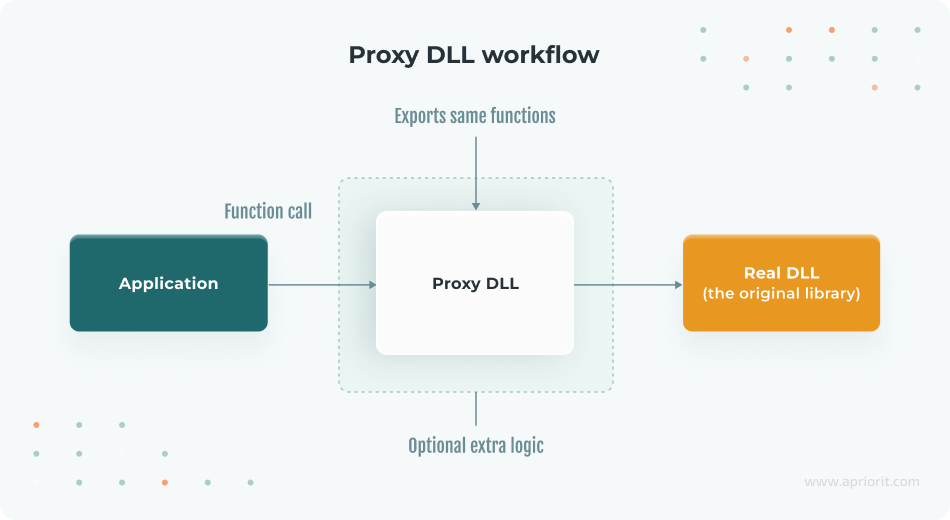
Note: Both attackers and cybersecurity experts use DLL proxying. In a proxying attack, an adversary doesn’t just drop a malicious DLL but renames or relocates the real DLL and puts a malicious proxy in its place. Then, the proxy DLL tricks the application into loading it, executes any malicious payload, and hands off execution to the legitimate DLL.
When using DLL proxying as a defensive technique, developers create a proxy DLL to oversee how the real DLL is loaded. A proxy can perform security checks before forwarding any calls. If it detects suspicious behavior, the proxy fails execution, preventing untrusted code from running.
Here’s a list of checks and techniques your team can implement in a proxy DLL to ensure the security of the real DLL:
1. Integrity verification of the real DLL
A proxy can verify that it’s loading the correct DLL and not a tampered version. For example, the proxy can check a cryptographic hash or digital signature of the original DLL. Or it can verify a DLL’s Authenticode digital signature using Windows Crypto APIs to ensure that the DLL is from the expected publisher. This technique prevents an attacker from secretly swapping out the real DLL for a malicious one, since the proxy will detect that the file is untrusted or altered.
2. Restricted loading and path validation
Instead of relying on the default search order, a secure proxy explicitly loads a legitimate DLL from a safe, expected location. Using LoadLibrary with an absolute path ensures that even if a malicious DLL with the same name exists elsewhere, it won’t be loaded.
3. Caller verification
In certain situations, a proxy DLL must verify that it’s being loaded within the appropriate context. At runtime, a proxy can examine the name or ID of the process that is invoking the application. If an unexpected process loads the DLL, it may indicate an exploit attempt.
4. Preventing in-memory patching
Advanced attackers may modify the behavior of the DLL by patching its code in memory rather than replacing files. To prevent such attacks, developers can add runtime checks that detect some forms of hooking or patching.
Note: Runtime integrity checks increase resistance to common manipulation techniques but do not provide absolute protection against a fully privileged attacker.
For instance, after loading a real DLL, your proxy can compute a checksum of critical function entry points or use Windows APIs to verify that memory pages of the loaded DLL are not writable or hold the expected properties.
This is a more complex technique of DLL hijacking prevention, but it adds another layer of defense by making sure that only a legitimate DLL can be executed.
5. Logging and alerting
Including robust logging mechanisms in a DLL proxy enables recording of unusual or unauthorized events, security incidents, and errors.
By combining these integrity checks and strict loading procedures, your team can turn a DLL proxy into a gatekeeper. This way, the proxy not only forwards calls to the real DLL but actively ensures that those calls are occurring under trusted conditions.
To illustrate how DLL protection works in practice, let’s build a sample solution in the next section.
Read also
Securing Your Windows Solutions from DLL Injection Attacks [With Examples]
Strengthen your Windows applications against DLL hijacking and secure your product from costly breaches. In this post, Apriorit experts provide practical protection techniques.

Implementing a secure DLL proxy to mitigate DLL hijacking
In this article, we’ll build a command-line application called SecureApp.exe. It relies on a custom library, SecureLib-real.dll, for sensitive operations such as encryption, decryption, and license validation. You can check out the full code for this app in the Apriorit GitHub repository.
Note: Our sample solution doesn’t safeguard against all potential hijacking attacks. This project can serve as a template or educational resource for developing more robust systems.
First, our application has to load the custom library using the LoadLibraryW API with a relative path:
bool SecurityLibraryHelper::LoadSecureDll()
{
    std::wcout << "[SecureApp] - Loading library: " << m_dllPath << std::endl;

// Load the DLL located in the same directory as the executable.
// When the DLL proxy is used, it’ll load the SecureLib.dll.
// Otherwise, it will load the SecureLib-real.dll.
// Without the DLL proxy, an attacker can replace the SecureLib-real.dll with a malicious one, and it will be loaded instead.
    m_hModule = LoadLibraryW(m_dllPath.c_str());
	if (!m_hModule)
	{
        std::wcerr << L"[SecureApp] - Error: Could not load " << m_dllPath << ". Ensure it is in the same directory.\n";
    	return false;
	}

    m_pCheckLicense = reinterpret_cast<CheckLicenseFunc>(GetProcAddress(m_hModule, "CheckLicense"));
m_pEncryptInPlaceFile = reinterpret_cast<EncryptInPlaceFunc>(GetProcAddress(m_hModule, "SecureEncryptFileInPlace"));
    m_pDecryptInPlaceFile = reinterpret_cast<DecryptInPlaceFunc>(GetProcAddress(m_hModule, "SecureDecryptFileInPlace"));

	return true;
}Then, the legitimate SecureLib-real.dll performs sensitive operations and exports the following functions:
// Encrypts the file at the specified path in place using XOR encryption.
SECURELIBREAL_API bool SecureEncryptFileInPlace(__in const std::wstring& filePath);

// Decrypts the file at the specified path in place using XOR encryption.
SECURELIBREAL_API bool SecureDecryptFileInPlace(__in const std::wstring& filePath);

// Validates the provided license key.
SECURELIBREAL_API bool CheckLicense(__in const std::wstring& licenseKey) noexcept;If an attacker were to hijack this DLL, they could manipulate it to ensure that license verification always succeeds or to bypass encryption and decryption calls. To protect these operations against DLL hijacking or tampering, we will create a proxy DLL. This proxy DLL wraps around the original library and includes security checks to enhance protection.
To prevent a hijacking attack, let’s create a simple SecureLib-fake.dll that exports the same functions and bypasses all function calls made by the SecureApp.exe application:
bool SecureEncryptFileInPlace(__in const std::wstring& filePath)
{
UNREFERENCED_PARAMETER(filePath);

std::wcout << "\x1b[31m" << "[SecureLib-fake] - SecureEncryptFileInPlace: ALWAYS returning true. The function call bypassed!" << "\x1b[0m" << std::endl;

return true;
}

bool SecureDecryptFileInPlace(__in const std::wstring& filePath)
{
UNREFERENCED_PARAMETER(filePath);

std::wcout << "\x1b[31m" << "[SecureLib-fake] - SecureDecryptFileInPlace: ALWAYS returning true. The function call bypassed!" << "\x1b[0m" << std::endl;

return true;
}

bool CheckLicense(__in const std::wstring& licenseKey) noexcept
{
std::wcout << "\x1b[31m" << "[SecureLib-fake] - CheckLicense: ALWAYS returning VALID for key \""
<< licenseKey << "\". License bypassed!" << "\x1b[0m" << std::endl;

return true;
}In our example, we prevented DLL hijacking by placing a fake SecureLib-real.dll in a location where SecureApp.exe looks for a library. We also created this simple bash script to swap SecureLib-real.dll and SecureLib-fake.dll.
Now, let’s explore DLL protection with a SecureLib.dll proxy. It performs several tasks:
- Exports the functions required for SecureApp.exe
- Performs security checks on load or function calls
- Loads SecureLib_real.dll from a secure location and forwards calls if the real DLL is verified
- Blocks potentially malicious code instead of executing it if verification fails
Here’s a proxy code snippet to load and verify the target SecureLib-real.dll:
bool Utils::LoadSecureDll()
{
if (g_realLibModule)
{
// Real Dll already loaded.
return true;
}

const auto dllDirectory = GetModulePath();
if (!dllDirectory)
{
std::cerr << "[SecureLib] - Failed: Could not get module file name. Error: " << GetLastError() << std::endl;
return false;
}

const auto realDllPath = dllDirectory.value() / L"SecureLib-real.dll";

if (!std::filesystem::exists(realDllPath))
{
std::wcerr << L"[SecureLib] - Failed: " << realDllPath.c_str() << L" does not exist." << std::endl;
return false;
}

try
{
// Lock the DLL file to prevent tampering and TOCTOU vulnerability during load.
DllLockGuard dllLock(realDllPath.wstring());

// TODO: Here, you can add more checks.

// Verify DLL integrity using an SHA-256 hash.
const auto targetDllHash = ComputeFileHash(dllLock.get());
if (ConvertHexToWstring(targetDllHash) != G_EXPECTED_DLL_SHA256_HASH)
{
// Don’t load the DLL if verification fails.
std::wcerr << "[SecureLib] - Failed: " << realDllPath.c_str() << " hash mismatch.The DLL may be tampered with." << std::endl;
return false;
}

// Load the real Secure DLL.
g_realLibModule = LoadLibraryExW(realDllPath.c_str(), nullptr, LOAD_LIBRARY_SEARCH_DLL_LOAD_DIR);
if (!g_realLibModule)
{
std::wcerr << L"[SecureLib] - Failed: Could not load " << realDllPath.c_str() << ". Ensure it is in the same directory." << std::endl;
return false;
}
}
catch (const std::exception& ex)
{
std::cerr << "[SecureLib] - Exception: " << ex.what() << std::endl;
return false;
}

realCheckLicense = reinterpret_cast<CheckLicenseFunc>(GetProcAddress(g_realLibModule, "CheckLicense"));;
realEncryptInPlaceFile = reinterpret_cast<EncryptInPlaceFunc>(GetProcAddress(g_realLibModule, "SecureEncryptFileInPlace"));
realDecryptInPlaceFile = reinterpret_cast<DecryptInPlaceFunc>(GetProcAddress(g_realLibModule, "SecureDecryptFileInPlace"));

if (!realCheckLicense || !realEncryptInPlaceFile || !realDecryptInPlaceFile)
{
FreeLibrary(g_realLibModule);
g_realLibModule = nullptr;

std::wcerr << "[SecureLib] - Failed: Unable to get function addresses from " << realDllPath.c_str() << std::endl;
return false;
}

return true;
}Here’s the proxy code snippet to handle function calls for the target DLL:
bool SecureEncryptFileInPlace(__in const std::wstring& filePath)
{
std::cout << "[SecureLib] - Proxy SecureEncryptFileInPlace called.\n";

if (!Utils::LoadSecureDll())
{
std::cerr << "[SecureLib] - Cannot proceed with SecureEncryptFileInPlace due to failed load/verify.\n";
return false;
}

return realEncryptInPlaceFile(filePath);
}

bool SecureDecryptFileInPlace(__in const std::wstring& filePath)
{
std::cout << "[SecureLib] - Proxy SecureDecryptFileInPlace called.\n";

if (!Utils::LoadSecureDll())
{
std::cerr << "[SecureLib] - Cannot proceed with SecureDecryptFileInPlace due to failed load/verify.\n";
return false;
}

return realDecryptInPlaceFile(filePath);
}

bool CheckLicense(__in const std::wstring& licenseKey) noexcept
{
std::cout << "[SecureLib] - Proxy CheckLicense called.\n";

if (!Utils::LoadSecureDll())
{
std::cerr << "[SecureLib] - Cannot proceed with CheckLicense due to failed load/verify.\n";
return false;
}

return realCheckLicense(licenseKey);
}In this proxy example, we use the LoadLibraryExW API with the LOAD_LIBRARY_SEARCH_DLL_LOAD_DIR flag, which searches for dependencies in the DLL folder first if necessary. This API and flag are used to explicitly load SecureLib_real.dll from the expected safe path. Using them helps bypass the standard search order, ensuring the application doesn’t load a malicious DLL from elsewhere.
We also implement a hash check for SecureLib_real.dll to prevent loading of an unexpected DLL. On top of that, we add functionality to block DLL modification during verification and loading to prevent other processes from editing or deleting the DLL. For example, this functionality prevents a time-of-check to time-of-use (TOCTOU) vulnerability that allows an attacker to change an application’s condition in the interval between when the application checks the DLL and when the application uses it.
Let’s see how our sample proxy DLL handles simulated DLL hijacking attacks.
Read also
3 Effective DLL Injection Techniques for Setting API Hooks
Learn how to secure your Windows solution with practical DLL injection methods for API control, monitoring, and feature extension.

Testing DLL hijacking vs. secure DLL proxy
At the start of our experiment, all compiled project binaries are organized into a single directory for testing:
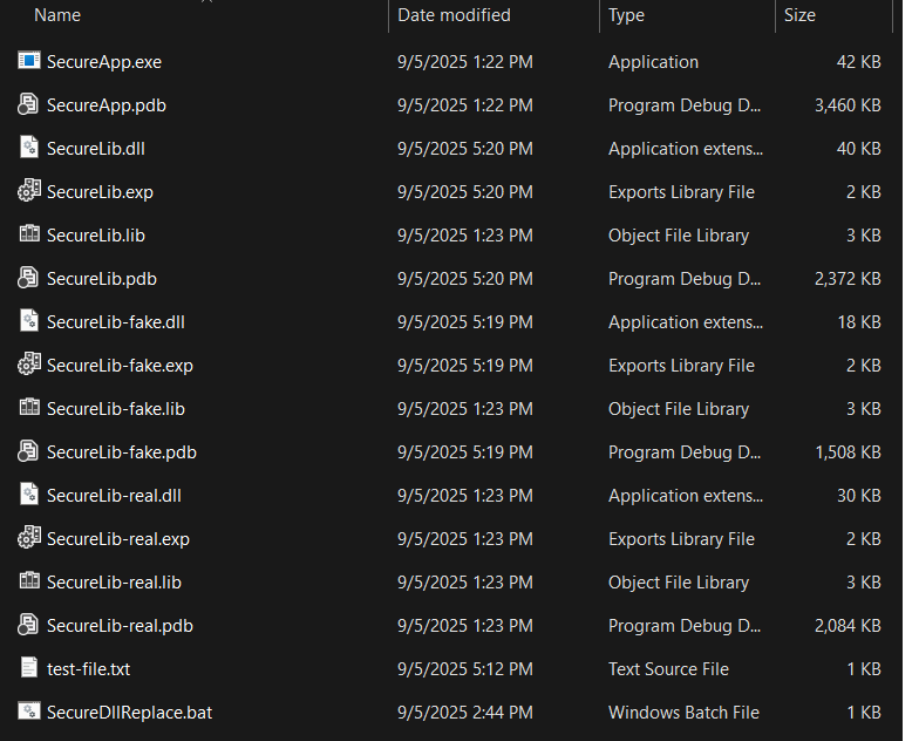
We can run the command-line application (SecureApp.exe) using the following command in Windows Command Prompt: SecureApp <proxy|direct> <license_key> <target_file_path>
Note that this command contains the following parameters:
<proxy|direct>— option to use the proxy DLL or load the real DLL directly<license_key>— license key to validate<target_file_path>— path to the test file to be encrypted and decrypted
First, let’s see how SecureApp works with the legitimate DLL that loads directly. Let’s execute the command SecureApp.exe "direct" "SECRET-KEY-APRIORIT" "test-file.txt"
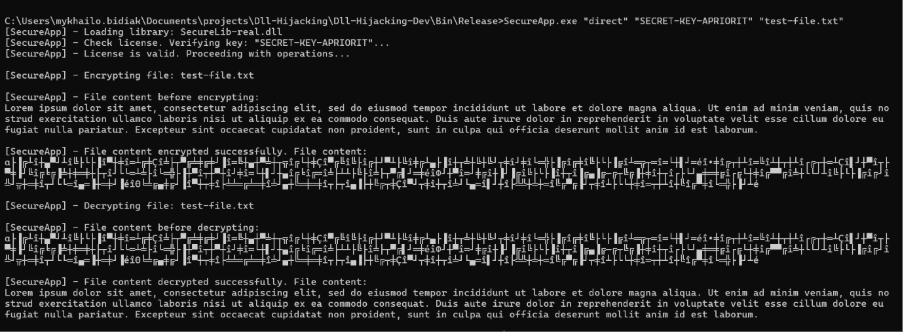
With these parameters, SecureApp works correctly, validates the license, and encrypts and decrypts the file.
As we’ve discussed, direct DLL loading is vulnerable to hijacking, where an attacker replaces the real DLL with a malicious one. Let’s simulate such an attack.
First, we replace the libraries using a simple bash script. Then, we execute the same command for DLL loading but get a different result.
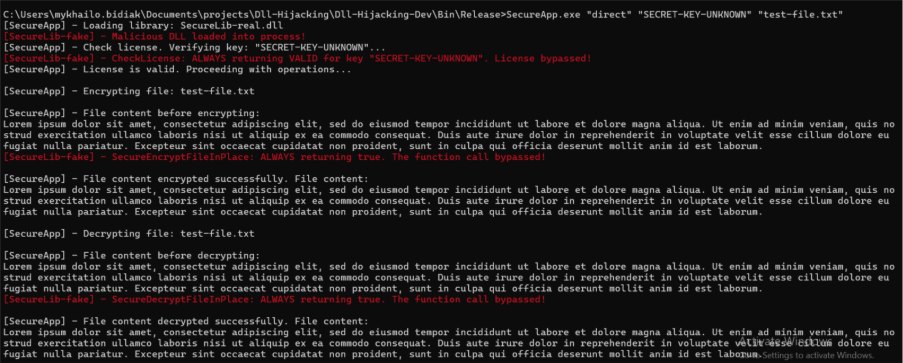
The SecureApp was compromised with a malicious DLL, allowing the attacker to bypass license validation and data encryption.
Next, let’s use our application with a proxy DLL in the same example where the real DLL was replaced with a malicious one. When we execute the SecureApp.exe "proxy" "SECRET-KEY-APRIORIT" "test-file.txt" command, we get this result:

Our proxy detects an integrity mismatch and refuses to load the malicious DLL. The app’s logs show that the app failed instead of executing malicious code.
Finally, let’s test how the application will work if it uses a proxy DLL to load a legitimate DLL. To do it, let’s run the SecureApp.exe "proxy" "SECRET-KEY-APRIORIT" "test-file.txt" command.
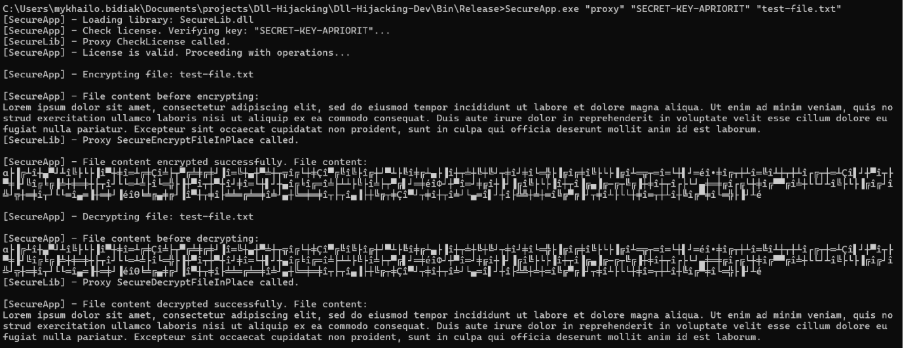
SecureApp works well using this technique. It validates the license and allows for successful encryption and decryption, as if it were loading the legitimate DLL. At the same time, the legitimate DLL is safe from DLL hijacking.
Securing Windows applications with Apriorit
The proxy DLL technique effectively protects applications against DLL hijacking by verifying code integrity and enforcing strict library loading rules. However, DLL proxying is not a panacea for all DLL-related attacks. For example, if attackers can replace files in your application directory, including the proxy DLL, they can still compromise the application.
The technique we’ve described in this article is most effective as part of a comprehensive security solution, complementing other mechanisms like restrictive file permissions, code signing, runtime binary protection, memory integrity and tamper protection, and safe DLL search settings.
Cybersecurity is our top priority when developing any Windows software. Before we write a single line of code, Apriorit teams plan reliable, modern, and compliant layers of software security relevant for the specific product. We also help clients test and improve the security of their existing Windows products.
Working with Apriorit, you get:
✅Deep Windows expertise. Apriorit teams know everything there is to know about the Windows operating system. Our experience in system programming, developing and securing kernel-level Windows solutions, and frontend and backend development for various types of apps helps us identify where to look for security vulnerabilities and how to fix them.
✅Proven background in reverse engineering. Ethical reverse engineering is one of the key ways of uncovering deep, hidden system vulnerabilities. It’s also a powerful tool for cybersecurity research and improvement. Apriorit’s reversing teams will provide new insights into your software’s security posture and help you build a roadmap for improving it.
✅Security-first approach. The first thing we do on any project is establish processes and activities that comply with secure SDLC principles, ISO 27001, and other cybersecurity standards and regulations. With these practices, we ensure the long-term security and compliance of your code.
✅In-depth security testing and auditing. Apriorit’s security testing teams not only uncover potential risks and vulnerabilities in your software but also help you prioritize them by business impact and plan fixes. We’ll help you level up your software security.
Apriorit’s development and cybersecurity experts are ready to tackle the most challenging tasks you face. We’ll provide clear, predictable results within agreed deadlines.
Looking for Windows security experts?
Partner with Apriorit to protect your app from mainstream and niche attacks, meet cybersecurity compliance requirements, and prevent data leaks.
FAQ
How can a successful DLL hijacking attack impact my business?
<p>A successful DLL hijacking attack allows an attacker to run arbitrary code within a legitimate application’s process. In a typical enterprise environment, this can lead to several high‑impact consequences, including privilege escalation, persistent access, and data theft or manipulation.
DLL hijacking can also result in a multi‑stage attack vector inside business‑critical systems.</p>
<p>For a business, such attacks can result in violation of regulatory compliance requirements, fines and audits, as well as reputational damage and loss of customers’ trust.</p>
What’s the difference between DLL hijacking, DLL side-loading, and DLL injection?
<p>All three techniques execute code through Windows DLLs, but their mechanics and objectives differ:</p>
<p>DLL hijacking occurs when an application unintentionally loads a malicious DLL because of weak or default search‑path logic. If the application doesn’t specify an absolute path, Windows searches a predefined list of directories. For the attack to succeed, an adversary must determine where the application expects its DLLs and have permission to place a malicious DLL in one of the searched directories, such as the application’s installation folder or any user‑writable location. If the malicious DLL is placed in a directory that Windows searches first, the application may load and execute untrusted code at startup.</p>
<p>DLL side-loading is a defense‑evasion technique and a variation of hijacking. It also relies on directory‑search priority, but the delivery method differs. Instead of modifying an existing application, the attacker places a legitimate, signed executable next to a malicious DLL. When the trusted executable runs, it side-loads the attacker’s DLL, allowing the malware to execute while bypassing security controls. This method gained public attention during the CCleaner breach, where attackers used side-loading to execute malicious code through a trusted software updater, demonstrating its real‑world impact.</p>
<p>DLL injection is fundamentally different from the previous two techniques. It does not rely on file‑system searches. Instead, DLL injection targets a running process directly. The attacker uses Windows APIs like WriteProcessMemory and CreateRemoteThread to write to the process’s memory and load a DLL into its address space at runtime.</p>
When is proxying a better option than refactoring DLL loading logic?
<p>Proxying is often preferred when:</p>
<ul class=apriorit-list-markers-green>
<li>The application is legacy or third‑party and you cannot modify its source code</li>
<li>Refactoring would be risky or costly, especially in large codebases with unpredictable side effects</li>
<li>The DLL loading behavior is deeply embedded, and adjusting search order or load calls affects multiple modules</li>
<li>You have a way to mitigate DLL hijacking quickly to eliminate exposure without redesigning the application</li>
</ul>
<p>Refactoring is ideal for long‑term architectural correctness. Proxying is typically used when connected risks, cost, or code ownership make refactoring unrealistic.</p>
Are proxy DLLs a short-term mitigation or a long-term security strategy?
<p>Proxy DLLs can serve both roles depending on how they are implemented:</p>
<ul class=apriorit-list-markers-green>
<li>For short‑term mitigation, proxy DLLs help to immediately close a security gap. They are quick to deploy and minimally disruptive compared to other security mechanisms.</li>
<li>For a long‑term strategy, a proxy is useful when rewriting core DLL loading paths is impractical or cost‑prohibitive. It can also be combined with strong operational controls like code signing and restricted permissions.</li>
</ul>
Are there Windows-native protections that reduce the risk of DLL hijacking?
<p>Yes. Windows provides several built‑in features that significantly reduce the attack surface:</p>
<ul class=apriorit-list-markers-green>
<li>Safe DLL Search Mode (enabled by default) prioritizes secure locations over the application directory.</li>
<li>The SetDefaultDllDirectories and AddDllDirectory APIs limit which directories the loader searches.</li>
<li>Code-signing enforcement prevents unsigned DLLs from being loaded in hardened environments.</li>
</ul>
<p>These features don’t eliminate all risk on their own, but they help to mitigate accidental or legacy‑driven vulnerabilities.</p>
How can organizations maintain proxy DLLs over time as Windows updates and APIs evolve?
<p>You can maintain proxy DLLs by treating them as part of the long‑term codebase. That means keeping an eye on Windows release notes, testing proxies against new builds early, and updating exported functions when Microsoft changes the underlying APIs. A consistent version‑control process and routine regression testing help ensure the proxy behaves exactly like the original DLL. Signing the proxy is also essential so it continues to work with modern code integrity policies.</p>



