
 Skip to main content

Every piece of hardware, from the GPU to the network adapter, needs a way to communicate with the machine’s operating system and applications. Device drivers make that communication possible.
This article explains how device drivers work, what types of drivers there are, and where they’re used across modern systems.
Contents:
What is a device driver?
A device driver is a software component that allows an operating system (OS) to communicate with and control a specific piece of hardware. Every hardware device (GPU, network adapter, USB controller, etc.) has its own instruction set, registers, and communication protocols. A driver abstracts those details and gives the operating system a standardized interface that it can issue commands to instead of directly interacting with the hardware.
Most drivers operate with elevated privileges within the OS, with direct access to system memory and hardware resources. Without the correct driver, the OS cannot reliably and safely detect, configure, or use the device.
What is the purpose of device drivers?
Device drivers handle every stage of interaction between the OS and a hardware device.
Specifically, device drivers:
- Detect and identify hardware when it’s connected or during system boot
- Initialize and configure devices by setting the right operating parameters at startup
- Translate OS commands into hardware-specific operations
- Handle data transfer between system memory and the device
- Manage interrupts and hardware events like incoming network packets or completed I/O operations
- Control power states, including sleep, wake, and low-power modes
- Enforce safe resource sharing so that multiple applications or processes can access the same device without conflicts
How do device drivers work?
A device driver sits between the operating system and a hardware device. Applications and the operating system don’t communicate with hardware directly. Instead, they send standardized requests to the driver, and the driver translates those requests into the specific commands, register writes, and bus transactions that the hardware understands.
The results travel back the same way: the driver reads the hardware’s response and passes it to the OS in a format the system can work with. The OS then sends it to the application.
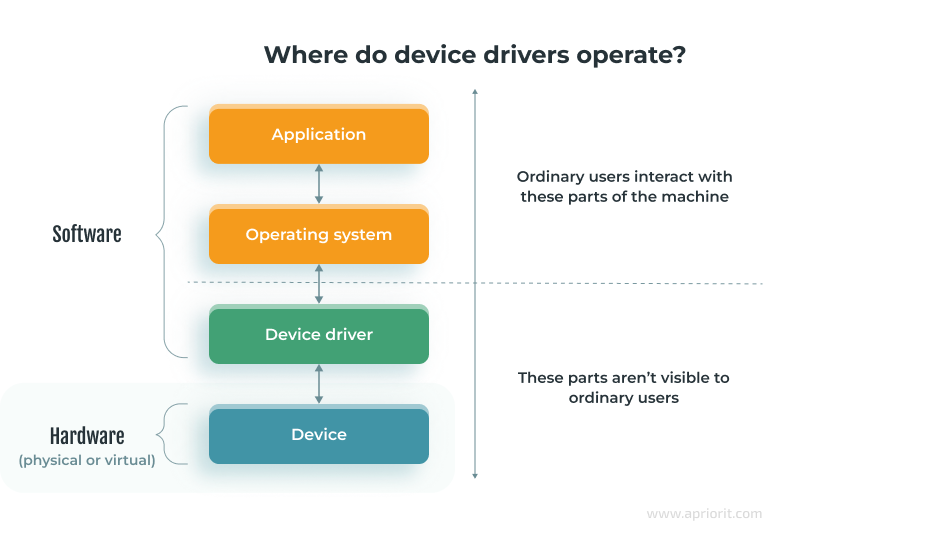
For each type of driver, communication with the OS and device looks a bit different. In general, it follows these steps:
- Enumeration and detection. When the system boots or a user connects a new device to their machine, the OS queries the hardware bus (PCI, USB, SATA, etc.) for device identifiers like a vendor ID and device ID pair. The OS then matches these identifiers against its driver database to find the right driver.
- Loading and initialization. The kernel loads the driver into memory. The driver then registers its capabilities with the OS and initializes the device.
- I/O request processing. When an application or OS component needs something from the device, the OS issues an I/O request. The driver translates it into hardware-level operations and returns a completion status once the device has done its part.
- Interrupt handling. When a device finishes an operation or needs attention, it sends an interrupt signal. The driver’s interrupt service routine picks up that signal, processes the event, and schedules any follow-up work.
- Data transfer. Depending on the device and the amount of data involved, the driver may transfer data through I/O ports, memory-mapped I/O, or Direct Memory Access (DMA). DMA is especially important for high-throughput devices like network adapters and storage controllers, as it lets the device move data directly to and from system memory without tying up the CPU for every byte.
With the help of device drivers, the OS and every application above it can treat wildly different hardware through a single, consistent interface.
3 types of device drivers
There are many types of drivers based on their goal, target operating system, and operational specifics. In this post, we’ll focus on three types based on the driver operation environment.
1. Kernel-mode device drivers
Kernel device drivers run in kernel mode — the most privileged execution level of the operating system which gives the driver unrestricted access to hardware registers, system memory, interrupt lines, and all other system resources. Most drivers for fundamental hardware such as storage controllers, GPUs, and network interfaces are kernel drivers.
This type of driver has direct access to hardware and core system resources. Because they operate at the lowest level, device drivers can handle time‑critical tasks such as:
- Interrupt processing
- Direct memory access
- Hardware state management
However, this level of access makes kernel drivers a potential risk, as a bug in such a driver can destabilize or crash the entire system. That’s why kernel driver development requires deep knowledge of operating system internals, and debugging is significantly harder than with regular application code.
2. User-mode device drivers
User‑mode device drivers run outside the kernel, at a lower privilege level, and communicate with the kernel through system calls and APIs. They are used for devices that don’t need high performance and stability: printers, cameras, PoS devices, etc. If a user‑mode driver fails, it usually affects only that driver rather than the whole system.
The main advantage of user-mode drivers is isolation from the kernel. If a user-mode driver crashes, it takes down only its own process. Development and debugging are also simpler: You can use standard programming languages, libraries, and debugging tools, and updates typically don’t require a system reboot.
3. Virtual device drivers
Virtual device drivers emulate or expose virtual devices to the operating system, often backed by software or shared system resources. Their role is to make software‑defined or shared resources appear as real hardware to the OS and applications.
The most common use case for virtual device drivers is virtualization. When an OS runs inside a virtual machine, it can’t access the machine’s physical hardware directly. Instead, the hypervisor presents virtual devices (virtual network adapter, virtual disk, virtual GPU, etc.) and virtual device drivers handle communication between the guest OS and these emulated components.
But virtual drivers aren’t limited to virtual machines:
- Virtual network adapters power VPN connections.
- Virtual audio and display drivers enable remote desktop sessions.
- Virtual drivers let engineers simulate hardware that isn’t physically available for software development and QA.
Examples of device drivers by function
Device drivers exist for almost every type of physical and virtualized hardware that a computer interacts with. Here are some of the most common examples:
- Network adapter drivers enable communication between the OS and network interface controllers, both wired and wireless. These drivers handle packet transmission, connection parameters, and link layer protocols.
- Storage drivers manage physical and virtual storage devices: hard drives, SSDs, NVMe controllers, iSCSI volumes. They control block-level read/write operations and I/O scheduling.
- Display drivers control GPUs and display adapters. They manage image rendering, display resolution changes, and video output.
- USB drivers manage a wide variety of devices from external storage and printers to custom hardware. The driver stack is layered: a host controller driver manages the bus, while individual drivers handle each connected device.
- Audio drivers manage sound cards and onboard audio chips. They also handle playback, recording, mixing, and routing between input and output devices.
- Printer drivers translate print jobs into a format the printer understands and communicate page layout, quality settings, and other instructions over USB or a local network.
- Bluetooth drivers manage pairing, connection, and data transfer between the OS and Bluetooth-enabled peripherals like headphones, keyboards, and IoT sensors.
- Sensor drivers are increasingly common in mobile devices, manufacturing lines, and IoT hardware. They manage accelerometers, gyroscopes, ambient light sensors, GPS modules, and similar components, helping to collect information from these devices and monitor their operations.
- Input device drivers handle keyboards, mice, touchpads, game controllers, and other human interface devices (HIDs). Most are covered by generic OS drivers, but custom hardware often requires vendor-specific ones.
There are more kinds of device drivers out there, including those unique to specific operating systems and custom devices. Building such drivers requires a team with a good understanding of the target device and OS, as well as performance, compliance, and security requirements.
Driver development with Apriorit
Apriorit has over 20 years of experience in kernel and driver development for Windows, Linux, and macOS. Our teams build custom drivers for a wide range of hardware — from network adapters and USB devices to display controllers, storage devices, and VR headsets. We also develop virtual drivers, file system minifilters, and other system-level components.
Our driver development services include:
- Building new drivers from scratch that are tailored to your product vision and compliance requirements
- Porting existing drivers across platforms, such as adapting a Linux driver to Windows (or vice versa)
- Upgrading and maintaining legacy drivers for compatibility with new OS versions
- Preparing device drivers for HLK testing and WHQL certification
- Auditing and improving driver security
Looking for a skilled driver development team?
Leverage Apriorit’s unique experience to get a driver that perfectly fits your device and business.



