
 Skip to main content


Cybersecurity logs can be a mess.
You’ve definitely seen it: incomplete and unstructured records, blind spots, and tons of data barely related to the incident you need to investigate.
Properly configured logging is key to the efficiency of many security products. Event logs not only help your team track the day-to-day activities of users and other entities but also help you quickly identify anomalies, investigate incidents, and meet stringent legal and regulatory requirements.
In this article, we share the key Python logging best practices for your project, from fundamentals to log finessing. It will be helpful for technical leaders and executives of cybersecurity product companies who want to build robust and safe logging pipelines.
Contents:
- How can logging support cybersecurity?
- Logging basics in Python
- Best practices for secure Python logging
- 1. Avoid the root logger
- 2. Use relevant logging levels
- 3. Add context and timestamps to messages
- 4. Structure message formats
- 5. Filter out secrets
- 6. Configure log rotation
- 7. Centralize log collection
- 8. Set up alerts
- 9. Assign unique identifiers
- 10. Verify logging
- Implement robust cybersecurity logging with Apriorit
- Conclusion
How can logging support cybersecurity?
Logs have diverse applications in IT. Among other things, they offer visibility and observability, and they help you improve performance and monitor systems and users. In this article, we’ll focus on logging use cases related to cybersecurity.
Logging is the backbone of security visibility. Every authentication attempt, configuration change, and system action leaves a digital footprint that records the who, what, when, and where of the activity. These records provide insights into cybersecurity incidents and the internal state of your system.
Logging information on user access, interactions with sensitive data, and security events is also a major part of legal and regulatory compliance. Frameworks such as HIPAA, PCI DSS, and the GDPR require organizations to maintain auditable records of events in their environments. Correctly configured logging demonstrates audit readiness and helps reduce the risk of costly penalties for non-compliance or reputational damage.
Logging is especially relevant to the following security-related tasks:
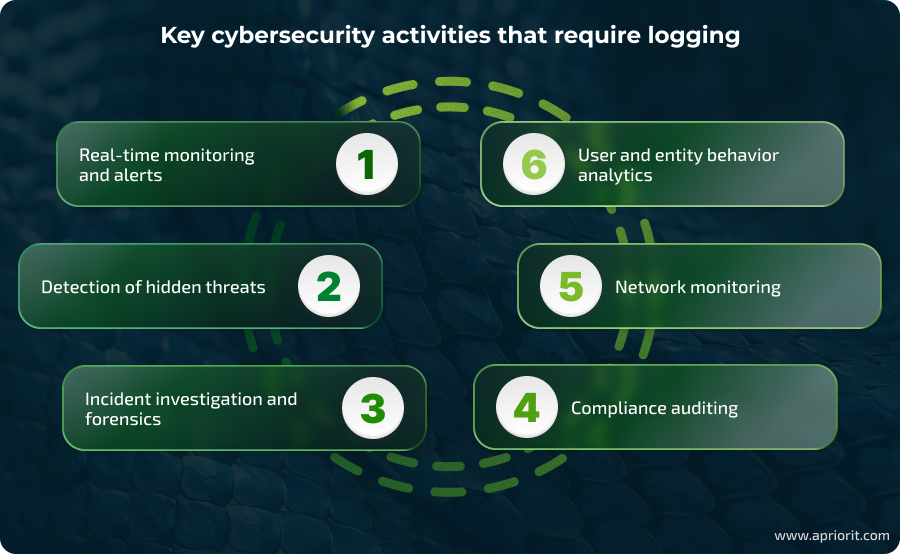
- Real-time monitoring and alerts. Continuous log collection allows security teams to spot incidents quickly. When your software logs suspicious activity (repeated failed logins, critical errors), it can automatically alert a security officer. To enable instant alerts and simplify log streaming, you can integrate logging with SIEM and SOAR tools. It’s also important to configure thresholds to minimize false positives.
- Detection of hidden threats. Analyzing long-term log data can uncover slow-moving threats and allow retrospective assessment of infrastructure security.
- Incident investigation and forensics. Comprehensive logs provide your Security Operations Center (SOC) with visibility into events at all levels: system, network, and application. A full picture of a security event helps the SOC understand the incident’s root causes and develop mitigation policies.
- Compliance auditing. To confirm your compliance with a certain standard or regulation, you’ll need to show how your systems process and provide access to sensitive data. Some standards even require logs to be securely stored for months or years. Access and configuration logs serve as verifiable evidence for audits, investigations, and regulatory reporting.
- Network monitoring. Firewall, IDS/IPS, and router logs provide visibility into abnormal traffic flows, scans, or potential command-and-control activity. When correctly designed and configured, aggregated network logs help security teams detect early attack signals without overloading them with unnecessary information.
- User and entity behavior analytics. Nuanced behavior analytics is based on baselines and patterns of user activity. With full logs of typical user actions, it’s easy to build such baselines. Deviations such as unusual login times, large-scale data exports, or access from unusual locations can trigger alerts for insider threats or compromised accounts.
These are only a few key applications of logging for cybersecurity purposes, but they show the importance of this process for data safety and software visibility.
The process of implementing efficient logging differs across programming languages and types of software. In this article, we’ll focus on best practices for Python logging, since many cybersecurity solutions use this language.
Need to see what happens in your environment in real time?
Partner with Apriorit to add new logging functionality to your existing products or design new solutions with robust and secure logging built in.
Logging basics in Python
What is Python logging?
Let’s start by examining Python’s built-in logging module and its key settings. This module is designed to work with minimal impact on system performance and provide you with structured, detailed records. It provides several ways of configuring logging systems for setups of different complexities.
To configure a rule with the logging module, your team has to define the following elements:
- Formatter — specifies the preferred format of log messages (often JSON). Typical fields include timestamp, logger name, level, and message. Having this information simplifies centralized processing and analysis.
- Handler — determines where each log is sent. Handlers route log messages to remote servers, consoles, log files, etc.
- Filter — defines which log messages are sent to handlers. This optional mechanism provides your team with fine control over logging.
- Level — indicates the severity of log messages. With configured levels, your team will be able to quickly filter records and find specific events.
By default, there are four logging levels:
- DEBUG — detailed information on the application’s state and internal workings, typically used by developers to diagnose issues
- INFO — information on normal app operation
- WARNING — information on unexpected events and potential problems
- ERROR/CRITICAL — information on serious operational failures that can lead to your app not functioning or crashing
Your team can also create custom logging levels as long as they don’t substitute default levels.
Let’s take a look at an example of a configured logger:
class SensitiveLogFilter(logging.Filter):
	"""
	Filter log messages containing sensitive keywords.

	This filter checks log messages for any keywords defined in the
	SENSITIVE_KEYWORDS list and blocks the log if any such keyword is found.
	"""

	SENSITIVE_KEYWORDS = [
    	'password',
    	'token',
    	'secret',
    	'apikey',
    	'authorization'
	]

	def filter(self, record) -> bool:
    	    # Convert the log message to lowercase for case-insensitive matching
    	    message = record.getMessage().lower()
    	    # Return False if any sensitive keyword is present, which prevents the log from being handled
    	    return not any(keyword in message for keyword in self.SENSITIVE_KEYWORDS)


def setup_logging() -> None:
	"""Set up logging configuration with JSON formatting, handlers, and filters."""

	# Ensure that the directory for log files exists; create if missing
	log_dir = os.path.dirname(LOGS_PATH)
	os.makedirs(log_dir, exist_ok=True)

	# Define JSON formatter to structure log output with timestamp, logger name, level, and message
	formatter = JsonFormatter(
    	"%(asctime)s - %(name)s - %(levelname)s - %(message)s"
	)

	# Create a console handler that outputs logs to standard output (stdout)
	console_handler = logging.StreamHandler(sys.stdout)
	console_handler.setFormatter(formatter)         	# Apply JSON formatter to console logs
	console_handler.setLevel(LOGGING_LEVEL)         	# Set logging threshold level for console
	console_handler.addFilter(SensitiveLogFilter()) 	# Add filter to block sensitive logs on console

	# Create a rotating file handler to write logs to a file with size-based rotation
	file_handler = RotatingFileHandler(
    	LOGS_PATH,
    	maxBytes=MAX_LOG_FILE_SIZE,
    	backupCount=BACKUP_LOG_COUNT
	)
	file_handler.setFormatter(formatter)             	# Apply JSON formatter to log files
	file_handler.setLevel(LOGGING_LEVEL)             	# Set logging threshold level for file
	file_handler.addFilter(SensitiveLogFilter())     	# Add filter to block sensitive logs in file

	# Get the root logger to configure global logging behavior
	logger = logging.getLogger()
	logger.setLevel(LOGGING_LEVEL)                    	# Set the global logging level
	logger.addHandler(console_handler)                	# Attach console handler to root logger
	logger.addHandler(file_handler)                   	# Attach file handler to root logger


# Initialize logging system before any logging occurs
setup_logging()

# Example usage: create a logger named 'test_logger' and log a message
test_logger = logging.getLogger("test_logger")
test_logger.info("token")  # This log contains a sensitive keyword and will be filtered out (not shown)
test_logger.info("Hello, world!")

>>> {"asctime": "2025-07-22 10:16:23,412", "name": "test_logger", "levelname": "INFO", "message": "Hello, world!"}Pro tip: Create a dedicated logger using logging.getLogger(name) for each file or component you want to monitor. This approach helps you keep the logging system flexible and modular, eliminating the risk of unexpected changes.
Setting up logging in Python may look pretty simple. But like many seemingly simple things, this process contains hidden complexities. In the next section, we’ll walk you through the key dos and don’ts of logging for cybersecurity.
Read also
Practical Guide to Unified Log Processing with Amazon Kinesis
Want better control over your cloud infrastructure? Learn scalable strategies for aggregating and streaming logs via Amazon Kinesis.

Best practices for secure Python logging
Logs are only valuable if they are accurate, consistent, and usable at scale. Security teams depend on them for real-time monitoring, anomaly detection, and forensic analysis, but too often logs are noisy, fragmented, or missing critical context.
Based on experience delivering dozens of Python-based projects, Apriorit specialists have developed a set of best practices that we use to keep our logs clear, understandable, consistent, and protected.
Here’s how our developers configure logging:
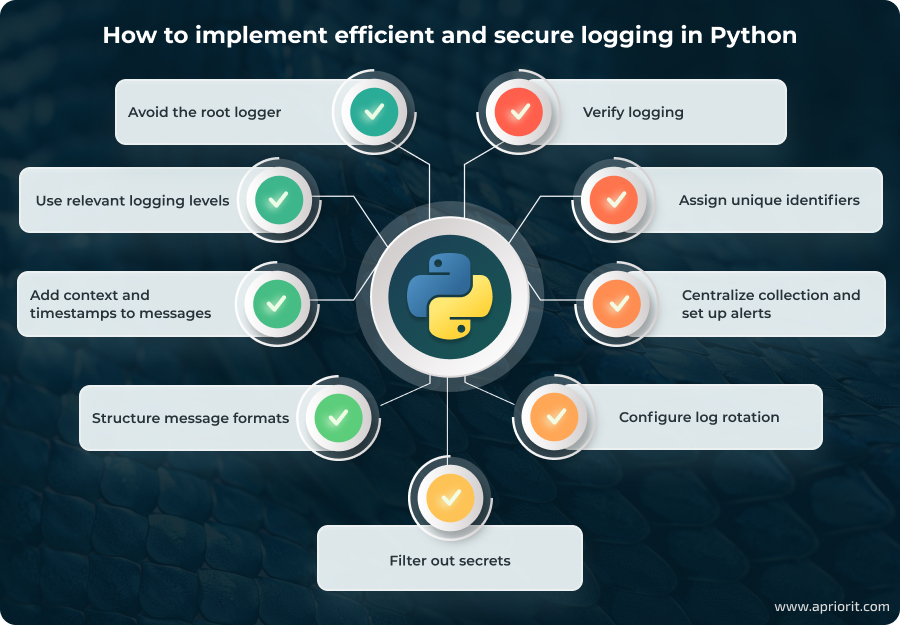
1. Avoid the root logger
The root logger is the default logger instance created when the logging system is initialized. It sits at the top of the logger hierarchy, and if you don’t explicitly create or configure a logger, all logging calls propagate up to the root logger. Here’s an example of using one root logger for all system logs:
import logging
logging.basicConfig(level=logging.DEBUG)  # Use one root logger for everything
logging.info(“Global message”) It’s best to create a separate logger for each component to prevent changes in one area from affecting the entire system. For example, thanks to separation, changing logging levels for one logger won’t affect others.
So instead of the example above, create separate loggers for different operations like this:
import logging
auth_logger = logging.getLogger("auth") # Create a logger named "auth"
db_logger = logging.getLogger("db") # Create a separate logger named "db"
auth_logger.info("User logged in") # Log a message to the "auth" logger
db_logger.info("Database query executed") # Log a message to the "db" logger 2. Use relevant logging levels
Logging levels are essential for understanding log messages, sorting them, and finding critical logs quickly. While Python allows for assigning flexible and custom logging levels, it’s easy to misuse this system.
For example, let’s take a look at this log:
def process(item):
	logger.info("Processing")          	# What exactly?
	logger.debug("Item data: %s", item)	# unnecessary DEBUG noise
	try:
    	result = item.do_work()
    	logger.info("Done")            	# No details
    	return result
	except Exception:
logger.error("Failed!") # No error description Here, the chosen levels provide little insight into logged events without reviewing the code.
To reduce the need for code review, we follow these three rules:
- Collect INFO, CRITICAL, ERROR, and WARNING level logs
- Always log errors (ERROR and CRITICAL levels) with maximum context
- Disable DEBUG detail, as it is intended for development and QA. However, it’s important to enable this in cases when you may require detailed investigation.
Here’s what this logging process looks like:
def process(item, req_id):
	logger.info("Start processing, req=%s, id=%s", req_id, item.id)
	if logger.isEnabledFor(logging.DEBUG):
    	logger.debug("Input data: %r", item.data)
	try:
    	result = item.do_work()
    	logger.info("Completed, req=%s, result=%s", req_id, result)
    	return result
	except Exception as e:
    	logger.error(
        	"Error, req=%s, id=%s: %s", req_id, item.id, e,
        	exc_info=True
    	)
raise3. Add context and timestamps to messages
Each log should specify what happened, for which user or request, and which resources are affected. Make sure to include a user, session, or request ID as well as a timestamp with at least second-level accuracy.
Such context makes it significantly faster to search through logs and analyze issues. Contextualized logs can help you quickly trace malicious activities to their source and understand the scope of the event, which is crucial for effective incident investigation and response.
For example, instead of short logs like this:
logger.error("Access error") Implement more nuanced logs like this:
logger.error(
	"Access error, user=%s, endpoint=%s, request_id=%s",
	user_id, endpoint, request_id
) 4. Structure message formats
Structured messages are easier for humans to read and for machines to parse. Using a fixed and detailed structure for log messages allows security tools to automatically analyze and correlate events across different systems, improving attack detection and facilitating automatic alerting and analysis.
It’s best to record logs using JSON or another machine-readable format that allows your team to define a fixed set of fields like timestamp, logger, level, and message.
Here’s an example of a well-structured log:
formatter = logging.Formatter(
	'{"timestamp":"%(asctime)s","level":"%(levelname)s",'
	'"logger":"%(name)s","message":"%(message)s",'
	'"request_id":"%(request_id)s"}',
	datefmt="%Y-%m-%dT%H:%M:%SZ"
)
handler.setFormatter(formatter)

logger.info(
	"User authenticated successfully",
	extra={"request_id": "req-12345"}
)

>>> {"timestamp":"2025-07-22T15:00:00Z","level":"INFO","logger":"app","message":"User authenticated successfully","request_id":"req-12345"}5. Filter out secrets
Logs should never contain sensitive information such as passwords, API keys, encryption keys, tokens, or personally identifiable data. Exposing these details can create severe security risks, as attackers often scan logs for credentials that grant immediate system access. It can also lead to privacy violations and non-compliance with cybersecurity requirements.
If sensitive values are included in log messages (for example, if you need them for later debugging or auditing), make sure to mask, hash, or tokenize them. For example, instead of logging a full API key, only log its last few characters to support troubleshooting without revealing the full value.
By ensuring that confidential data is excluded or anonymized, you can significantly reduce the risk of credential leakage, regulatory non-compliance, and privacy violations — even if logs are accessed by unauthorized parties.
Related project
Custom Cybersecurity Solution Development: From MVP to Support and Maintenance
Discover how our team developed a robust cybersecurity platform, empowering our client to effectively log user activity and detect threats while safeguarding sensitive digital assets.

6. Configure log rotation
Log rotation is the process of automatically creating a new log file once the current one reaches a certain size or age. Instead of letting a single log file grow indefinitely, rotation ensures old logs are archived or deleted while new events are written to a new file.
Rotating logs by size or time prevents disks from overflowing, keeps log management efficient, and makes it easier to store, back up, and analyze historical data.
Here’s how you can configure log rotation with RotatingFileHandler:
from logging.handlers import RotatingFileHandler
handler = RotatingFileHandler(
	"app.log", maxBytes=10*1024*1024, backupCount=5)

logger.addHandler(handler)
logger.info("The message will be rotated when the file grows") Note that without proper configuration, the RotatingFileHandler class saves only the latest log file. This class can also make services freeze during the rotation of a large number of logs. It renames each file from the backup count, so if, for example, you have 100 log files, it will generate 100 rename requests during rotation. To improve this class’s performance, you can write a different RotatingFileHandler that will not rename files but will write to files with greater and greater indexes with an unlimited backup count. In this case, the class will create one file ready for logging right away.
7. Centralize log collection
Aggregate logs from all applications, services, and infrastructure into a centralized platform such as a SIEM, ELK stack, or cloud-based logging service. Centralization ensures that security teams can search, correlate, and analyze events across the entire environment without wasting time switching between isolated log sources.
8. Set up alerts
Once logs are unified, configure automated alerts for high-risk events such as repeated failed login attempts, privilege misuse, or service outages. You can do this with SIEM or SOAR tools. Real-time notifications allow your team to respond to an incident immediately, reducing attacker dwell time and preventing unusual activity or user errors from escalating into major issues.
Here’s an example of an alert notification configured with a SIEM system:
def send_to_siem(record):
	payload = {
    	"timestamp": record.created,
    	"level": record.levelname,
    	"logger": record.name,
    	"message": record.getMessage(),
    	"request_id": getattr(record, "request_id", None)
	}
	requests.post("https://siem.example.com/ingest", json=payload)
handler = logging.Handler()
handler.emit = send_to_siem
logger.addHandler(handler)9. Assign unique identifiers
In distributed or microservices-based systems, it may be difficult to trace how a single user action flows across multiple services. To solve this, your team can assign a unique identifier to each request or session and include it in every related log entry.
For cybersecurity teams, unique identifiers help build a chain of events around a certain user, activity, or file. Identifiers help analysts follow an attacker’s activity across services, detect where errors or anomalies originated, and correlate suspicious behavior with specific users or sessions.
Adding identifiers to logs is simple. Here’s how you can do it:
# Generate and reuse one operation ID
op_id = uuid.uuid4()
logger.info("Operation started", extra={"operation_id": op_id})
# ... do work ...
logger.info("Operation finished", extra={"operation_id": op_id})10. Verify logging
To ensure continuous and efficient logging, it’s not enough to configure all loggers once. Every time your team adds new modules or services, it creates a risk of breaking existing loggers. New features and services also have to follow established logging standards. Gaps in coverage can leave blind spots, making it harder to detect attacks or troubleshoot issues.
Regularly verifying that logging features work ensures that logs remain complete and reliable as the system evolves. Here’s how to check that a logger actually writes logs:
import os, time
path = "app.log"
if os.path.exists(path):
	if time.time() - os.path.getmtime(path) > 300:
    	print("Logs have not been updated in the last 5 minutes!")
else:
print("Log file not found")With these ten core practices, you can ensure that logging in your Python project works correctly and securely. However, we have described only the initial configuration stages. To be able to use logging, especially in large and distributed projects, you’ll need to build automated pipelines for gathering, storing, and processing logs.
Implement robust cybersecurity logging with Apriorit
Whether you are interested in building simple logging features or a complete monitoring and observability stack, Apriorit’s team will provide the technical expertise you need. We have real-life experience developing many types of logging systems, from user activity monitoring and audit trails for cybersecurity products to device activity monitoring for mobile device management and protection.
Here’s what you can expect from our team:
- Diverse tech stack expertise. Whether your product is based on Python, C++, Rust, or another language, we’ll provide developers and QA specialists with practical experience. They’ll help you select relevant frameworks, libraries, and tools, as well as avoid common issues with these languages.
- Cybersecurity-focused development. As a company with ISO 27001 certification, we focus on the code and data protection of all software we develop. Our teams follow a secure SDLC framework and internal coding standards to ensure software protection at every stage.
- Problem-solving mindset. Apriorit’s skillset goes beyond simple logging and monitoring. We’ll help you figure out how to build observability systems for distributed solutions and microservices, automate log processing and gathering, and reduce information noise from constant security alerts.
With Apriorit, you get more than just a couple of skilled developers — you get access to the rare expertise you need to solve your technical challenges.
Conclusion
Logging is far more than a stream of event messages — it’s a fundamental tool for managing performance, security, and compliance in modern cybersecurity products. When properly designed, logs provide visibility into user and system behavior, support real-time threat detection, and enable early troubleshooting.
At Apriorit, we specialize in cybersecurity development and Python engineering. Whether you are enhancing an existing platform or building a new security product, our experts will help you integrate continuous logging into your security product, automate log management, and configure meaningful notifications on suspicious events.
FAQ
Is Python good for implementing logging?
Yes, Python offers a built-in logging module that is flexible, extensible, and production-ready. It supports structured logging, multiple handlers, and integration with enterprise monitoring tools, making it well-suited for cybersecurity products.
Does logging slow down Python applications, and how can I optimize it?
Excessive or poorly configured logging can slow down applications. To optimize logging, use asynchronous handlers, adjust log levels, rotate files, and implement other practices we described above. Offloading logs to external systems like SIEM or ELK also helps maintain performance.
How does logging relate to cybersecurity compliance requirements (e.g., GDPR, HIPAA, PCI DSS)?
<p>Compliance frameworks often require visibility into any activity with sensitive data. For example, HIPAA demands tracking of access to patient records, PCI DSS requires logging of payment system activity, and the GDPR enforces monitoring of personal data processing.</p>
<p>Logging provides an audit trail for compliance audits and incident investigation, and it helps you demonstrate that access control policies are enforced.</p>
How can I handle log retention and storage growth at scale?
Log data can quickly consume massive amounts of storage if left unmanaged. To address this, implement rotation policies, compress and archive older logs, and use cloud logging services. A tiered strategy can help balance cost and availability: keep recent logs in hot storage for fast queries and move older logs to cheaper archival storage.
What are common mistakes developers make when implementing event logging?
It can be hard for developers to find a balance. Excessive logging floods systems with unfiltered records and hides critical events, but logging too little creates blind spots in your security posture. Timestamp inconsistencies, caused by unsynchronized clocks, can disrupt event correlation across systems and cloud environments. Additionally, poor log protection exposes logs to tampering or theft by attackers



