
 Skip to main content


Key takeaways:
- Delivering flawless visuals and predictable behavior under real-world conditions is the biggest challenge for human–machine interface (HMI) vendors.
- The platform you choose determines the quality of your HMI. Consider capabilities for multi-display orchestration, updates, and maintenance.
- Building an in-vehicle HMI requires advanced expertise in multi-screen UX, embedded engineering, safety constraints, and AI.
A competitive cockpit interface results from balancing technical standards, consumer expectations, and safety constraints. It requires architecting for multi-screen consistency while respecting mixed-criticality boundaries and planning for cybersecurity and OTA governance before your first feature is even released.
Meanwhile, every connected capability you add expands the attack surface, making it even more challenging to maintain automotive-grade safety while delivering a smartphone-level UX.
This article helps product leaders and engineering teams navigate these realities. You’ll learn what automotive HMI design and development actually involve today:
✔ What your system needs to deliver
✔ Which technical and organizational challenges typically surface during HMI design
✔ Which practices help you build HMIs that stay secure, performant, and updateable at scale
Contents:
What is HMI in automotive products?
To make sure we’re on the same page about HMI fundamentals, let’s define some key terms. If you’re an industry insider, you might skip to the next section, where we analyze requirements for modern HMI products.
In the automotive domain, a human–machine interface is the set of technologies that enables people (drivers and passengers) to interact with vehicle systems. These systems provide comprehensive information on the vehicle’s current status and control over its functions.
An HMI, however, is not the same as an in-vehicle infotainment (IVI) system or a digital cockpit, though these terms are sometimes used interchangeably.
The key differences are in their scope:
- An HMI is the layer that enables interaction between the system and its users.
- An IVI system is typically responsible for a subset of the cockpit experience, focused on infotainment and connected services like media, navigation, and communications.
- A digital cockpit is the broader ecosystem that includes multiple displays, compute domains and controllers, middleware, connectivity, and update mechanisms that together create and deliver the in-car experience.
At its core, an HMI system is a combination of different hardware and software components.
Core hardware elements of an HMI
These elements present information and capture user intent:
- Digital instrument clusters — Driver-critical visualization of vehicle state, warnings, and assistance status
- Touchscreens and center stack displays — Primary surface for navigation, media, comfort, and vehicle settings
- Head-up displays (HUDs) — Passenger-focused entertainment and information (primarily IVI rather than driver-facing HMI)
- Sensors and input devices — Cameras, microphones, and traditional controls (rotary controllers, buttons, stalks) that capture driver and passenger commands and enable adaptive system behavior
Software elements of HMI
For the hardware elements we listed above to turn into a cohesive HMI system, we need software elements that manage interactions, intelligence, and visual feedback:
- Voice recognition and voice guidance enable hands-free control and provide voice-based feedback, reducing the need for drivers to manually interact with the vehicle in motion. This is critical for reducing driver workload in safety-sensitive scenarios.
- Gesture input integration detects and interprets hand movements for touchless control.
- Haptic feedback provides tactile confirmation for user actions, helping to reduce visual load and prevent input errors while minimizing driver distraction.
- A driver monitoring system (DMS) continually assesses driver attention and adjusts interface timing, prompts, and escalation strategies to maintain safe interaction patterns.
- Artificial intelligence (AI) and personalization systems learn user preferences and adapt the interface accordingly.
- Graphics and rendering logic control the visual hierarchy, animations, transitions, and overall presentation performance across all displays, ensuring a smooth, consistent user experience.
- Advanced driver assistance system (ADAS) status alerts clearly communicate ADAS states, limitations, and warnings to help drivers understand what the vehicle is doing and when they need to intervene.
Each of these software and hardware elements must meet specific safety, usability, security, and lifecycle adaptability requirements. Let’s look closer at the specifics of those requirements before you make any platform or architectural decisions.
Want to build a competitive digital cockpit solution?
Apriorit will help you deliver a product that meets safety standards and elevates the user experience across devices. Our experts will take care of integrating your displays, touch controls, and embedded software into a unified and seamless HMI system.
Key requirements for modern HMIs
Automotive HMI software has to meet the expectations of three critical groups of stakeholders:
- Customers
- Regulatory bodies
- Your own business
This means that as a product leader, you need to set system-wide expectations regarding architecture, tooling, validation, and long-term maintainability.
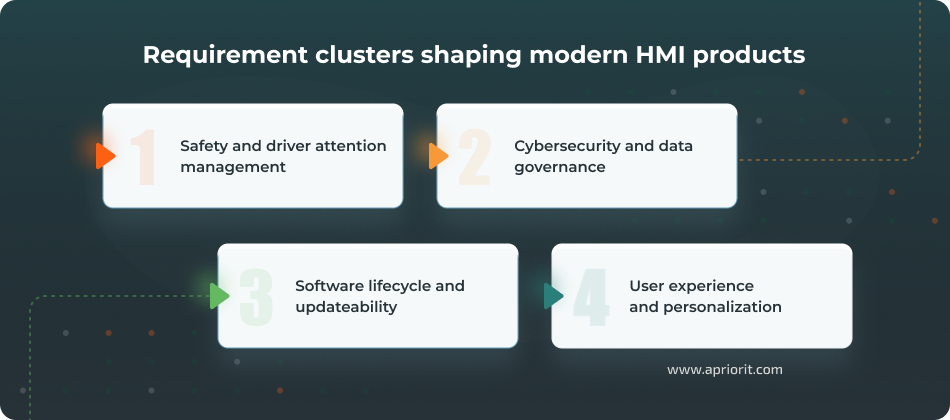
1. Safety and driver attention management
Driver distraction is something your HMI product must prevent by default. In the US alone, crashes involving distracted drivers resulted in over 3,200 fatalities and 324,000 injuries in 2023, with hundreds of deaths specifically tied to cellphone-related activities.
In-vehicle display failures also become safety-critical defects. When Toyota recalled nearly 600,000 vehicles in 2025 because their 12.3-inch displays could fail while driving, regulators explicitly classified it as a safety risk: a blank display prevents drivers from seeing malfunction indicators. Similar recalls from Ford, Hyundai, and Kia for cluster blackouts reinforce that display availability and warning visibility are significant for regulatory compliance, not just user satisfaction.
A high-quality HMI is supposed to:
- Support safe interactions in motion
- Communicate the vehicle state clearly
- Behave predictably under real-world conditions
To meet these expectations, you need to consider different standards and guidelines. For example, ISO 15005 defines specific ergonomic principles for driver–system interaction while the vehicle is in motion. NHTSA Guidelines [PDF], in turn, require individual glances away from the road to stay under two seconds, with total task time capped at twelve seconds.
Another important reference for automakers is Euro NCAP, whose ratings are a massive decision factor for customers. Starting in 2026, Euro NCAP will penalize vehicles for over-reliance on touchscreens for essential functions.
To maintain five-star safety ratings, you’ll need physical controls with tactile feedback for core functions like turn signals, wipers, and hazard warnings. The same protocol significantly increases the scoring weight for driver monitoring systems, requiring continuous attention tracking and robust fatigue and distraction detection.
If you are targeting other regions, such as ASEAN, Japan, or South Korea, you will need to consider other relevant standards and regulations.
2. Cybersecurity and data governance
HMI systems handle sensitive user data, manage connectivity flows, and integrate third-party components such as navigation, payments, and AI assistants. Thus, building an HMI entails significant cybersecurity responsibilities and requires you to mitigate many risks.
Speaking of risks, your team must be prepared to deal with an increasing number of cybersecurity threats. According to Upstream’s 2025 Automotive & Smart Mobility Cybersecurity Report, there were 409 publicly reported cyber incidents in the automotive industry in 2024. A year before, this number was 39% lower. Most of these attacks are executed remotely and target telematics and application servers.
Thus, it comes as no surprise that major regulations make security non-negotiable for HMI systems. UN Regulation No. 155, which has been mandatory for new vehicle types in the EU, Japan, and South Korea since 2022, requires manufacturers to establish a Cybersecurity Management System covering risk assessment, incident monitoring, and lifecycle management. ISO/SAE 21434 provides the engineering framework to meet these obligations.
Read also
Automotive Cybersecurity Testing 101: Requirements, Best Practices, and Tips on Overcoming Challenges
Explore what makes automotive cybersecurity testing different and why traditional testing approaches are not enough for modern vehicle ecosystems.

3. Software lifecycle and updateability
Software-defined cockpits evolve after the start of production (SOP), which makes updateability a fundamental product requirement. Your team needs systematic processes for managing updates, from organizational procedures down to project-level engineering practices.
Currently, over 70% of new vehicles worldwide have at least some support for over-the-air updates.
Requirements for automotive software updateability are outlined in UN Regulation No. 156, which has been enforced since July 2022. This regulation requires manufacturers to implement a Software Update Management System covering identification, distribution, integrity, and traceability. It also demands that manufacturers prevent updates from adversely affecting safety by ensuring they are verifiable and reversible.
4. User experience and personalization
Users expect modern vehicles to offer smartphone-level responsiveness, clarity, and personalization in the cockpit.
At the same time, your HMI must meet stricter constraints than consumer devices: legibility standards for in-motion viewing, predictable behavior under varying conditions, and seamless handling of connectivity loss.
McKinsey’s 2024 survey [PDF] of approximately 37,000 consumers clearly shows this expectations gap. McKinsey found that only 20% of mobility users are satisfied with current in-vehicle technology, even though these same users navigate smartphone ecosystems daily without significant frustration.
The disconnect is especially pronounced among electric vehicle buyers, 59% of whom want more digital connectivity services than current vehicles offer.
And the market is responding, moving voice assistants, AI-powered personalization, and seamless connectivity from premium differentiators to baseline expectations. By 2030, over 90% of vehicles are expected to be connected — up from roughly 50% today — with connectivity features influencing purchase decisions across safety, convenience, and entertainment categories.
However, each capability you add to meet consumer expectations also expands your architectural and cybersecurity scope.
For example, adding voice control affects microphone placement, edge processing decisions, and fallback behavior design. Cloud personalization introduces heightened data governance requirements and a greater need for handling offline mode and managing latency. And multi-screen consistency demands maintaining shared component libraries, coordinating state management, and implementing coordinated change control across displays.
As a result, your team faces architectural commitments that will shape your entire product’s security posture, update complexity, and validation workload. Following through with these commitments often comes with extra challenges, which we’ll discuss in the next section.
Read also
Automotive Software Development: Trends and Challenges
Find out why automotive software projects face growing technical and regulatory pressure. Discover ways to address critical challenges and deliver a robust automotive product.

Main challenges in automotive HMI development
Most HMI solutions hit the same problems, just at different stages. And what’s really dangerous is that engineering teams often discover these challenges much later in the SDLC, when addressing them becomes much more expensive.
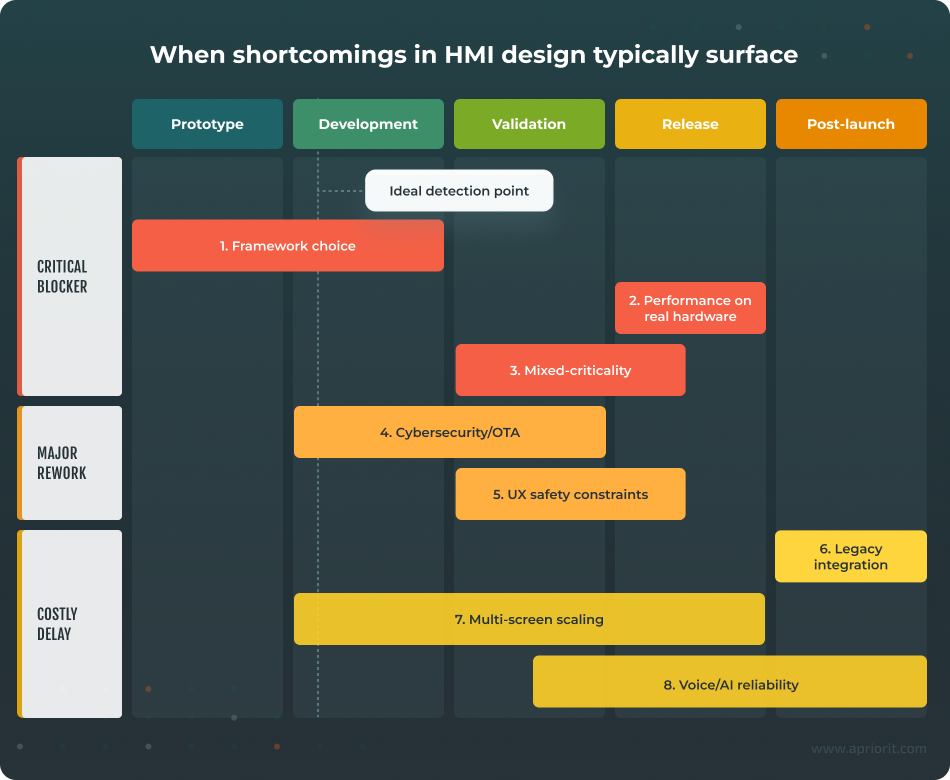
1. Choosing the right HMI framework
Choosing a framework is one of the first and most impactful decisions you’ll have to make when working on an HMI project.
The framework you go with will determine everything:
- How quickly you can add new features
- Your ability to reuse parts of code or even entire components
- The quality of the UX you can deliver
HMI projects rely on various frameworks and platforms such as Qt, Crank, QNX, Linux, and Android Automotive. The tricky part is that no framework can cover all of your needs.
Your HMI will need to be supported for years or even decades, while UI expectations and AI capabilities evolve monthly. And most HMI projects can’t afford switching frameworks later, as it requires rewriting UI code, rebuilding toolchains, and re-qualifying safety and cybersecurity for the entire system.
“With hardware-dependent solutions like HMIs, the way you plan and build your system determines everything.
If it’s properly designed, you can grow and extend your system later without refactoring everything from scratch. At the same time, a single design mistake discovered at later stages will force you to spend extra developer hours or, what’s worse, rework the physical production line itself.”
Dmitriy, Development Leader at Apriorit
For this reason, some HMI projects use hybrid approaches instead of committing to a single platform. Determining which trade-offs you can tolerate and which platform specifics are an absolute must for your project is the true challenge, often requiring expert assistance.
2. Ensuring stable HMI performance on real automotive hardware
HMI performance is shaped by choices across the stack: rendering approach, asset pipeline, memory strategy, animations, and how multiple displays share compute and GPU resources. Sustaining responsiveness, smooth rendering, and predictable boot/resume behavior under real ECU constraints is non-negotiable in this case.
Yet, many performance issues remain invisible in early demos and surface only when running on production-class hardware with tighter CPU/GPU budgets and thermal constraints.
For instance, smooth 60fps animations on a development workstation might drop to 15fps on target hardware when three displays are active simultaneously. When something like this happens during tests, your team will have to redesign all of your animation strategies or re-optimize your asset pipelines.
3. Keeping safety-critical and entertainment features properly separated
Modern cockpits often combine safety-relevant information paths, like cluster or HUD warnings, with infotainment-rich experiences. The challenge is to explicitly separate mixed-criticality components, implementing stricter availability and timing requirements for critical alerts than for infotainment features.
Consider a navigation prompt that appears on both the HUD and center display: the HUD version must render with guaranteed timing even if the IVI system is updating, while the center display can show broader context with acceptable latency variation.
If clusters and IVI share resources without clear boundaries, an infotainment software fault can cascade into safety-critical displays. For example, a bug in your media player can cause your speedometer to fail or reboot.
4. Building secure, updateable systems without sacrificing usability
Enforcing advanced security measures often requires degrading some parts of the UX. For example, encrypted communication adds latency, while authentication flows interrupt tasks and code signing slows updates.
As a result, your team is constantly negotiating how much friction you can add before the interface starts to feel too clunky for end users.
During these negotiations, you need to account for a lot of security-related factors:
- complex security validation measures
- third-party components and dependencies
- OTA-related vulnerabilities
Security validation multiplies your testing workload with penetration testing, fuzzing, attack surface analysis, and regression testing for every patch.
Hidden vulnerabilities in third-party libraries and SDKs that your HMI relies on can block your entire release.
Even updates meant to help you expand product capabilities and fix previous issues can create their own UX and security problems. At the same time, you need to make the update process seamless and intuitive so that users clearly understand what’s happening and how long it will take.
On the other hand, if an attacker compromises your update server, they can push malicious code to your entire fleet. Secure channels require certificate management, encrypted transport, integrity verification, and proper rollback protection, all of which further increase your product’s complexity.
Read also
Cybersecurity Risks of Automotive OTA Updates and How to Mitigate Them
Reduce business and safety risks by addressing security gaps in your OTA mechanisms. Gain insights that help you safeguard vehicle software integrity and brand reputation.

5. Designing a UX for driver safety
Designing interactions that remain intuitive while minimizing driver distraction also requires extra effort.
The biggest challenge for your team is finding the right balance between smooth UX and driver safety. On the one hand, users expect rich features and a high degree of personalization. On the other hand, your product should stay within strict in-motion constraints regarding glance efficiency, predictable feedback, and conservative error handling.
This balance becomes especially critical when HMI behavior is responsible for the driver’s understanding of ADAS states and limitations.
6. Integrating modern UX with existing vehicle architectures
Vehicle architectures often run on Controller Area Networks (CAN) and Local Interconnect Networks (LIN) that were designed for periodic, low-bandwidth signals. But modern cockpits rely on continuous UI updates and thus require broader network bandwidth for real-time data processing.
The mismatch creates friction that Automotive Ethernet can’t always eliminate. Many vehicles still use gateways to bridge Ethernet and legacy CAN/LIN segments, creating new bottlenecks and translation layers.
As a result, you end up with a patchwork architecture where some displays get real-time data while others face intolerable update delays.
7. Scaling across multiple screens without fragmenting the product
When your team needs to deliver a consistent interaction model across cluster, HUD, IVI, and secondary displays, there’s always a risk of turning the cockpit into a set of loosely related apps.
Multi-screen scaling demands shared design rules, reusable components, coordinated state, and change management. Without a strong foundation, teams often duplicate logic per screen, creating inconsistencies that compound with every release. This leads to slower delivery, higher QA costs, and user journeys that feel disconnected even when the UI visuals seem aligned.
8. Making voice, AI, and gesture features reliable enough
Voice assistants, gesture controls, and AI-powered personalization sound great in product pitches. Getting them to work reliably in real-world conditions is a different story.
Features that rely on AI introduce probabilistic behavior, meaning they don’t always generate the same results from the same input. This makes validating such features much more complicated than testing deterministic button presses.
Your team will need to account for variables like:
- microphone quality
- background noise
- accent recognition
- gesture detection under different lighting conditions
- cloud processing latency
Fail to address these factors on time and you risk delivering a feature that only distracts and frustrates users rather than assisting them.
Now that you know where problems typically surface, let’s discuss how to catch and fix them early. The next section equips you with best practices to help your team build an HMI system that remains secure, stable, and maintainable throughout the vehicle lifecycle.
Read also
Automotive Functional Safety: Ensuring ISO 26262 Compliance
Explore how ISO 26262 requirements affect automotive software design and validation, and why early attention to functional safety helps reduce costly project risks.

Best practices for building a secure and reliable automotive HMI
Surely, a significant portion of your automotive HMI development roadmap will be shaped by the specifics of your region, market niche, and customer preferences. However, our own experience with HMI development projects shows that some development practices are still universal across industries and countries.
Here are nine practice-validated recommendations that will help your engineering team deliver an HMI system that’s secure, stable, and maintainable at scale.
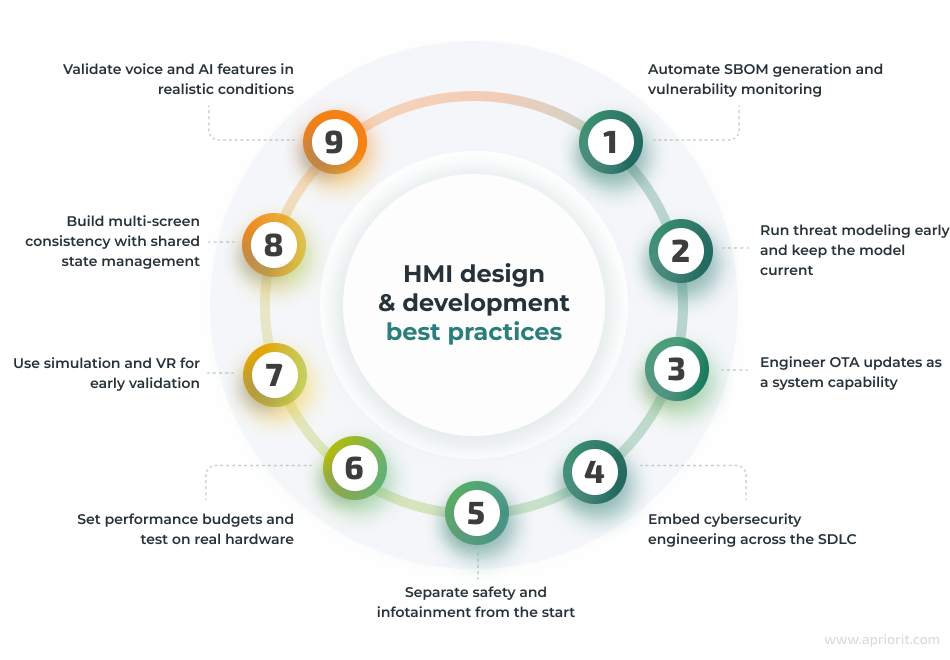
1. Automate SBOM generation and vulnerability monitoring
Having a software bill of materials (SBOM) will deliver the greatest benefits if you automate its generation and integrate it into your CI/CD pipeline. This will allow you to have a complete component inventory every time you release a new build of your product, capturing all libraries, frameworks, and middleware components, along with their versions.
It’s important to treat SBOMs as build artifacts that get versioned and stored alongside your releases, so that your team has an accurate snapshot of what’s actually included in each deployed software version.
To enhance HMI security, implement continuous vulnerability monitoring against your SBOM data. When a new exploit or vulnerability is discovered, your tooling should automatically cross-reference it against your component inventory and flag affected builds. Identifying vulnerabilities fast lets you assess impact, prioritize patches, and plan OTA updates while the issue is still fresh.
When you integrate third-party binaries or middleware, you need visibility into their dependencies too. Ask your suppliers to provide machine-readable component inventories for their deliverables, so that you can make them a part of your master component inventory.
2. Run threat modeling early and keep the model current
Threat modeling helps your team proactively identify where an attacker could exploit your HMI’s entry points — connected apps, cloud connections, update mechanisms — and define controls before vulnerabilities become expensive to fix.
Ideally, your team should start implementing threat modeling along with designing and implementing the first version of your automotive HMI architecture.
Map data flows and trust boundaries across HMI, cloud, mobile, and in-vehicle networks. It’s best to use a structured method like Spoofing, Tampering, Repudiation, Information disclosure, Denial of service, Elevation of privilege (STRIDE) to systematically evaluate threat categories and ensure you don’t miss attack vectors.
Also, remember that each new feature and integration point expands your attack surface in ways that aren’t always obvious. Therefore, you need to revise your threat models at every major integration point: new connectivity paths, new third-party components, new OTA workflows, and so on.
3. Engineer OTA updates as a system capability
Modern HMIs need systematic update management with clear versioning, dependency tracking, compatibility validation, and rollback mechanisms.
There are several levels at which you need to validate the quality of your update workflows:
- User communication — Your system must provide users with clear messaging about what’s changing and why.
- Safe timing — Safety-critical updates should never be initiated while the vehicle is in motion.
- Failure recovery — When updates fail mid-install, there must be automatic rollback mechanisms with clear recovery paths.
- Dependency validation — Your team should run compatibility checks across ECU versions before deploying any updates.
To ensure the security of your OTA update mechanism, your team needs to build regression testing into the release process. It’s also important to validate that critical HMI functions (startup sequence, warning displays, ADAS visualization, state persistence) still work correctly after every update.
Additionally, plan your versioning strategy for fleet-scale deployment. In particular, your HMI architecture should support multiple software versions running simultaneously during phased rollouts.
Finally, make sure your team documents the compatibility requirements between HMI versions and vehicle ECU software so you can deploy updates safely without requiring fleet-wide, synchronized changes.
4. Embed cybersecurity engineering across the SDLC
In every project Apriorit works on, we follow principles of a secure SDLC. Adopting this approach is particularly critical for automotive software projects.
Make clear security requirements part of feature definition from the very start of your project, especially for user accounts, pairing, personalization, and cloud services.
To secure your data, ensure you apply least-privilege access controls and explicit permission models for all apps and services your product relies on.
Never give smartphone apps, cloud APIs, user inputs, or third-party services direct access to vehicle control systems or sensitive data stores. For example, when adding smartphone pairing functionality, you need to define up front which vehicle data the phone can access, how credentials are stored, and what happens if pairing is compromised.
Isolate untrusted data sources and ensure that anything from outside your domain of control is validated, sanitized, and quarantined until proven safe.
“Cybersecurity should be at the core of any HMI.
The attack surface your product is exposed to grows as its capabilities expand. If your HMI handles pairing, personalization, cloud services, or third-party apps, you also need to think about implementing measures like threat modeling, component transparency, and update governance.”
Dmitriy, Development Leader at Apriorit
5. Explicitly separate safety and infotainment
Most cockpits combine important features of modern HMI systems with non-critical infotainment functions. Treating this mix of functions as a single, uniform software domain creates fragile dependencies and increases safety and validation risks.
To prevent these risks, your team needs to define which HMI behaviors are sensitive to availability and timing early on. Typically, these behaviors include warnings, telltales, and safety state messaging. You also need to establish clear isolation boundaries for these safety-critical behaviors, separating them from infotainment features.
Document failure behavior clearly to determine which components must remain functional even if non-critical components fail. For example, if your IVI system crashes during a software update, your cluster and HUD must continue to display speed, warnings, and ADAS status without interruption.
6. Set performance budgets and test on real hardware
Without clear budgets and continuous measurement, performance issues accumulate quietly until they become release blockers. Therefore, you need to define your performance budgets early, especially for factors such as frame consistency, startup/resume time, memory ceilings, and responsiveness under load.
“HMI quality really comes down to UX consistency. Users can live with simple visuals — what they won’t tolerate is lag, jank, or unpredictable response times, especially with multiple displays and vehicle signals in the mix.
The only way to actually deliver a smooth cockpit experience is to set performance budgets early and keep validating them on real hardware as the UI grows.”
Dmitriy, Development Leader at Apriorit
Measure performance on target-like hardware throughout development and include worst-case scenarios in your testing. Such scenarios may include:
- Having multiple screens active
- Running animations
- High signal churn from vehicle networks
- Degraded connectivity
- And more
Continuous performance validation on representative hardware helps you catch potential issues early, before they force late-stage redesigns or feature cuts.
7. Use simulation and VR for early validation
Sometimes your team needs to start working on software before the target hardware is even available. This is where simulators and VR tools come into play.
Simulation reduces the cost of discovering issues late, especially when hardware availability is limited or when you need to evaluate interactions under varied conditions.
With the help of simulation and VR tools, your team can:
- Validate interaction safety, glance patterns, and multi-screen coordination
- Test driver attention under varying road conditions, lighting, and task complexity
- Evaluate cross-screen state synchronization and navigation flow across cluster, HUD, and IVI
- Prototype voice interaction and gesture controls under simulated noise and movement conditions
However, remember that simulators can’t catch everything. Many performance bottlenecks, thermal behavior, and real-world environmental factors, such as sunlight readability, vibration, and actual road noise, will only surface on production hardware. Thus, your team should use simulation for early direction-finding and safety validation but should always verify on representative ECUs under automotive conditions before final signoff.
8. Build multi-screen consistency with shared state management
Modern cockpits display related information across cluster, HUD, IVI, and secondary displays. Without a single source of truth for application state, you’ll duplicate logic across screens and introduce synchronization bugs.
To mitigate these risks, implement centralized state management to coordinate updates across all displays.
For example, when navigation recalculates, all screens should update atomically from the same state change. When preferences change, updates should propagate through your state layer to every affected display simultaneously.
Also, make sure to define ownership rules for different screens:
- Which display is authoritative for input?
- How do you resolve conflicts between multiple screens?
- What’s the update order for cascading changes?
Lastly, plan for failure. You need to build an explicit action plan for scenarios such as updating one display while keeping the others active, or handling display crashes and re-synchronization.
9. Validate voice and AI features in realistic conditions with explicit fallbacks
While offering greater UX personalization, AI-powered features introduce probabilistic behavior, delivering slightly different outputs as a result of the same inputs. This requires different validation approaches compared to deterministic UI flows.
In particular, you need to test your AI-driven capabilities under realistic conditions. For example, you can test AI-powered voice assistants using different accents and background noise similar to road noise, an HVAC system, and talking passengers. When working on gesture recognition, it’s important to use different lighting conditions for camera-based features.
Most importantly, you need to design explicit fallback behaviors for low-confidence recognition, ambiguous gestures, and cloud timeouts and document these paths in your feature specification.
These practices address the most common pitfalls in automotive HMI development. Applying them consistently helps your team prevent validation failures, security gaps, and late-stage rework.
And if your project involves complex multi-domain integrations, deep performance optimizations, or strict regulatory timelines, you may want to bring in specialized engineering expertise to accelerate implementation and reduce risks. The key is recognizing early which challenges require focused expertise and enhancing your project team accordingly.
Related project
Auditing the Security of a Connected Vehicle Communication System
See how our team conducted an in-depth audit of a vehicle communication system, helping the client enhance security awareness and strengthen safeguards across critical components.

Design and deliver secure HMI systems with Apriorit
Apriorit is a TISAX-certified company specializing in cybersecurity and automotive software development. We work with OEMs and Tier-1 suppliers on HMI solutions that require deep technical expertise — from early architectural decisions through production deployment and post-launch updates.
You can entrust our team with:
- Custom software engineering for complex automotive systems — Be it a separate feature or a full-scale platform, Apriorit will build the solution you envision within the agreed timeline and budget.
- Embedded and device-level engineering for HMI platforms — Many HMI challenges live below the UI layer. Apriorit’s experts in embedded and IoT development will help your team design and implement the parts of the stack that keep the HMI responsive and reliable in production.
- Advanced cybersecurity testing and audits — We will help you run complex cybersecurity checks, identify potential risk areas, and improve your system’s resilience in a way that fits both industry and market expectations.
- Performance and security optimizations — Your product’s evolution doesn’t have to end with its release. Upon request, Apriorit will help you improve performance, enhance implemented security mechanisms, and introduce new functionality.
As a full-cycle software development company with deep automotive expertise, we will equip your project with the experts you need, from top-level engineers and ISTQB-certified quality assurance specialists to experienced business analysts and project managers.
We also offer flexible partnership options, so if you want to explore cooperation, you don’t have to start with a large, open-ended engagement. We can begin with a small fixed-scope project to validate our approach or close a specific gap on your team. Then, you can scale to a dedicated team model for long-term product development and continuous improvements as your automotive software system evolves.
Need a trusted partner for automotive software development?
Rely on our team’s expertise in automotive-grade systems, compliance, and embedded solutions. Apriorit will reduce technical risks, ensure regulatory alignment, and deliver automotive solutions tailored to your business goals.
FAQ
What technologies are best for building modern HMIs?
<p>There’s no universal technology stack for automotive HMIs. The best choice for your project will depend on your system scope, safety constraints, hardware limits, and long-term update strategy.</p>
<p>Core technologies that modern HMIs rely on include:</p>
<ul>
<li><strong>UI framework and rendering stack</strong> — Determines visual quality, responsiveness, and scalability across screens.</li>
<li><strong>Voice interaction and language processing</strong> — Enables hands-free control and reduces driver distraction. Effectiveness depends on dialogue logic, confirmation patterns, and error handling design.</li>
<li><strong>Driver monitoring and context awareness</strong> — Allows the HMI to adapt interaction timing and alerts based on driver attention and state, improving safety and building trust in assistance features.</li>
<li><strong>Connectivity and vehicle integration layer</strong> — Connects the HMI to vehicle signals, devices, and services. Ensures accurate, timely UI behavior across ECUs and variants.</li>
<li><strong>Security and update infrastructure</strong> — Allows your HMI to safely evolve after launch through secure software updates, rollback mechanisms, and transparency into third-party components.</li>
</ul>
How to ensure safety in HMI design and what are the biggest risks?
<p>In HMI systems, the biggest safety risks come from driver distractions or confusion. You need to design your HMI system so that drivers remain oriented and in control, even when the system is busy, the situation changes quickly, or something fails.</p>
<p>This requires your team to:</p>
<ul>
<li>Design for predictable interaction with a clear hierarchy of what matters most.</li>
<li>Keep in-motion interaction lightweight and avoid flows that require frequent corrections or decision-making while driving.</li>
<li>Make safety-related communication easy to understand at a glance and reliable even under degraded conditions.</li>
</ul>
What is the difference between HMI and IVI?
<p>These terms can sometimes be used interchangeably, but they’re not the same thing.</p>
<p>HMI refers to the complete interaction layer, with everything the driver and passengers use to see, hear, and control the vehicle. That includes visual displays, voice commands, alerts, haptics, physical buttons, and steering wheel controls.</p>
<p>IVI, in turn, is only responsible for the entertainment and information subset: media playback, navigation, phone connectivity, and apps. It’s part of the HMI but not the whole system.</p>
How can AI improve HMI usability and personalization?
<p>There are several areas where AI shows big potential for improving usability and personalization:</p>
<ul>
<li><strong>Layouts</strong> — AI learns from usage patterns (frequent functions, typical routes, time of day) and rearranges shortcuts and widgets so common actions are easier to reach.</li>
<li><strong>Context</strong> — AI reads driver monitoring data, vehicle state, and traffic conditions to show or hide UI elements. When the workload is high, it simplifies the interface, delays non-urgent notifications, or shifts critical messages to less distracting screen regions.</li>
<li><strong>Voice</strong> — Modern AI assistants let drivers speak naturally, without having to memorize specific commands. Multimodal interaction that combines speech, gesture, and gaze also simplifies menu navigation.</li>
<li><strong>Accessibility</strong> — AI helps adapt interfaces for drivers with motor, visual, or cognitive limitations by enlarging targets, simplifying workflows, or shifting tasks to voice.</li>
</ul>
<p>AI-powered technologies help make interfaces adaptive, enabling your system to learn driver preferences, adjust to context, and reduce interaction effort.</p>
What automotive standards apply to HMI development?
<p>Depending on your target region and market, your HMI system may need to comply with different standards and regulations.</p>
<p>Some of the requirements to keep in mind include:</p>
<ul>
<li><strong>Cybersecurity</strong> — ISO/SAE 21434 and UN R155 for connected HMI and infotainment systems; UN R156 for software update management</li>
<li><strong>ADAS interfaces</strong> — UNECE Driver Control Assistance Systems requirements for mode awareness and driver engagement</li>
<li><strong>Driver distraction</strong> — NHTSA Human Factors Design Guidance and OICA Worldwide Distraction Guideline for visual–manual task limits and lockout functions</li>
<li><strong>Ergonomics</strong> — ISO 15005 for dialogue principles and ISO 15008 for visual presentation requirements</li>
</ul>
<p>Additional regulations may apply depending on your system scope and safety classification.</p>
What factors influence the cost of building an automotive HMI?
<p>Several factors will affect the cost of your HMI project:</p>
<ul>
<li>Functional scope</li>
<li>Platform and framework choices</li>
<li>Safety and compliance requirements</li>
<li>Supported integrations</li>
<li>Project team and sourcing</li>
</ul>
<p>For example, implementing multiple integrations and adding advanced features like multi-screen cockpits, AR HUDs, and AI-powered personalization significantly increase R&D, prototyping, and validation costs. Advanced cybersecurity measures, including threat analysis and penetration testing, can also expand the project budget.</p>
<p>Even your team’s location and skill mix affect the project budget.</p>
<p>At the same time, using standardized frameworks such as Qt, Android Automotive, QNX, and AUTOSAR stacks helps HMI development teams enable component reuse and cut some engineering costs.</p>
Have a question?
Ask our expert!

VP of Innovation and Technology, Canada Branch Director



