
 Skip to main content


The in-vehicle infotainment (IVI) system is no longer just another ECU. It’s the face of the modern car — the screen drivers look at, touch, and judge every day.
As cars shift toward software-defined platforms, IVI has become one of the most complex and business-critical systems to get right. Developing an engaging and reliable IVI platform is a challenge even for experienced development teams. However, the right combination of development skills, implemented requirements, and customer suggestions can help you build a platform that elevates the in-vehicle experience.
In this guide, our experts share the key elements of in-vehicle infotainment software development. Inside, you’ll find:
- What features are essential for modern in-vehicle infotainment
- How IVI systems are regulated
- Which steps are a must for customizing an IVI platform
- How to manage key challenges of IVI development
This article is written for product managers, system architects, and tech leaders of automotive OEMs and Tier-1 suppliers who work on IVI products.
Contents:
- The infotainment system is the face of a modern car
- Must-have features for in-vehicle infotainment
- Key components of an IVI system
- Regulatory requirements for in-car infotainment
- Development steps for customizing an IVI system
- 1. Research your customers’ needs and wants
- 2. Choose the IVI architecture pattern
- 3. Integrate and personalize the right services
- 4. Secure data collection, processing, and storage
- 5. Ensure post-release remote support with OTA updates
- Challenges of IVI development and customization
- Build customized in-car infotainment systems with Apriorit
The infotainment system is the face of a modern car
Some 10 years ago, a touchscreen, built-in navigation, and a rear-view camera were considered high-tech luxuries. Today, customers and regulatory bodies consider this to be less than the basic minimum even for budget vehicles.
Modern in-vehicle infotainment software combines dedicated software and hardware to deliver driver assistance, improve road and vehicle safety, and provide audio and video entertainment for the driver and passengers. Automakers want IVI systems to be customized for different types of vehicles and buyers. As a result, the infotainment segment is one of the largest and most dynamic in the modern automotive industry. According to research by Grand View Horizon, in 2023, the IVI market was estimated at $15 billion, and it is projected to reach $29 billion by 2030.
The majority of vehicle buyers in the US are now millennials and Gen Z, who grew up with technology and expect their vehicles to be not only reliable but smart, autonomous, and personalized. Market research suggests they have high expectations of in-vehicle infotainment:
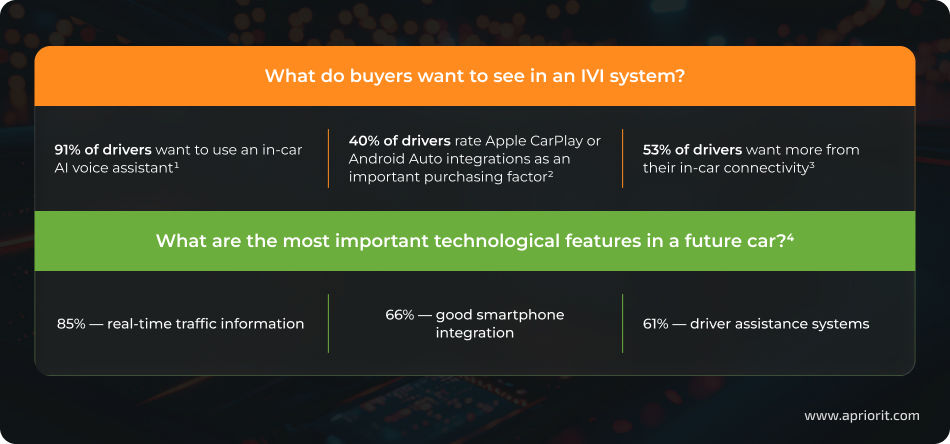
1. The Customer Odyssey: What Car Buyers Really Want in 2026
2. Automotive Infotainment Market To Hit $14 billion By 2030
3. 2025 Gracenote Auto Infotainment Report
4. 2025 AUMOVIO Mobility Report
High customer expectations regarding IVI in new vehicles leave automotive OEMs and suppliers with no choice but to invest in flawless infotainment experiences or lose their customers to another manufacturer.
Those who deliver reliable cars with robust infotainment systems benefit by:
- Attracting more customers
- Improving brand awareness
- Ensuring reliable long-term cybersecurity of vehicles
- Gaining higher (and more consistent) revenue thanks to subscription services
Let’s start investigating infotainment development by reviewing features that customers expect in their vehicles. In the next section, we examine how these features work and which technologies they use.
Build IVI that attracts customers at first sight
Partner with Apriorit to develop a heavily customized IVI system that works smoothly and reliably under any conditions.
Must-have features for in-vehicle infotainment
The goal of a modern IVI system is to keep the driver informed about their trip and the vehicle’s condition while keeping them focused on the road and providing some entertainment. The exact set of features to do these tasks depends on the vehicle’s capabilities and the driver’s preferences.
So what is automotive infotainment in a modern car? Most drivers expect it to have the following features and capabilities:
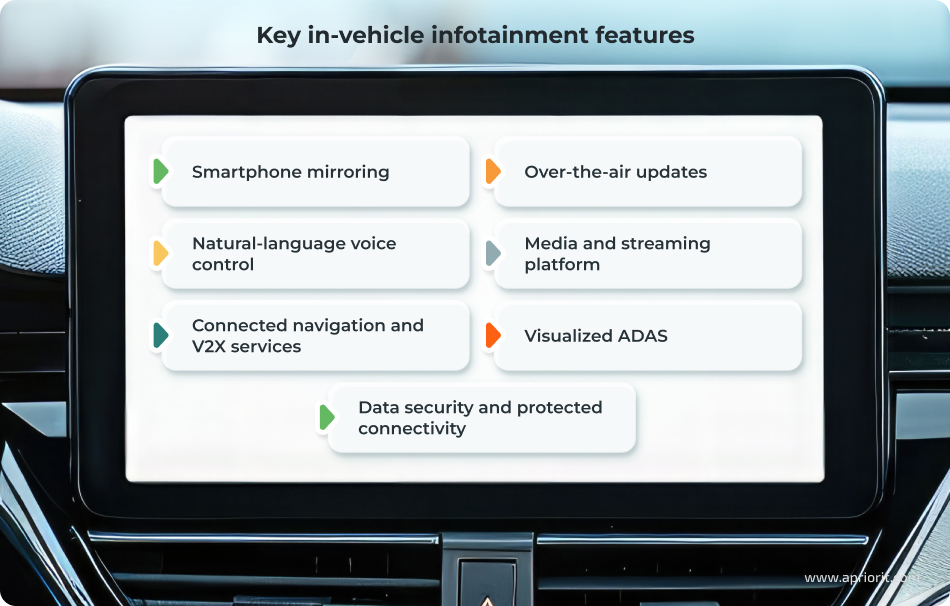
Seamless smartphone mirroring. Mirroring a driver’s mobile ecosystem on the vehicle’s main screen ensures a consistent and familiar user experience across the driver’s devices. Typically, drivers expect a way to seamlessly connect their phone’s navigation, messaging, and media applications to the IVI display.
Adding this feature helps OEMs avoid replicating entire mobile app ecosystems in-house. Instead, they can implement Apple CarPlay and Android Auto, supported by Bluetooth for device pairing and Wi-Fi Direct for high-bandwidth data transfer.
Natural-language voice control. Intuitive, hands-free interaction via a vehicle’s IVI helps reduce driver distraction. Drivers expect a robust voice assistant that helps them with navigation, media, communication, climate control, and other selected vehicle functions.
Traditionally, automotive manufacturers used voice recognition algorithms to implement rigid voice controls for key IVI features. With AI integration, automakers can enable conversational commands rather than set voice prompts.
IVI voice assistants are usually based on Alexa Auto, ChatGPT, or OEM-specific solutions, combined with in-car microphones and advanced noise and echo suppression.
Real-time connected navigation and vehicle-to-everything (V2X) services. Traditional navigation will help your customers get from point A to point B. Connecting your vehicle with other road elements and users enhances this experience with live traffic conditions, dynamic rerouting, charging and fueling availability, toll road integration, and more. These features ensure shorter travel times, better route predictability, and higher confidence in unfamiliar environments.
Such connectivity relies on a cloud-connected navigation stack, telematics modems with 4G/5G connectivity, GNSS positioning, map and traffic data APIs, and data inputs from onboard cameras and sensors. This data can be processed in the cloud or on board and displayed for the driver on the main IVI screen.
Over-the-air (OTA) software and content updates. OTA updates allow OEMs to remotely deliver new software versions, functionality, and content. With OTA updates, drivers can enjoy the latest IVI experience without visiting the dealership or upgrading their mobile device.
Secure OTA updates require a platform with backend orchestration, in-vehicle update clients, cryptographically signed packages, and reliable connectivity.
Built-in media and streaming platform. In-vehicle infotainment systems typically offer direct access to music, podcasts, audiobooks, and some video content through native and third-party applications. Paired with seamless smartphone integration, IVI media streaming keeps the driver entertained and reduces phone distractions.
Typically, OEMs don’t develop a completely custom media platform, instead choosing a container environment such as Android Automotive, DRM-enabled streaming clients, and AI analytics to support content personalization.
Visualized advanced driver assistance systems (ADAS). ADAS provides drivers with alerts on vehicle condition, range estimates, charging status, and vehicle health indicators. Displaying this information on the digital cockpit interface or head-up display improves drivers’ situational awareness and road safety. Simple and informative visualization also reduces distraction, as drivers don’t have to switch between menus and press multiple buttons to get information.
ADAS visualizations are based on deep integration with vehicle networks, domain controllers, real-time data buses, and coordinated HMI design across clusters and center displays.
Data security and protected connectivity. IVI systems collect sensitive information about the driver, passengers, and the vehicle itself. This information includes payment data, credentials for connected accounts, vehicle condition, preferred driving style and routes, etc. Securely storing and processing this information helps OEMs comply with cybersecurity and automotive requirements. Basic safeguards for IVI security include end-to-end encrypted communication channels, secure authentication and key management, secure boot, and continuous monitoring of network traffic.
These features are tightly connected to the hardware that powers IVI. In the next section, we overview key components and their role in keeping the driver informed and focused on the road.
Related project
Auditing the Security of a Connected Vehicle Communication System
See how a comprehensive security audit by the Apriorit team, an SBOM, and a security assessment report helped our client enhance the resilience of a vehicle communication system.

Key components of an IVI system
IVI capabilities heavily depend on vehicle hardware, both in terms of the features you can implement and the quality of user interactions. Modern vehicles that prioritize automation and visualization typically include the following IVI elements:
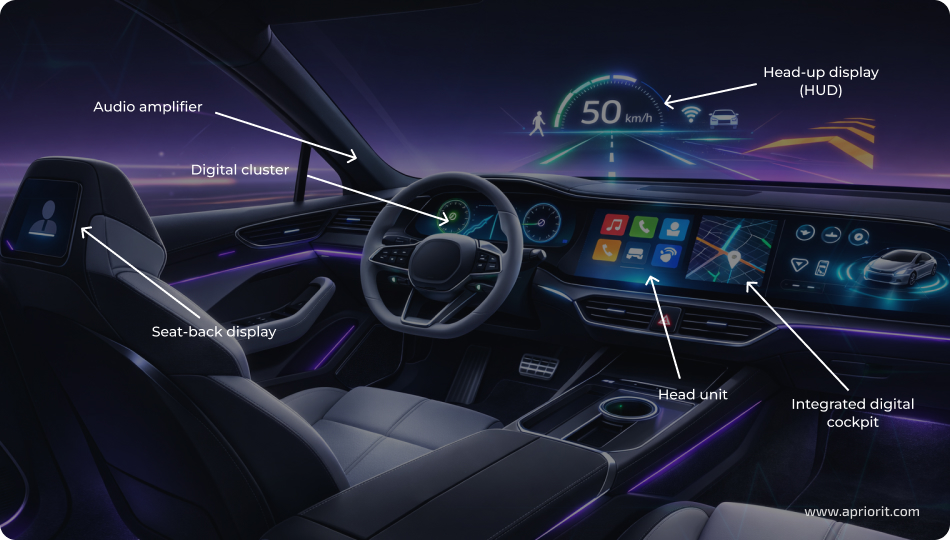
- Audio amplifier — manages in-vehicle music and enables consistent audio quality for navigation prompts, media playback, voice assistants, and alerts. It often supports tuning profiles, surround processing, and dynamic volume control.
- Head-up display (HUD) — projects critical IVI information like vehicle speed and navigation cues onto the windshield in the driver’s line of sight. Its role is to assist the driver and minimize road distraction.
- Digital cluster — a digital alternative to a traditional dashboard that displays driving-related data like speed, range, warnings, and selected infotainment elements.
- Steering-mounted controls provide tactile access to IVI functions like volume, track selection, voice activation, and call handling. Their role is to enable fast, low-latency interaction with infotainment features without diverting attention from the road.
- Seat-back display — extends IVI capabilities to rear passengers and delivers independent media, streaming, and control interfaces.
- Head unit — acts as the core computing and integration hub of the IVI system. It runs infotainment software, manages connectivity, hosts applications, and connects with vehicle networks and devices.
- Integrated digital cockpit — unifies the head unit, digital cluster, HUD, and auxiliary displays into a coordinated user experience.
Together, these elements create a seamless and interactive user experience for the driver and passengers.
Data exchange between IVI elements and other in-car devices and ECUs is constant and involves sensitive data that has to be processed securely and in real time. It is also heavily regulated by automotive laws, standards, and regulations. We examine key requirements in the next section.
Read also
Automotive Functional Safety: Ensuring ISO 26262 Compliance
Explore how ISO 26262 shapes automotive software and system development. We overview practical approaches to functional safety that help teams reduce hazards and ensure compliance.

Regulatory requirements for in-car infotainment
Customers aren’t the only ones shaping IVI requirements. In recent years, automotive and government regulators have been catching up with new technologies and market advances by issuing standards and regulations that govern many aspects of automotive development, including IVI.
Here are the key requirements an IVI system has to comply with:
Table 1. Requirements and standards for IVI development
| Criteria | Key requirements | Required by |
|---|---|---|
| Cybersecurity | – Secure vehicle lifecycle management – Secure E/E architecture for IVI that includes threat and risk assessment, intrusion detection, incident response processes, and protection of in-vehicle and external interfaces | – UNECE R155 – ISO/SAE 21434 |
| Data privacy | – Transparent data processing – Data minimization and in‑vehicle consent and user rights controls – Secure storage and transfer of personal data | – GDPR – CCPA/CPRA – EU DPA guidance |
| Functional safety | – Hazard analysis and risk assessment – Safety goals and ASIL classification – Fault detection and mitigation – Fail-safe and fail-operational behavior for safety-related functions | – ISO 26262 |
| Driver and passenger authentication | – Reliable user authentication mechanisms aligned with threat models – Protection against unauthorized accessIdentity and access management for vehicle functions and data – Secure credential storage | – UNECE R155 – ISO/SAE 21434 |
| Driver monitoring and distraction warnings | – Detection of driver attention and drowsiness – Visual and acoustic warnings and alerts – Integration with HMI and ADAS – Secure storage of driver biometric data | – EU GSR2 – Euro NCAP |
| Accessibility of digital interfaces | – Inclusive IVI interface design – Support for users with visual, auditory, or motor impairments – Consistent interaction patterns across IVI systems | – European Accessibility Act 2019/882 |
As automotive regulations and standards keep changing, it’s important to monitor emerging projects and statements from regulatory bodies. Implementing their requirements at the early development stages helps avoid costly last-minute rework.
Developing an in-vehicle infotainment system is more like building a LEGO set than creating a completely unique solution from the ground up. An IVI system’s success with customers depends on the building blocks you choose and how well they are connected. In the next section, we take a look at key steps for customizing IVI.
Read also
AI in the Automotive Industry: 7 Key Applications for a Competitive Advantage
See how AI is reshaping the automotive landscape, from advanced driver assistance to predictive maintenance and smarter vehicles.
Development steps for customizing an IVI system
Only major automotive manufacturers like Tesla and BMW can afford to build a completely custom IVI system for their vehicles, usually as part of a custom automotive OS. Most OEMs and IVI providers choose to build their systems on open-source platforms, mainly Android Automotive OS or Automotive Grade Linux.
Customization is a more realistic approach than development from scratch for most companies, as it saves time, development resources, and money while still resulting in a reliable product. Let’s see which steps can help your team build a recognizable product with an open-source platform as its foundation.
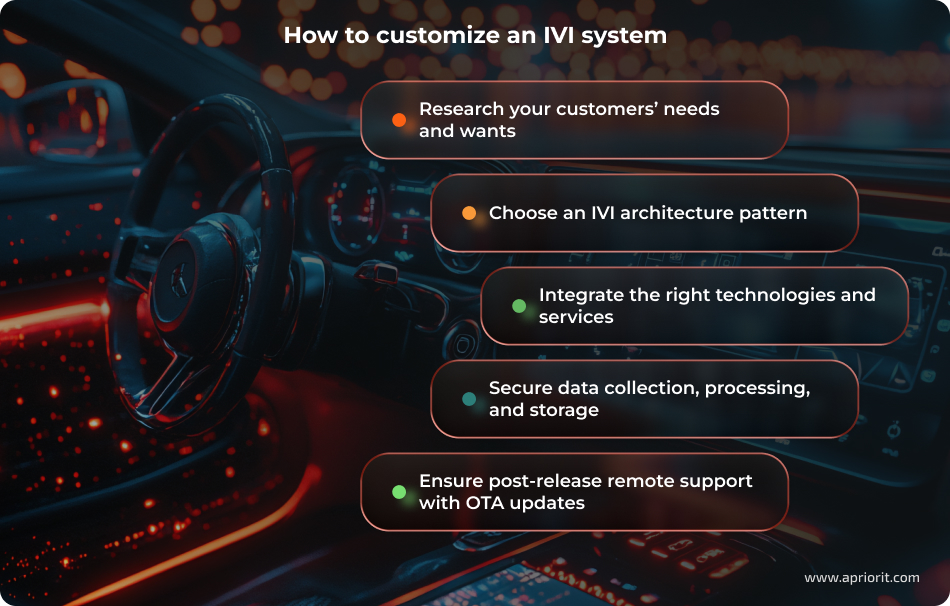
1. Research your customers’ needs and wants
Different generations of drivers expect different features in their vehicles. Millennials and Gen Z look for in-vehicle infotainment innovations like AI and connectivity with the entertainment services they use, while Gen X and boomers prefer analog controls and features for car monitoring. Customers’ expectations of a vehicle also differ based on their budget, lifestyle, location, and other factors.
Customer preferences influence the level of customization an IVI system requires, must-have integrations, and even its architecture. There are several ways to discover what your potential buyers are looking for:
- Analyze the UX, feature sets, and reviews of competitors’ IVI systems to see where users complain about complexity, lag, or missing integrations.
- Run short online and in‑dealer surveys to quantify must‑have features like smartphone mirroring, AI voice assistance, and personalization.
- Observe real-world use via anonymized telemetry from existing vehicles to learn which screens, apps, and controls are actually used and which are ignored.
Using this feedback when designing IVI requirements and architecture will help your team build a competitive product and avoid major rework and redesign at late stages of development.
2. Choose the IVI architecture pattern
The architecture of your IVI depends on hardware limitations, features and capabilities required by customers, and regulatory constraints. Key patterns for IVI architecture include:
- Monolithic. A classic layered architecture that isolates UI, application logic, middleware, and hardware abstraction into tiers. This type of architecture is simple and easy to integrate with embedded Linux or QNX, but it scales poorly as features multiply. Adding new features to a monolithic IVI requires changes in many layers of the solution.
- OS-centric. Platforms like Android Automotive or QNX provide a full OS and middleware stack with built-in services for UI, multimedia, connectivity, and app frameworks. Heavily relying on the OS architecture speeds up IVI development but may limit your team’s options for customization.
- Virtualization and partition. Virtualized IVI architectures use a hypervisor to run multiple operating systems on the same hardware while keeping them strictly isolated. A common setup is Android Automotive for infotainment and UX, running alongside a real-time OS such as QNX that handles time-critical or safety-related functions. This division helps to improve IVI safety and security, as well as contain faults or breaches to a single domain.
- Service-oriented (microservices). Creating a service-oriented architecture means structuring the system around independent services with well-defined interfaces, typically communicating over automotive middleware such as SOME/IP or DDS. This architecture facilitates frequent IVI changes and scaling but requires development discipline and a lot of maintenance effort.
“Most production IVI systems combine patterns. A hybrid architecture can pair, for example, virtualization for domain isolation, an OS-centric platform for core IVI functionality, and service-oriented elements for extensibility and OTA updates.
However, such combinations add architectural complexity and higher demands on system integration maturity. Hybrid architectures are the default choice for modern, software-defined cockpits but are excessive for entry-level or single-function IVI units.”
Lidiia Mandrovna,
VP of Innovation and Technology, Canada Branch Director
3. Integrate and personalize the right services
At minimum, an IVI platform combines navigation and location services, media and app streaming, hands-free voice control, telephony, and cloud connectivity. Advanced IVI systems also provide electric vehicle (EV) routing and charging services, driver monitoring inputs, and remote vehicle control via companion mobile apps.
Developing all of these services in-house takes too long and is expensive; instead, you can integrate secure services that your audience already uses. For example, you can use Google Maps, Apple Maps, or Waze for your navigation stack; Apple Pay and Android Pay for in-car payments; Gemini or OpenAI for AI voice assistance; and so on.
Personalization options for integrated services help customers adjust their vehicles to their needs. Key personalization parameters should include driver profiles that store preferences for UI layout, media, navigation, and climate controls and synchronize those preferences across vehicles and devices.
4. Secure data collection, processing, and storage
Personalized, highly connected services collect lots of personal data about the driver and passengers: driving style, typical destinations, credentials for entertainment services, payment details. That’s why securing vehicle communications is a must, both to protect customers and to comply with the legal and regulatory requirements discussed above.
To secure infotainment development, make sure to enhance IVI with end-to-end encryption, an access management system built on zero-trust principles, intrusion detection systems, a firewall, and secure boot. You can use AUTOSAR and Automotive SPICE standards as guidelines for ensuring vehicle security.
5. Ensure post-release remote support with OTA updates
Providing reliable support throughout vehicle’s lifespan using traditional means — vehicle recalls, dealership visits, and in-shop repairs — is too costly and often impossible, especially considering modern vehicles’ complexity and dependence on technology.
Supporting over-the-air (OTA) updates becomes a must for all vehicle systems, including the infotainment system. OTA updates allow OEMs to remotely update apps, system software, navigation maps, connectivity modules, and even calibration data for sensors or HMI elements.
However, OTA mechanisms can introduce security and reliability risks. To make OTA updates secure, all packages should be digitally signed and encrypted, with authentication enforced before installation. Make sure to use secure transport protocols for update channels and validate each update for integrity and compatibility to prevent bricking the system. Rollback mechanisms and staging environments are also important to safely recover from failures.
Building an IVI platform that is competitive, efficient, flexible, and secure is challenging even for experienced development teams. In the next section, we take a look at several issues your team may face and offer practical solutions.
Read also
10 Best Companies for Automotive Software Development
Find out which automotive software companies stand out and learn what factors matter most when selecting a partner for complex vehicle software projects.

Challenges of IVI development and customization
How you balance IVI requirements, must-have options, market trends, and user wants can make or break a vehicle’s success. Here are some of the choices your team can encounter:
Table 2. Challenges and solutions of IVI development
| Challenge | Solution |
|---|---|
| Balance UI attractiveness, functionality, and compliance | – Design for regulatory constraints and accessibility guidelines – Ensure close collaboration between design, engineering, safety, and legal teams – Conduct usability testing in in real-world conditions – Create reusable design systems to ensure future IVI scalability |
| Minimize driver distractions | – Develop adaptive interaction models – Provide voice and analog controls for key driving features and full app views with glanceable summaries – Define and validate quantitative UX safety targets – Implement passenger detection features |
| Control IVI energy consumption | – Define the IVI power budget earlyImplement aggressive power-state management – Provide display power optimization options |
| Choose between third-party components and custom development | – Retain control over critical and brand-defining IVI layers – Source common third-party components that are reliable and familiar to customers – Define a clear API integration strategy for strategic third parties – Document boundaries between own software and third-party code |
Balance UI attractiveness, functionality, and compliance
From a functional perspective, an IVI UI requires a disciplined information hierarchy, consistent interaction patterns, and predictable behavior across screens and vehicle states. Visual elements such as animations, typography, and color schemes must enhance clarity, not distract from it. Dark mode, adaptive contrast, and scalable layouts are no longer optional, especially across varying lighting conditions and screen sizes.
Emerging standards also limit the use of touchscreens: starting in 2026, OEMs must add physical controls for key vehicle functions to achieve a 5-star Euro NCAP safety rating. These measures are called for to reduce driver distractions across multiple screens and menus. Regional accessibility regulations also define interaction time, text readability, and feature availability while driving.
Designing for compliance only often leads to compromises or redesigns. To deliver a functional and compliant IVI UI, Apriorit recommends the following:
- Embed regulatory constraints and accessibility guidelines into the design system from the start
- Ensure close collaboration between design, engineering, safety, and legal teams
- Conduct usability testing in real-world contexts
- Create reusable design systems to ensure future IVI scalability
Minimize driver distractions
Driver distraction is a system-level problem created by the combination of media content, interaction design, and context awareness. Providing uncontrolled information and entertainment features can lead to road accidents. However, simply removing features is not viable, as users expect seamless access to navigation, media, messaging, and cloud services.
Here’s how you can balance delivering content with safeguarding driver attention:
- Develop adaptive interaction models that change based on driving context: adjust available functionality depending on speed, ADAS state, and driver attention signals.
- Provide voice and analog controls for key driving features and full app views with glanceable summaries.
- Define (and validate through testing) quantitative UX safety targets like maximum glance duration, number of interaction steps, and screen density.
- Implement passenger detection features to differentiate interaction modes without compromising safety.
Control IVI energy consumption
Modern IVI systems rely on large displays, powerful GPUs, continuous connectivity, and always-on background services such as voice assistants, navigation, and cloud sync. All of these features require a lot of energy, even when running in the background. At the same time, IVI energy consumption is often underestimated until late validation phases, especially in EVs.
When using Android Automotive or a similar platform for IVI development, some teams rely on built-in power management and platform-level policies. However, they are often insufficient for automotive usage patterns, especially when a development team adds custom features and services to the platform.
“Lack of power management practices at early stages of IVI development can be very costly for OEMs. Energy efficiency problems usually surface during vehicle-level testing, when real displays and thermal constraints are finally in place. At that point, it’s too late to redesign the whole system and your team is forced into reactive optimizations, which rarely provide optimal long-term results.
That’s why Apriorit prefers taking more time gathering and eliciting product requirements. These steps save our clients and us a lot of time and money at the late project stages.”
Lidiia Mandrovna,
VP of Innovation and Technology, Canada Branch Director
Since limiting IVI capabilities is not an option, your team has to find a way to manage power consumption while providing robust infotainment. Here are some steps to design an IVI system with energy efficiency in mind:
- Define power budgets for different elements of the vehicle early, and strictly enforce them across all software development cycles.
- Implement power-state management that includes aggressive suspension of inactive apps, adaptive rendering complexity, and throttling of background services such as navigation, media indexing, and cloud sync.
- Provide display power optimization options like brightness control, local dimming, and refresh-rate scaling.
Choose between third-party components and custom development
Large automotive OEMs strive for full in-house software ownership, as it offers maximum control over UX, data, compliance, and cybersecurity. However, it also requires significant development investments and organizational maturity. On the other hand, third-party-focused systems accelerate launch but create dependency risks and customization limits. When issues arise, internal teams are dependent on a vendor’s response, which may not align with project deadlines.
At Apriorit, we rely on selective ownership of software:
- Retain control over critical and brand-defining IVI layers like HMI behavior, personalization logic, vehicle-specific services, and data strategy.
- Source common third-party components that are reliable and familiar to customers (OS platforms, navigation engines, voice assistants, app ecosystems).
- Define a clear API integration strategy for strategic third parties.
- Document boundaries between own software and third-party code so that the team knows whether they should modify third-party components, work around limitations, or wait for vendor fixes.
As you can see, dealing with IVI development challenges requires a diverse development team skilled in project management, cybersecurity, integration, hardware–software interactions, and more. Many OEMs and automotive suppliers don’t need so many development experts full time, so they prefer outsourcing their development projects to automotive infotainment development companies like Apriorit and focusing on hardware production.
Let’s see how Apriorit helps build secure and personalized automotive solutions.
Build customized in-car infotainment systems with Apriorit
Apriorit combines extensive expertise in working with automotive companies, embedded and kernel development, OS customization, integration, and other development domains. With a focus on cybersecurity, we build each project based on secure SDLC principles, making sure that all of our code is safe at all stages of development.
When collaborating with us on automotive software development, you’ll get:
- Niche expertise in embedded OS development, Automotive Grade Linux, Android Automotive and QNX customization, and more. The Apriorit team knows how to build a reliable foundation for automotive products.
- Compliance-focused development by a TISAX- and ISO 27001–certified company. We design any solution with applicable standards and requirements in mind to help you demonstrate compliance and get necessary certifications.
- An SBOM for your existing and new automotive software that details components, versions, licences, dependencies, and more. This document helps you streamline your product’s maintenance, improvement, and security.
- Customized AI and ML tools for voice and gesture recognition, driver behavior analysis, natural language conversation, driving safety, and more. Our team will adjust an appropriate AI model to your tasks and needs.
- In-depth security testing by specialists with ISTQB Certified Tester Automotive Software Tester certification. They know how and where to look to ensure the security of your software.
With practical experience in automotive development, the Apriorit team knows how to build a solution that complies with key standards and regulations, performs smoothly, and ensures a reliable and consistent driving experience. Reach out to us for professional automotive HMI software development services and more.
Looking for a reliable automotive development partner?
Leverage Apriorit’s top-of-the-line skills to get a solution customized for your business needs and challenges.
FAQ
How can I ensure that IVI systems stay stable and responsive under load?
<p>Stability and responsiveness depend on controlling resource use, isolating workloads, and designing for peak scenarios from day one. IVI systems experience load spikes during boot, navigation rendering, media playback, phone pairing, and OTA activity.</p>
<p>To handle this, teams should focus on these areas:</p>
<ul class=apriorit-list-markers-green>
<li>Technical measures: enforce CPU, GPU, and memory budgets per feature or domain; prioritize UX-critical processes over background tasks</li>
<li>System-level safeguards: isolate components so failures don’t cascade; test worst-case scenarios on real hardware; make performance profiling part of CI</li>
</ul>
How can you keep an IVI UI modern over vehicle lifecycle?
<p>A modern IVI UI survives long lifecycles only if it is built to change. This means separating visual presentation from business logic and avoiding hard-coded layouts.</p>
<p>Designing systems with reusable components, theming, and layout rules allows OEMs to refresh the look and feel via OTA updates without rewriting applications. Mid-cycle visual refreshes should be planned from the start, not treated as exceptions.</p>
<p>Choosing flexible HMI frameworks and maintaining backward compatibility are critical, as hardware constraints often remain fixed while user expectations evolve rapidly.</p>
What are the top security risks of connected infotainment systems?
<p>Connected IVI systems expand the vehicle’s attack surface. Common risks include:</p>
<ul class=apriorit-list-markers-green>
<li>Vulnerable network interfaces (cellular, Wi-Fi, Bluetooth)</li>
<li>Insecure OTA pipelines</li>
<li>Unvetted third-party apps</li>
<li>Weak separation between infotainment and vehicle control networks</li>
</ul>
<p>Addressing these risks requires secure boot, encrypted and signed updates, strict network segmentation, and continuous vulnerability monitoring. Security must be treated as an ongoing operational responsibility, aligned with UNECE R155 and ISO/SAE 21434.</p>
What standards and laws regulate IVI infotainment development?
<p>IVI systems are regulated across several overlapping domains:</p>
<ul class=apriorit-list-markers-green>
<li>Functional safety: ISO 26262</li>
<li>Cybersecurity: ISO/SAE 21434, UNECE R155</li>
<li>OTA updates: UNECE R156</li>
<li>Data privacy: GDPR (EU), CCPA/CPRA (US)</li>
<li>Driver safety & accessibility: GSR2, regional accessibility acts</li>
</ul>
<p>These laws and regulations influence an IVI system’s architecture, update mechanisms, data storage, and even UI interaction models. Compliance planning must start early, as retrofitting requirements late in development is costly and risky.</p>
How can I improve my IVI system’s connectivity?
<p>Improving connectivity starts by accepting one fact: networks will fail.</p>
<p>Effective IVI systems are designed to degrade gracefully. This includes:</p>
<ul class=apriorit-list-markers-green>
<li>Intelligent switching between cellular, Wi-Fi, and Bluetooth</li>
<li>Local caching of maps, media, and user data</li>
<li>Retry and fallback mechanisms for cloud services</li>
</ul>
<p>Background traffic must be prioritized and state-aware. For example, OTA downloads should run while charging, not while driving. Post-launch telemetry and diagnostics are essential to identify real-world connectivity issues that lab testing cannot replicate.</p>
Have a question?
Ask our expert!

VP of Innovation and Technology, Canada Branch Director



