
 Skip to main content
Key takeaways:
- As malware evasion tactics become more nuanced, catching malware requires a wide range of well-known and niche detection techniques.
- Monitoring low-level system behavior, using multi-layer sandboxes, and integrating YARA rules can help you build an advanced detection tool.
- To develop a sandbox that’s resilient to evasion techniques, you can strengthen your team with a partner that has proven experience in developing cybersecurity solutions.
Sandboxing remains a proven way to detect malware and prevent its execution. However, as the volume of advanced evasive malware attacks grows, demand for anti‑evasion sandbox architectures is also increasing.
In this article, we explore core and emerging evasion techniques and share best practices we use at Apriorit to build reliable sandboxes that are capable of detecting and containing evasive threats.
This article will be useful for сybersecurity product owners, CTOs, technical leads, and developers working on:
- EDR and XDR solutions
- Antivirus products
- Secure email/web gateways
- Sandbox tools
Contents:
What are sandboxes and sandbox-evading malware?
A sandbox is a restricted execution environment that runs untrusted code with minimal system privileges, isolating it from the host and limiting access to critical resources.
Let’s see how a sandbox works schematically:
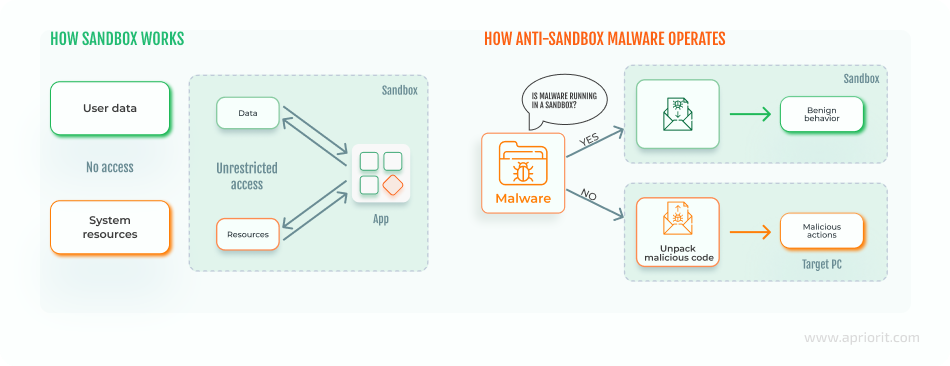
Though sandboxing technology has long been considered effective, cybercriminals are now applying techniques that let malware evade sandbox analysis.
Sandbox-evading malware can recognize if it’s inside a sandbox or virtual machine (VM) environment. Such malware doesn’t execute its malicious code until it’s outside of the controlled environment. To hide threats, malware can use various anti-sandbox techniques, including encryption and AI algorithms.
Real-world examples of sandbox-evading malware
According to the Red Report 2026 [PDF] by Picus Labs, the prevalence of the sandbox evasion techniques grew by up to 20% in 2025. The report also mentions that modern malware not only checks for files but also analyzes human behavior using geometry.
Let’s explore some examples of modern anti-sandbox malware:
- LummaC2 uses trigonometry to calculate the Euclidean distance of mouse movements to verify a human is present. The calculated angle is then converted into degrees and checked against a hardcoded threshold. Small, gradual directional changes between segments indicate smooth, human‑like motion. In contrast, sharp or erratic angle shifts suggest scripted or synthetic input.
- Blitz, discovered in 2024, checks the system configuration to determine whether it’s running in a VM or sandbox. It verifies whether the system has fewer than four CPU cores, checks for low screen resolutions, and looks for known sandbox drivers or registry keys tied to virtualization tools. If any of these indicators show the malware is running inside a sandbox or virtual environment, it immediately aborts execution to evade detection and analysis.
- GootLoader relies on several advanced sandbox evasion techniques — primarily time-based delays and anti-analysis checks. By inserting long sleep intervals early in its execution chain, the malware exploits the short runtime of automated analysis environments, activating its payload only after the sandbox has timed out. These delayed execution tactics significantly reduce the likelihood of detection in resource-constrained or tightly timeboxed analysis setups.
New types of evading malware are created and discovered daily. You can’t prepare for all of them, but you can use techniques and behavioral patterns that work for most. Let’s look closer at how these techniques work to hide malware from cybersecurity solutions.
Need expert support for advanced sandbox solutions?
Work with Apriorit specialists to build resilient and effective sandboxes tailored to the threats you face.
Sandbox evasion techniques: from core to AI-based
Sandbox evasion techniques differ depending on:
- What system characteristics they detect
- When they activate
- How sophisticated their logic is
- How stealthy their behavior appears to security tools
- What specific virtualization layer they target
Let’s break down malware sandbox evasion techniques into the following categories:
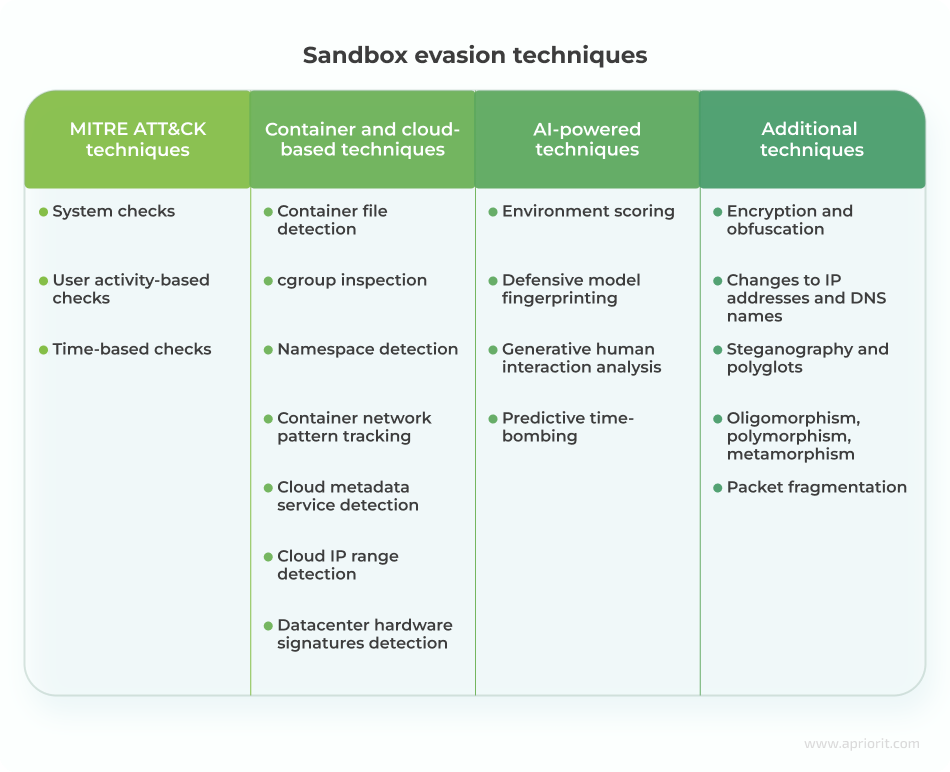
System check techniques
System checks are programmed to identify some features of a real system that aren’t available in a sandbox or virtual environment.
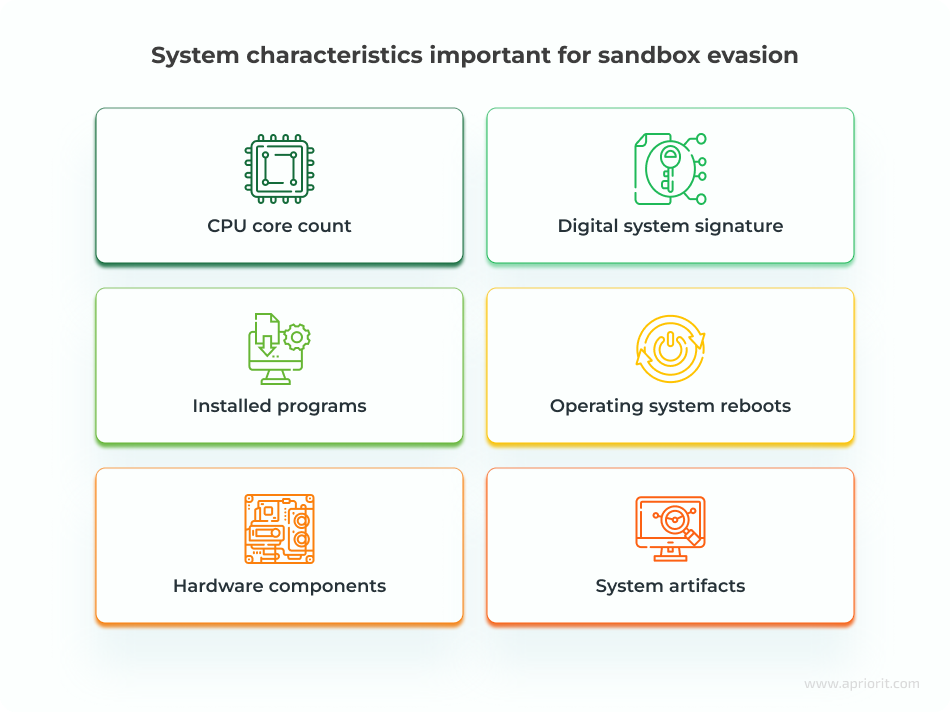
Here’s how malware can use system information to get out of a sandbox:
- СPU core count and hardware components. Malware can find discrepancies between virtual and physical systems, such as the number of CPU cores, and use them for sandbox detection. This is why many sandbox vendors hide their actual configurations so hackers are unable to detect sandbox specifications.
- Digital system signature. Some malware is designed to find a system’s digital signature, which contains information about the computer’s configuration.
- Installed programs. This technique allows malware to check for the presence of antivirus programs by looking for active processes in the operating system.
- Operating system reboots. Some sandboxes can’t survive operating system reboots, so malware can be programmed to activate only after a reboot. Though the virtual environment may try to emulate a reboot by logging the user in and out, malware can detect this, as not all reboot triggers are executed.
- System artifacts. A VM contains specific artifacts in its memory, processes, and files. Malware can look for artifacts like VM instructions and communication with I/O ports to detect whether it’s launched inside a sandbox.
User activity-based check techniques
This type of check relies on the fact that users can interact with computers in different ways, but there are no human-like interactions in the sandbox environment. Thus, hackers can teach malware to wait for a specific user action and exhibit malicious behavior only afterward. Here are some examples of sandbox detection techniques that rely on user actions:
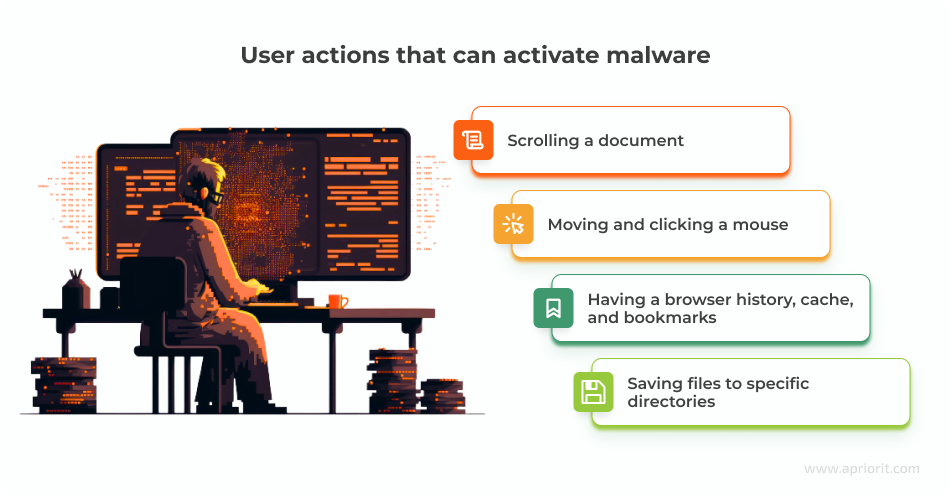
- Scrolling a document. Modern malware can be programmed to execute only after a user reaches a particular place in a document. Malware written in Microsoft Word documents may contain special paragraph codes to detect scrolling. The sandbox environment doesn’t assume any scroll movements, allowing the malware to stay dormant.
- Moving and clicking a mouse. Some malware is programmed to check the speed of mouse movements and clicks and remain inactive if the speed is suspiciously fast, it doesn’t detect enough mouse clicks, or the user doesn’t take a particular action.
- Having a browser history, cache, and bookmarks. A real user who surfs the internet daily will have their history and cache saved on their machine. A sandbox will have none of that because it regularly cleans the browsing cache to delete potential malware and ensure the correct operation of the sandbox. Malware can check whether a system has such information and lay dormant if it doesn’t find anything.
- Saving files to specific directories. Malware can check whether a system allows for saving custom files to the desktop and the root folder. It’s not recommended to save your files in these directories, so a sandbox wouldn’t do that. But the majority of real users save their files to the desktop and root despite system recommendations.
Time-based check techniques
In some cases, malware evades the sandbox using timing-based checks. Sandboxes usually analyze malware for a limited period of time, and timing-based techniques gladly abuse this feature.
Here are three common types of time-based sandbox detection methods:
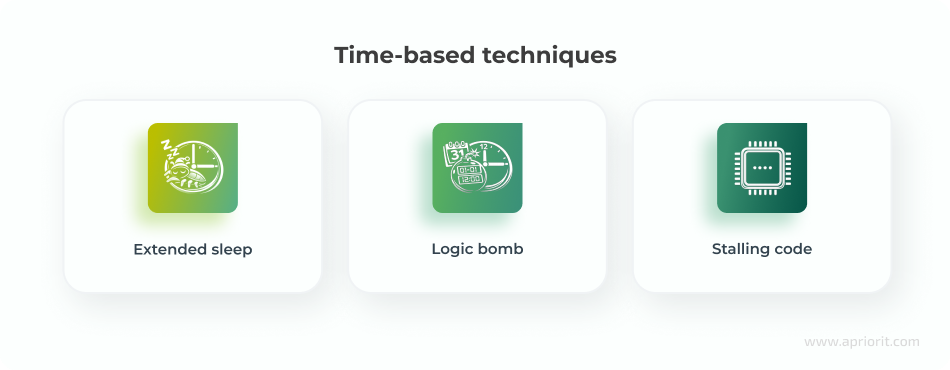
- Extended sleep. When malware uses extended sleep, it can successfully leave the sandbox before execution.
- Logic bomb. In some cases, malware can be programmed to execute on a particular date and at a particular time.
- Stalling code. Malware can contain code that executes useless CPU cycles to delay malicious code execution until the sandbox has finished testing.
Container and cloud-based sandbox evasion techniques
Sandbox evasion techniques vary for container and cloud environments, as malware looks for different artifacts and behaviors depending on the virtualization layer.
Techniques for container-based sandboxes:
- Container file detection. Malware checks for container-specific files, such as
/.dockerenvor/.containerenv. - cgroup inspection. Since containers use Linux control groups, malware can check for control group indicators like
docker,kubepods, andcontainerd. - Namespace detection. Malware can detect Linux namespace isolation.
- Container network pattern tracking. Malware can track for predictable IP ranges, such as 172.17.x.x for Docker.
Techniques for cloud-based sandboxes:
- Cloud metadata service detection. Most cloud providers expose metadata endpoints (such as 169.254.169.254), which can be detected by malware.
- Cloud IP range detection. Malware checks if the public IP belongs to known cloud provider ranges.
- Datacenter hardware signature detection. Cloud systems often show server-grade CPUs, virtual disks, and generic hostnames.
AI-powered sandbox evasion techniques
Advanced threat actors experiment with AI‑driven, environment‑aware malware that identifies signs of sandboxing, imitates human behavior, and adapts its evasion tactics in real time. Such malware can also stay dormant whenever it detects an artificial analysis environment. Among these emerging techniques are:
- Environment scoring. Malware collects a wide range of subtle environmental indicators, such as CPU core count, system uptime, recent file activity, and mouse movement patterns, and feeds them into a machine learning (ML) model. The ML model analyzes these signals to generate a suspicion score and estimate the likelihood that the malware is running inside a controlled or artificial environment.
- Defensive model fingerprinting. This involves probing the host system to elicit responses from defensive tools. An AI model can recognize subtle artifacts of an EDR or sandbox monitoring process, fingerprinting the defensive software.
- Generative human interaction analysis. Instead of relying on simple mouse move checks, an AI model is trained to recognize the irregular dynamics of real user behavior (such as mouse acceleration curves, typing rhythms, and interaction delays). The malware won’t activate until these organic patterns are observed.
- Predictive time-bombing. Malware stays dormant for a specific period before executing. An AI model can choose a delay based on its analysis of the system.
Read also
What Is Data Poisoning in AI? Risks, Examples, and Prevention Tips from Apriorit Experts
Discover how to identify data poisoning attacks early and protect the integrity of your AI-driven decisions.

Additional sandbox evasion mechanisms
When developing malware, malicious actors try to implement as many evasion techniques and mechanisms as possible to ensure the success of their code. Here are key additional mechanisms they use to enhance the techniques discussed above:
- Encryption and obfuscation. Encrypted malware usually contains a decryption loop and a main body. The decryption loop encrypts and decrypts the main body, which contains the malicious code.
- Changes to IP addresses and DNS names. This mechanism helps malware hide phishing and malware delivery addresses. This allows the malware to bypass website blacklists that security solutions create.
- Steganography and polyglots. These types of malware hide malicious code in passive parts of code, like images. It’s possible to place code both in an image’s metadata and within the image itself. This method of evasion is especially useful for browser-based exploits.
- Oligomorphism, polymorphism, metamorphism. Malware can tamper with its decryptors to make it harder for a sandbox to detect malicious code. For example, it can create new decryptors for each infection and type of code (oligomorphism), modify malware code slightly for every new decryptor (polymorphism), or use a mutation engine to modify malicious code depending on the properties of a sandbox (metamorphism).
- Packet fragmentation. Security solutions usually wait for the whole traffic packet to arrive and then analyze it. Malware can take advantage of this packet fragmentation protocol and send malicious code only as part of a packet.
This variety of malware sandbox evasion techniques and mechanisms makes containing malware in a secure environment a tricky task. At Apriorit, we can solve this challenge in several ways depending on the nature of the solution. Let’s take a look at best practices we use to ensure malware containment.
Best practices for mitigating sandbox-evading malware
At Apriorit, we combine a variety of cybersecurity checks and defenses when developing a sandbox. Here are principles you can implement in your security solution to protect it from sandbox-evading malware:
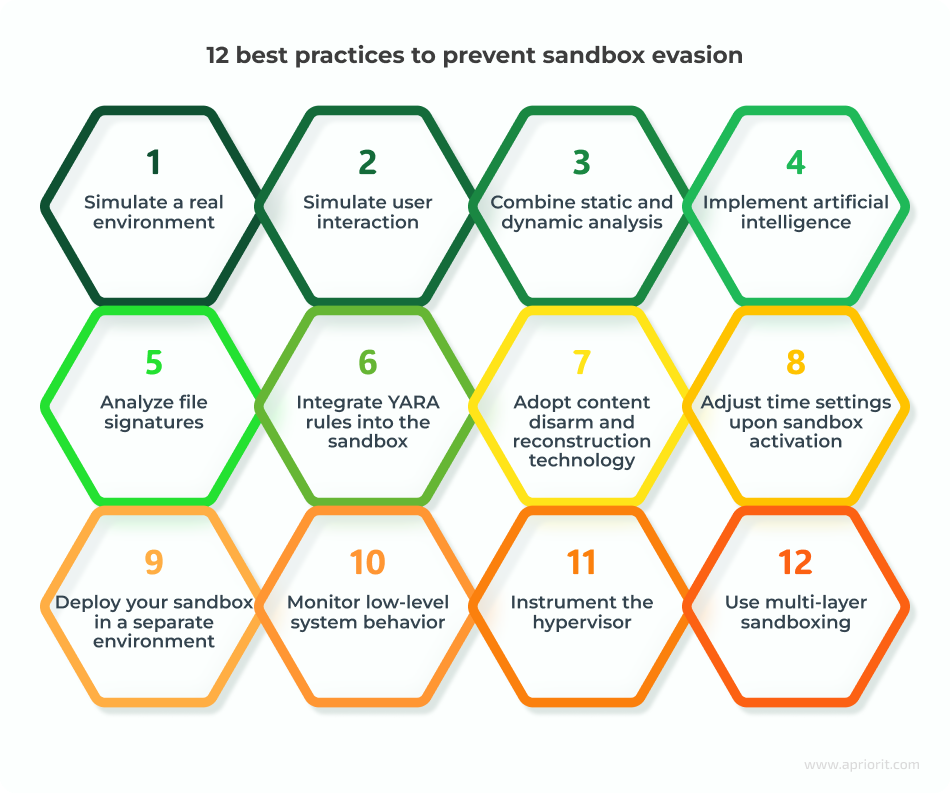
1. Simulate a real environment
A virtual machine operates differently compared to a real environment with real users. Modern malware can pick up differences like infrequent reboots and VM-specific instructions as well as detect fake mouse clicks and movements. Retrieving hardware information in your sandbox will help you detect malware that checks for:
- Hard disk size
- Recent files
- Number of CPU cores
- Operating system version
- Memory capacity
- Other system and hardware characteristics
You can also configure your sandbox to dynamically change the sleep duration and period of malware analysis. While a sandbox usually analyzes malware for seconds, prolonged analysis significantly increases the chances of detecting malware with an increased sleep duration.
2. Simulate user interaction
To make the sandbox environment behave like a normal workstation used by a human and activate malware logic that requires human interaction, you can generate realistic system activity:
- Mouse movements
- Keyboard typing
- Opening applications
- Browsing websites
- Interacting with pop-ups
- Scrolling documents
- Dragging windows
3. Combine static and dynamic analysis
Sandboxing technology is a form of dynamic code analysis, as it examines malware behavior in a safe environment. Knowing this, many malware developers try to evade dynamic analysis by putting their code to sleep or making it take as few actions as possible.
To detect such malware, add static code analysis to your sandbox. Static analysis checks potential malware for evasion techniques or encrypted pieces of code with no regard to file activities. This method is effective for detecting malware with scripts for delayed execution. However, you can’t rely solely on static analysis to stop malware.
4. Implement artificial intelligence
AI algorithms can improve the accuracy of sandboxing and detect more threats before they’re executed. In contrast to traditional rule-based cybersecurity mechanisms, AI can learn to detect zero-day threats, adjust to new evasion techniques, and identify malware based on its early actions.
You can add cybersecurity-focused AI algorithms that:
- Simulate real user behavior to make malware think it’s outside of a sandbox
- Analyze the behavior of potentially malicious files
- Enhance static and dynamic analysis
Read also
How and Why Should You Build a Custom XDR Security Platform?
Explore proven ways to architect an XDR platform that improve threat detection accuracy and accelerate your response.

5. Analyze file signatures
Signature-based detection analyzes the unique digital footprint, or signature, of each piece of software that gets into the system. Each antivirus solution has a built-in database of known malware signatures. If a signature of new software matches a record in this database, the sandbox automatically deletes or quarantines the software.
However, a signature check can’t stop dynamically changing malware. To detect such threats, consider implementing a calculation of the cyclic redundancy check. Checksumming helps verify that files under analysis haven’t changed from the time they entered the system.
6. Integrate YARA rules into the sandbox
YARA-based tools operate using predefined rules that describe specific patterns or behaviors to look for and define when a file, process, or memory region should be flagged as suspicious. These rules can also be crafted to detect sandbox‑evasion logic, helping you identify whether a malicious sample attempted to avoid or manipulate the analysis environment.
Modern malware sandboxes (such as Cuckoo or ANY.RUN) integrate YARA as a pattern-matching layer during analysis. When a sample runs in a sandbox, YARA scans memory, dropped files, processes, and extracted strings. If it finds known patterns, it flags them in the report.
7. Adopt content disarm and reconstruction technology
Content disarm and reconstruction (CDR) is a cybersecurity technology that deletes any suspicious code from files. To determine that code is suspicious, CDR uses system policies and definitions. This technology is often considered the opposite of sandboxing, but it may serve as an add-on to other security solutions.
CDR removes all active content from a file and provides the user with a sanitized document. It allows you to instantly prevent malware hidden in documents, yet there’s a risk that it may corrupt non-malicious files containing scripts (such as Office macros written in JavaScript).
8. Adjust time settings upon sandbox activation
Delaying execution of malicious code is one of the basic evasion tactics for malware. A sandbox isn’t active 24/7, so even the simplest malware can evade security checks by putting itself to sleep for several hours. Because of that, when a sandbox becomes active, it can mistake a malicious file for a safe one.
One way to detect time-evading malware is to change the time configurations of your VM when a sandbox becomes active. This way, you’ll be able to trick malware into waking up and executing its malicious code. Another option is to make time go faster inside the VM and simply wait out the malware’s sleeping period.
9. Deploy your sandbox in a separate environment
Even the most secure sandbox might break at some point and let malware into your environment. To prevent this from happening, deploy your sandbox in an environment separate from your main one. For example, you can use a cloud deployment, remote endpoints with restricted access, or another virtual machine.
10. Monitor low-level system behavior
Low-level monitoring allows you to observe fundamental system operations and suspicious activity below the application layer. Monitored components include:
- Kernel-level system calls
- Memory access and modification
- Hardware interaction
- Process creation and thread activity
- Network packet generation
Low-level monitoring helps identify shellcode execution, runtime unpacking, boot configuration changes, and other activities that are typical of malware.
Modern low‑level monitoring solutions use eBPF (extended Berkeley Packet Filter), a Linux kernel technology that enables safe, high‑performance instrumentation without requiring custom kernel modules. By attaching to system calls, kernel probes, and network events, eBPF helps to detect stealthy activity like abnormal process behavior, suspicious network flows, privilege escalation attempts, and kernel API misuse.
11. Instrument the hypervisor
Instrumenting the hypervisor embeds monitoring and control mechanisms directly into the virtualization layer. Because this logic runs outside the guest operating system, malware can’t detect or disable the monitoring code.
Hypervisor‑level instrumentation also enables direct observation of system activity through hardware virtualization events, providing deeper visibility compared to OS‑level hooks.
12. Use multi-layer sandboxing
Instead of relying on a single monitoring technique or execution environment, you can deploy multiple layers of isolation, observation, and behavioral analysis. This makes it much harder for malware to detect the sandbox environment or bypass monitoring.
Such layers can include:
- Virtual machine isolation that safely executes the suspicious sample
- Hypervisor monitoring to observe the guest VM from outside the operating system
- Kernel-level observation to track kernel activity inside the operating system
- Network analysis to capture DNS requests, HTTP/HTTPS traffic, and data exfiltration attempts
- Behavioral analysis engines to track application-layer behavior
Related project
Custom Cybersecurity Solution Development: From MVP to Support and Maintenance
Explore how we helped a client build a competitive cybersecurity solution tailored to regional and industry-specific markets.

Overview of sandbox tools
To make malware behave as if it’s in a real environment, you need tools that combine advanced sandboxing, hypervisor monitoring, behavioral analysis, and environment simulation. Here are some of the tools we recommend using:
Table 1. Sandbox tools
| Name | Type | Deployment | Key capabilities |
|---|---|---|---|
| Cuckoo Sandbox | Open-source dynamic analysis sandbox | Local/on-premises | – Automated malware execution – Behavior logging – Network traffic simulation – Basic user interaction emulation |
| CAPE | Open-source malware analysis sandbox | Local/on-premises | – Advanced memory forensics – Automated unpacking of evasive samples – Payload extraction – Extended process execution tracing |
| ANY.RUN | Interactive cloud sandbox | SaaS | – Real‑time, analyst‑driven interaction during execution – Customizable system parameters – Wide OS/browser coverage – Strong visual workflow for tracking malware behavior |
| Joe Sandbox | Enterprise-grade malware analysis platform | Cloud/on-premises | – Evasion-resistant environment – Multi‑OS support – Extensive behavioral monitoring – User activity simulation – Strong anti‑VM detection mitigation |
| DRAKVUF | Hypervisor-based analysis framework | Local research environments | – Stealth, VM‑external monitoring using Xen hypervisor introspection – System call tracing – Kernel‑level observation – Minimal footprint inside the guest OS |
To achieve a higher level of protection against modern malware, you can develop a custom sandbox tailored to your specific infrastructure and threat landscape.
Here’s how Apriorit can support you in building customized sandboxes and advanced malware detection solutions.
How to build malware detection solutions with Apriorit
With more than 20 years of experience in the cybersecurity market, Apriorit has delivered numerous custom solutions with advanced sandboxing capabilities. Our security engineering experts build tailored sandboxes using a combination of Python-based frameworks, AI‑powered detection algorithms, reverse engineering expertise, and virtualization techniques.
As part of our cybersecurity engineering services, we can help you with:
- Engineering sandbox environments. Get secure, isolated execution spaces that follow established best practices for sandboxing and threat containment. At Apriorit, we support multiple sandboxing approaches tailored to your project’s architecture, including virtual machine-based sandboxes, bare metal isolated environments, and hypervisor‑level sandbox configurations.
- Reverse engineering of malicious software. To help you mitigate emerging threats and strengthen your product’s protection mechanisms, Apriorit specialists perform in‑depth reverse engineering of malicious software. Our experts analyze malware behavior, identify attack vectors and persistence techniques, and deliver actionable insights to support the development of effective detection and anti‑malware solutions.
- Developing EDR/XDR solutions. Whether you need to implement advanced threat detection and response features across your infrastructure or strengthen protection for your organization’s endpoints, Apriorit specialists will help. We can build custom EDR/XDR solutions from the ground up or enhance your existing security product with robust detection logic, telemetry processing, and automated response capabilities.
At every stage of the development process, we adhere to secure SDLC principles to ensure your solution is maximally protected and meets the relevant compliance requirements.
Want to future-proof your sandbox software against evasive malware?
Engage our engineers to apply advanced anti-evasion techniques that keep your solution robust and secure.
FAQ
What is sandbox evasion in cybersecurity?
Sandbox evasion is a technique used by malware to detect and avoid analysis in isolated testing environments known as sandboxes. Sandboxes isolate suspicious files for dynamic analysis, detonating potential threats without risking production systems. Malware evades by identifying sandbox indicators (like virtual machine artifacts or limited runtime), then halting execution to appear benign.
How does a sandbox detect malware?
Sandboxes typically start with static analysis, scanning files for known signatures, hashes, or anomalies before detonation. Dynamic execution follows in a virtualized or emulated setup, where every action gets logged for review. Key monitoring areas are:
<ul class=apriorit-list-markers-green>
<li>File and registry changes: Tracks creations, modifications, or deletions that signal persistence or data exfiltration</li>
<li>Network activity: Flags unusual connections, C2 communications, or data uploads to attacker servers</li>
<li>Process and system calls: Detects injections, privilege escalations, and API abuse patterns, such as ransomware encryption</li>
<li>Memory patterns: Analyzes dumps for code injection, obfuscation, or anti-analysis attempts</li>
</ul>
How do sandboxes work in antivirus software?
<p>Sandboxes in antivirus software provide dynamic analysis by safely executing suspicious files in isolated virtual environments. This reveals malicious behaviors that signature-based scans might miss, enhancing the detection of unknown or zero-day threats.</p> <p>Antivirus engines first perform static checks like hash lookups and signature matching on incoming files or downloads. Suspicious items flagged by heuristics or cloud prefilters then enter the sandbox for detonation, where behaviors are monitored in real time without risking the host system.</p>
What types of files can a sandbox analyze?
A sandbox can analyze almost any file that can execute, open, or trigger system behavior. Such files include executables, documents, scripts and code files, compressed files, email files, mobile app files, URLs, and memory-based payloads.
What is dynamic malware analysis vs. static malware analysis?
<p>Static malware analysis examines suspicious files without executing them, focusing on code structure, strings, and signatures to quickly identify threats. Dynamic analysis runs the malware in isolated sandboxes to observe live behaviors like network calls or file changes, catching evasive threats that static methods miss.</p> <p>Static analysis suits initial scans in antivirus software for known malware families, while dynamic analysis powers sandbox detonation for unknowns like polymorphic ransomware.</p>
Have a question?
Ask our expert!

VP of Innovation and Technology, Canada Branch Director



