


Memory management is the process of controlling and organizing a computer’s memory by allocating its portions (blocks) to concurrently running programs.
Contents:
Why memory management matters
Memory management helps increase computer performance and efficiency. Every application running on a computer uses up memory, but the memory is not limitless. If too many applications use it inefficiently, this can lead to problems like:
- Crashes and slowdowns — processes that can’t access the memory simply fail, or the system grinds to a halt trying to find space.
- Unpredictable behavior — memory that isn’t tracked or reclaimed correctly gets handed out incorrectly, producing bugs.
- Cross-process corruption — without boundaries between processes, one program can overwrite another program’s data, thus corrupting it.
- No ability to multitask — without memory management, a computer might only be able to safely run one program at a time.
A memory management mechanism keeps track of memory location statuses, sharing this information with the processor while keeping a record of how memory is allocated.
How memory management works
Memory management works on three levels:
- Hardware level. RAM chips and the CPU’s memory caches store the data itself. The memory management unit (MMU), usually built into the processor, handles the low-level work of translating the logical addresses a process uses into the actual physical addresses on the memory hardware.
- Operating system level. The OS allocates and continually reallocates memory blocks to processes as demand shifts and turns to swapping and virtual memory when physical RAM runs short.
- Application level. The program itself manages the memory it’s been given, requesting space for its objects and data structures and releasing that space once it’s no longer needed.
So, the OS decides how much memory a process gets, the MMU handles the low-level address translation, and the application manages what it does with the memory once it it’s available. Each level depends on the one below it, forming a chain from the physical hardware all the way up to the code.
Memory management techniques
Memory management techniques fall into two broad categories, depending on whether a process’s memory must occupy just one block (contiguous allocation), or it can be split across several blocks (non-contiguous allocation).
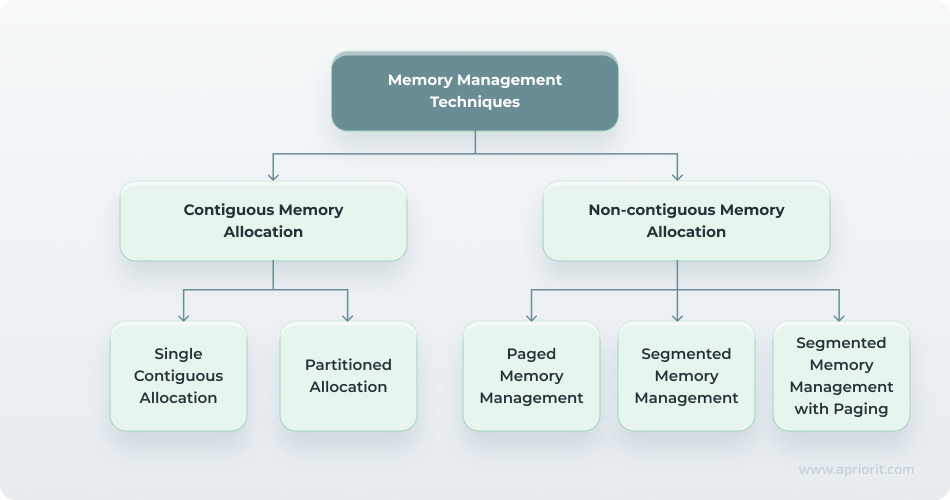
Contiguous memory allocation
In contiguous allocation, a process occupies a single, continuous block of memory addresses.
- Single contiguous allocation. This is the simplest model. Main memory is split into two zones: one for the OS and one for a single user process. It’s easy to implement but it wastes memory, since only one process can run in a block at a time, and any leftover space in it goes unused.
- Partitioned allocation. According to this model, memory is divided into multiple parts, so several processes can be resident at once. Partitions can be fixed-size, or dynamic/variable size. In fixed-size partitions, each process is dropped into a slot of predetermined size. This approach is simple, but prone to internal fragmentation when a process is smaller than its partition. A dynamic/variable-size partition gives every process the exact memory it needs. This utilizes memory better but can lead to external fragmentation as free gaps scatter across memory over time.
Non-contiguous memory allocation
In non-contiguous allocation, a process is broken into smaller pieces that don’t need to sit next to each other in physical memory. Most modern operating systems use this approach.
- Paged memory management divides memory into fixed-size frames and each process into equal-size pages, then maps the two together as needed. Because pages don’t need to be adjacent, paging largely eliminates external fragmentation and is the default technique in virtually every modern OS.
- Segmented memory management divides a process into variable-size logical segments like code, data, stack, and so on. These segments mirror the program’s actual structure. This is more intuitive for programmers, but the variable sizes require more complex fragmentation and bookkeeping than paging does.
- Segmented memory management with paging is a hybrid approach that divides memory into logical segments first, then divides each of those segments into fixed-size pages. This combines segmentation’s programmer-friendly structure with paging’s resistance to external fragmentation. The downside is the extra overhead: first, the program needs to locate the segment, then the page within it, which can lead to latency.
Manual vs. automated vs. ownership-based memory management
How memory gets allocated and freed at the application level comes down to three broad approaches, each with a control-safety trade off.
Manual memory management
Here, the developer explicitly writes the code to allocate and free up memory, as in C and C++. This gives fine-grained control and top-tier performance, but it’s also the root cause of classic bugs like memory leaks, double frees, and use-after-free errors, which can crash a program or create security vulnerabilities.
Automatic (garbage-collected) memory management
The language runtime tracks which objects are still reachable and automatically reclaims memory that’s no longer in use. Languages like Java, Python, Go, and JavaScript work this way. It’s fast to develop and eliminates most manual memory bugs. However, garbage collection runs on its own schedule, which can introduce pauses or overhead that are harder to fine-tune than hand-written allocation code.
Ownership-based memory management
This is a newer, middle-of-the-road approach, best known in Rust. This model enforces memory safety at compile time through a system of ownership and borrowing rules, rather than relying on a garbage collector at runtime. The compiler verifies that memory is freed exactly once and never accessed after it’s gone before the program ever executes, delivering memory safety without garbage-collection overhead. It demands more upfront discipline from the developer, since the compiler rejects any code that violates its ownership rules.
Improving memory management with Apriorit
Getting memory management right, especially in performance-critical, low-level, or safety-critical software, often requires specialized expertise beyond what a typical application team has in-house.
Apriorit works with teams that need to make their software’s memory handling faster, safer, and more reliable, offering:
- Memory safety engineering. We build software with memory-safe patterns and practices from the ground up, reducing the risk of leaks, corruption, and exploitable vulnerabilities before they reach production.
- Kernel and driver memory management. Our engineers handle tight constraints of memory management inside kernel-mode code and device drivers, preventing mistakes that can crash an entire system.
- Memory safety auditing. We review existing codebases to identify unsafe allocation patterns, potential leaks, and use-after-free or double-free risks before they become incidents.
- Custom memory allocator development. Our developers design allocators tailored to your specific workload when general-purpose allocators don’t meet performance or footprint requirements.
- Refactoring and optimization. We restructure how your existing software allocates, uses, and releases memory to reduce waste and improve maintainability.
- Performance optimization. We tune memory usage patterns to cut latency, reduce fragmentation, and get more out of available hardware resources.
- Crash analysis. Our engineers investigate memory-related crashes and instability to trace root causes back to the allocation or deallocation logic responsible.
Eliminate costly memory bottlenecks
Partner with engineers experienced in low-level development and performance optimization, and build faster, more stable and scalable solutions.