
 Skip to main content


Key takeaways:
- SaaS migration is a strategic move that helps companies scale, reduce operational expenses, and stay competitive.
- A successful transition to SaaS requires careful planning across architecture, security, compliance, costs, and customer migration.
- A structured step-by-step approach, supported by experienced SaaS, DevOps, and QA teams, ensures a smooth and secure transition.
With so many products going cloud-first, it’s challenging for developers of on-premises software to keep up with customer expectations. The SaaS model offers efficient scaling, 24/7 availability, and ease of use that on-premises solutions simply cannot compete with. Migrating to the cloud seems like a logical step for many businesses, but this process requires careful planning, from architectural adjustments to cloud deployment.
In this article, we guide you through key considerations when transitioning to SaaS and highlight common challenges along the way. We also outline a practical step-by-step migration plan based on the real-world experience of Apriorit’s development and DevOps teams.
This guide is designed for technical leaders, CTOs, and product owners who are exploring SaaS adoption and want to make informed decisions about architecture, infrastructure, and long-term business impact.
Contents:
Why move to a SaaS business model?
On-premises solutions can meet strict compliance, data sovereignty, and infrastructure control requirements. Still, many organizations find that moving to SaaS unlocks far greater business value. A SaaS model helps companies grow faster, deliver regular product updates, and meet modern customer expectations. For businesses that need agility and want to stay competitive, SaaS is often the smarter choice for long-term success.
For many midsize B2B vendors, staying fully on-premises has become increasingly challenging. The traditional licensing model makes it harder to scale, slows down product updates, and places the burden of infrastructure management on customers. This can create friction in markets that now expect fast, flexible, and always-available software services.
Turn your on-premises product into a scalable SaaS solution
Get expert SaaS migration planning that aligns with your business goals, regulatory requirements, and customer needs.
Benefits of SaaS for your business
Migrating to a SaaS business model helps vendors unlock various benefits compared to their existing delivery model:
- Lower barrier to access. With a SaaS model, end customers no longer need to invest heavily in infrastructure, communication with the software provider, or complex deployment processes. SaaS makes it easier for customers to start using your product with minimal upfront cost.
- Anytime, anywhere access. With SaaS, your product is no longer tied to corporate infrastructure or office networks. This means faster onboarding for new clients, easier adoption across distributed teams, and higher product stickiness. Constant availability helps you expand into new markets, support global customers, and ensure uninterrupted service delivery.
- Built-in scalability and reliability. SaaS providers can design systems with advanced cloud capabilities, such as autoscaling and load balancing. This helps them achieve consistent performance even when customer demand or data volumes grow unexpectedly.
- Continuous updates and security fixes. Instead of waiting for customers to install patches or upgrades, SaaS vendors can roll out updates automatically. This guarantees that users always have access to the latest features and security protections, and also simplifies product maintenance.
SaaS isn’t just about following a trend. It’s about removing barriers for your customers, making your product more resilient, and ensuring your business stays relevant in a cloud-first market.
Let’s see how end users perceive and benefit from SaaS compared to traditional on-premise software.
Table 1. On-premises vs SaaS
| Aspect | On-premises | SaaS |
|---|---|---|
| Infrastructure | Own servers, IT team, heavy upkeep | Responsibility placed on SaaS provider |
| Costs | High up-front | Lower barrier to entry, subscription-based |
| Scalability | Limited by hardware | Cloud-native autoscaling |
| Access | Tied to the office network | Anywhere with an internet connection |
| Updates | Manual installs, delays | Automatic, always up to date |
| Security | Client-dependent, patching burden | Centralized, faster fixes |
| Time to value | Weeks/months to deploy | Ready instantly after configuration |
Now that you understand the benefits of SaaS migration, let’s see if it’s time for you to make the transition.
When should you migrate to SaaS?
Determining the ideal time to transition your product from on-premises to SaaS can be difficult, especially if you are balancing legacy systems with evolving market demands. This simple checklist will help clarify whether it’s the right moment.
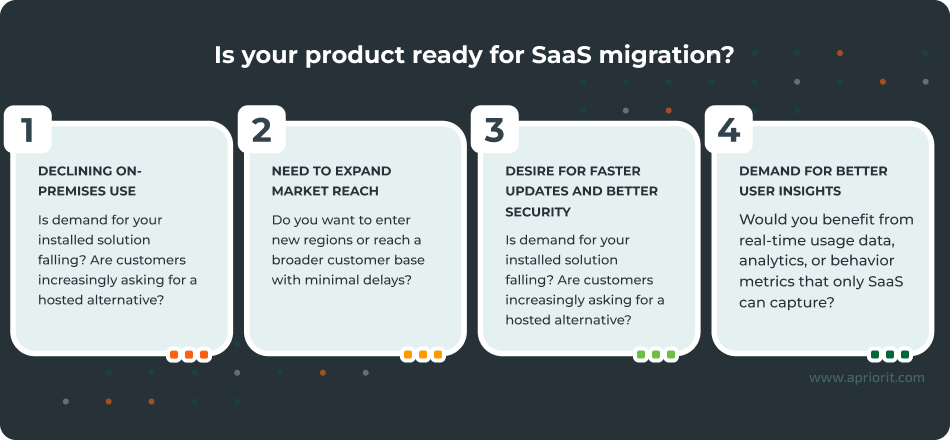
If you said yes to at least one of the statements in the checklist, it’s your sign to start the SaaS transition.
But transitioning to SaaS comes with challenges. Let’s take a look at the most common headaches during SaaS migration.
What makes SaaS migration challenging?
Transitioning from an on-premises product to a SaaS delivery model is a strategic move that requires both technical and organizational transformation.
Many organizations underestimate the complexity of SaaS migration, which leads to delays, budget overruns, or stalled projects. According to the 2025 Revenera Monetization Monitor industry report, 43% of software vendors need one to three years to complete a SaaS cloud migration.
Here are other common SaaS migration challenges and ways you can effectively address them:
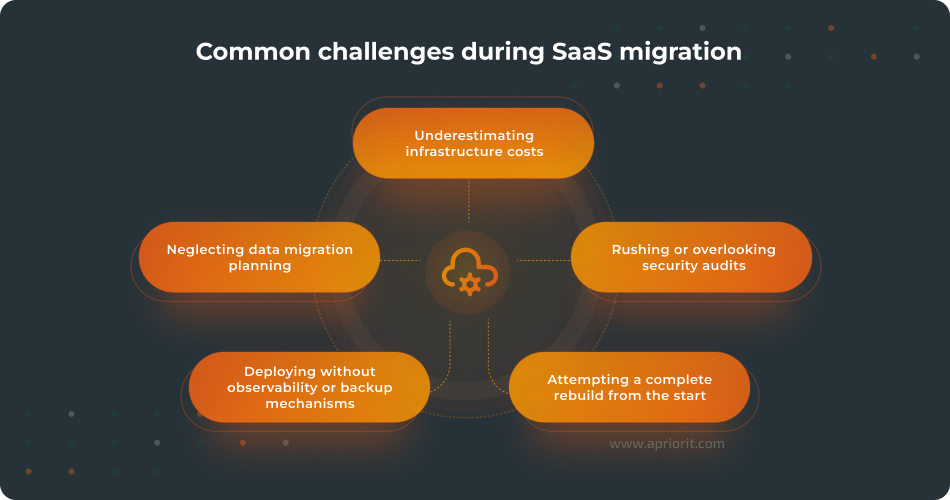
Underestimating infrastructure costs. Cloud services provide flexibility, but expenses can quickly escalate because of poor forecasting and inefficient implementation. For instance, suboptimal code that makes frequent database calls, heavy reliance on AI APIs, or over-provisioned computing power can quickly inflate costs. Many companies only realize this after launch, when expenses far exceed projections.
Rushing or overlooking security audits. For companies transitioning to SaaS, rushing through or postponing security reviews often leads to gaps in data protection or non-compliance with key requirements such as the GDPR, HIPAA, or SOC 2. Unlike infrastructure and computing resources, where the cloud provider handles much of the responsibility, data security and compliance remain a shared responsibility. Skipping thorough audits may lead to breaches, penalties, and reputational damage. A common example is launching without testing authentication flows, only to discover later that customer data was insufficiently protected.
Attempting a complete rebuild from the start. While it may be tempting to re-architect the entire product for SaaS delivery from a technical standpoint, this approach often results in prolonged development cycles and market delays. A phased approach usually delivers more value with less disruption, helping you enter the market earlier and capture the audience first.
Neglecting data migration planning. When moving customers from an on-premise deployment to your SaaS platform, data migration is one of the most complex and risky steps. Poor mapping, cleansing, or validation can result in corrupted or lost records, broken integrations, or duplicated data. A good example is Microsoft’s shift from locally installed Outlook to Outlook for Web: if user emails, contacts, or calendars weren’t migrated accurately, customer trust would collapse immediately. The same applies to any SaaS transition: mishandled data migration undermines adoption and confidence in your product.
Deploying without observability or backup mechanisms. Once deployed, SaaS platforms must perform reliably under changing workloads. Monitoring and observability provide visibility into system health, but can’t prevent outages on their own. That’s why companies also need proper autoscaling, disaster recovery processes, and regular backups. Without these safeguards, even small incidents can quickly escalate into prolonged downtime and data loss.
Now that you are aware of the potential challenges, let’s move from theory to action. In the next section, our experts share how to migrate to SaaS smoothly and successfully.
Related project
Improving a SaaS Cybersecurity Platform with Competitive Features and Quality Maintenance
Explore how our experts helped a client enhance their SaaS cybersecurity platform, boosting system security, scalability, and efficiency while giving a stronger competitive edge.

Step-by-step SaaS migration plan from Apriorit developers
At Apriorit, we have helped numerous software vendors successfully move from on-premises delivery models to SaaS. Based on this experience, we’ve created a practical step-by-step plan that ensures both technical and business readiness while reducing risks during migration.
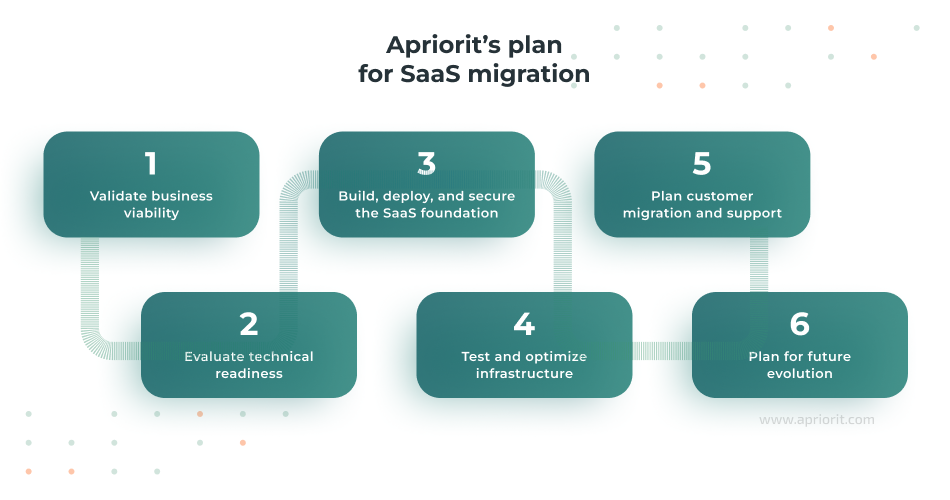
Step 1. Validate business viability
Before touching the codebase or infrastructure, it’s critical to confirm that the SaaS migration strategy makes sense for your business. When validating business viability, you should consider:
- Market competitiveness. This involves analyzing pricing models, customer expectations, and competitors’ offerings to get an understanding of whether SaaS migration will improve your market position and customer appeal.
- Cloud provider capabilities. This could include checking for compliance with data residency requirements, availability in your target regions, and security guarantees. By assessing cloud provider capabilities, you will gain confidence that migration supports both regulatory obligations and business expansion.
- Cost forecasts. You can forecast cloud expenses using calculators by providers such as AWS, Azure, and Google Cloud, factoring in all SaaS-related expenses, not just hosting. As a result of this realistic financial planning, you can be confident in migrating while avoiding budget overruns and supporting long-term profitability.
- Team readiness. This is about analyzing the availability of cloud engineers and DevOps specialists to support migration and long-term operations. By assessing team readiness, you will get an understanding of whether your organization has the capacity to deliver and sustain migration at scale.
Apriorit experts know how to prepare a detailed viability report and suggest options for aligning your SaaS migration process with customer and business needs. For example, in a previous project, we modeled multiple AWS configurations to show how scaling and infrastructure choices impact costs and operational reliability.
Step 2. Evaluate technical readiness
Once you have confirmed the business viability of SaaS migration, the next step is to analyze your system’s current state and define essential changes needed for SaaS delivery. Here is what you should consider:
- Architecture. Assess whether your existing architecture supports the SaaS model. Can it handle high loads, scale with user demand, and quickly recover if one service fails?
Tip from Apriorit experts: While microservices often provide the best scalability and resilience, a service-oriented architecture or even a hybrid architecture may be more practical depending on your product and requirements.
- Tenancy model. Decide whether a single-tenant, multi-tenant, or hybrid approach is right for your customers. In a single-tenant model, each client has a dedicated instance of the application and a separate database. With a multi-tenant model, multiple clients share the same application instance and database, though data can be logically separated. Multi-tenant setups are often used for free or trial subscriptions, while single-tenant deployments may be preferable for paying clients that require strong data isolation.
Tip from Apriorit experts: It’s important to enforce data separation for multi-tenant solutions to make sure that one client cannot access another client’s data and to maintain security and compliance across all tenants. For example, you can add customers to separate schemas within the same database instead of consolidating all clients into a single schema, which raises the risk of data exposure.
- Codebase. Review the application code for SaaS readiness. This typically includes identifying areas that require refactoring, modernizing data protocols, and ensuring APIs are designed for external access.
Tip from Apriorit experts: Implement security measures, such as penetration testing, to confirm that web-facing components and any externally accessible services can safely handle exposure to broader internet traffic.
Ultimately, this stage determines whether your existing system can support SaaS delivery as-is or if it needs more architectural changes before migration can proceed.
Read also
Developing an MVP for SaaS: Technical Insights
Find out how to create a SaaS MVP that balances speed, cost, and scalability while keeping your product vision on track.

Step 3. Build, deploy, and secure the SaaS foundation
At this step, focus on transforming your product into a fully functional SaaS solution by implementing the technical backbone. The goal is not to rewrite everything from scratch but rather to make only those changes necessary for a successful launch. You can introduce further improvements gradually as the SaaS model proves itself. Here’s how to do it:
- Make core changes first. Prioritize only the architectural and code modifications needed to enable SaaS delivery. For example, adjust database schemas to support multi-tenancy, modify APIs for external access, or harden authentication layers. This step also includes adapting critical components such as user management and billing logic, which often require significant redesign for SaaS delivery. Things like UI redesign, advanced analytics features, or optional integrations can be deferred to future releases once the SaaS platform is stable and operational.
- Set up the infrastructure. Configure the cloud environment by selecting regions, setting availability zones, and designing for scalability with auto-scaling and failover strategies. This way, you can achieve consistent performance and resilience under changing workloads.
- Take a security-first approach. Build security into your SaaS foundation from day one. For example, you can implement role-based access control, encrypt data in transit and at rest, and protect cloud infrastructure with traffic filtering, firewalls, and DDoS defenses.
- Establish CI/CD pipelines. Your team needs to establish automated processes for building, testing, and deploying code. CI/CD should also include rollback mechanisms and automated security checks to ensure fast and safe releases.
- Monitor and observe. Introduce tools for real-time visibility into infrastructure and applications. Your team can use dashboards to track system health, performance analytics to monitor latency and errors, and alerts to enable quick incident response and improve performance.
- Implement backups and plan for disaster recovery. Your team needs to define clear recovery objectives, including acceptable data loss and downtime. Based on this, they can implement reliable backup routines and geographic redundancy and test recovery procedures.
These measures will help you minimize early risks and position your product for continuous growth and improvement.
Step 4. Test and optimize infrastructure
Testing in SaaS requires more than functional verification. With the help of rigorous testing, you can account for scale, shared resources, and external exposure.
- Functional and performance testing validates core features under varying loads to ensure responsiveness.
- Security testing can help you assess compliance readiness and avoid costly vulnerabilities.
After you conduct testing, you can perform a cost optimization assessment that will help you see how scaling affects infrastructure expenses. Then you can adjust configurations to balance performance with efficiency.
This stage ensures the SaaS product remains both cost-effective and reliable as usage grows.
Step 5. Plan data migration and product support
Migrating customer data and workloads is often more complex than preparing the SaaS system itself. In most cases, the customer’s own technical team will be responsible for moving their data from the on-premise deployment into your SaaS platform. Your role as the SaaS provider is to guide them by suggesting one of three common migration approaches:
- Bulk transfer, or moving all customer data at once. This is best for smaller datasets or when downtime can be tolerated.
- Phased migration, or moving data in stages within a single customer’s environment. Instead of transferring everything at once, the customer’s team can use your migration solution to split their data into logical groups (for example, by region, department, or workload) and move them step by step. This approach helps reduce risks, makes it easier to monitor system performance, and ensures smoother adoption of the SaaS platform.
- Parallel environments, or running the old on-premises system alongside the new SaaS until all customers are ready to switch. During this period, the customer continues running their on-prem deployment alongside the SaaS version. Data isn’t deleted from the on-prem environment until the customer is confident in the SaaS setup. This safety net is especially valuable for mission-critical workloads, where uninterrupted access is essential during migration.
Here is what you should consider apart from the data migration strategy:
- Migration toolkit. Provide scripts, APIs, or dedicated migration tools to simplify the customer transition.
- Downtime mitigation. You can minimize disruption by scheduling migration during off-peak hours or offering temporary dual access.
- Support structures. Set up customer support and a dedicated SaaS-focused DevOps team to assist clients during migration, monitor infrastructure, and quickly respond to issues.
The customer experience during migration directly impacts trust in your SaaS solution, so this step is just as important as the previous one.
Related project
Developing and Enhancing a Custom SaaS Platform for HR Management
Explore our success story of developing a Microsoft Azure-based SaaS human resource management platform. With our help, our client received an improved SaaS system that resulted in 20% growth in new business.

Step 6. Plan for future evolution
SaaS migration doesn’t end at launch.
- Define a roadmap for future improvements, such as performance tuning, additional automation, and expanded analytics.
- Introduce gradual changes to optimize infrastructure and reduce costs over time.
- Strengthen resilience and security through regular updates, audits, and monitoring improvements.
Thanks to this phased approach, you can launch your SaaS product quickly without sacrificing scalability, security, or customer satisfaction.
Conclusion
Migrating from an on-premises product to a SaaS model is a complex process. If done correctly, it can help you expand your reach, improve scalability, and deliver a better experience to your customers.
However, successful migration requires more than technical adjustments. It also requires a clear strategy for customer onboarding, continuous support, and future evolution. Without a thoughtful approach, businesses risk downtime, security issues, and dissatisfied users.
At Apriorit, we support software companies through every stage of SaaS adoption:
- Our SaaS development teams help you redesign and optimize your product architecture for a SaaS environment.
- Our DevOps experts build secure, scalable infrastructure and CI/CD pipelines to keep your product running smoothly.
- Our QA specialists thoroughly validate performance, security, and the user experience before and after launch.
With Apriorit as your partner, you can confidently apply SaaS migration best practices and transition from on-premises to SaaS with no hassle.
Seamless SaaS migration starts here
Let our development experts handle your product’s architecture, infrastructure, and post-launch optimization.
Have a question?
Ask our expert!

VP of Engineering



