
 Skip to main content


Key takeaways
- As companies grow, payroll becomes increasingly complex due to varying tax regulations, labor laws, and jurisdictional requirements.
- Off-the-shelf payroll software often becomes a liability instead of an asset for large businesses due to lack of flexibility.
- A custom payroll system can reflect your exact workflows, handle multi-country compliance rules, and scale as your business grows.
- Developing secure payroll software requires strong expertise in encryption, access control, audit-ready reporting, and evolving tax and labor compliance.
- Investing in a custom payroll solution allows you to automate processes and have full control over employee data and business logic.
Payroll management should be simple — just calculate hours, pay employees, and stay compliant. But as your business grows, the complexity snowballs: taxes, jurisdictions, strict security requirements.
Off-the-shelf payroll systems often struggle to keep pace with growing needs, especially for large, international, or multi-state organizations. They can also become expensive.
Custom payroll systems offer an alternative. They provide greater flexibility, deep automation, and full control over payroll processes and compliance. A custom payroll system allows an organization to tailor integrations, reporting, and compliance to their exact requirements.
In this article, we discuss how to build a payroll system along with benefits, challenges, and best practices. This article is for business leaders, CTOs, and IT project leaders who are thinking of building custom payroll software for their organization or who want to create a SaaS solution for other businesses in their niche.
Contents:
When off-the-shelf is no longer enough
For many businesses, payroll management starts with a subscription. Off-the-shelf software is quick to set up, easy to manage, and often seems cost-effective. But as the company grows, limitations of ready-made systems become evident.
Suddenly, it’s hard to stitch all the new tools and systems together, requirements grow faster than updates arrive, and subscription costs snowball. At this point, simplicity becomes a limitation.
Common signs that a business has outgrown an off-the-shelf payroll system include:
- Integrations have become overly complex. It’s difficult to connect payroll to existing HR, ERP, time tracking, accounting, and tax filing systems. This limits your ability to automate processes and grow your system.
- You’re having trouble scaling. Off-the-shelf payroll systems often struggle to handle increased employee numbers, multiple locations, or global operations. If they can, doing so often becomes exponentially more expensive as your employee count grows.
- You’re facing data security and compliance risks. In some industries and regions, regulations govern secure data storage and encryption, and labor laws and data privacy laws govern the handling of sensitive employee data. Off-the-shelf payroll systems may lack industry-specific compliance certifications, or they may not allow you to control where and how data is stored.
- You’re having issues with performance and accuracy. Off-the-shelf payroll systems can make mistakes in tax and payroll calculations that can cost your company hundreds of thousands of dollars. Moreover, you can’t update the software yourself to fix those mistakes.
- You’ve hit customization limits. All ready-made payroll systems force you to make compromises in your workflows, reports, and even calculations. This is especially true if your company is in a niche industry that has unique requirements and processes.
- You must operate across various states or countries. Handling different tax rates, benefits, overtime rules, and languages is often challenging for off-the-shelf systems.
- You’re experiencing the pains of vendor lock-in. With a ready-made payroll system, your business depends on a third party. Operational bottlenecks, combined with the risk of payroll delays and losing accumulated data if you ever switch, are strong indicators that it’s time to consider a custom payroll system built for your unique processes.
Overall, while off-the-shelf solutions are great for kick-starting your payroll processes, they can become a liability down the road with the growth of your business, internal systems, employee count, and tax and compliance obligations.
Let’s discuss how custom solutions can help you overcome these limitations.
Need to develop an error-free payroll system?
Reach out to our development experts and build a scalable, reliable payroll solution that will boost your business operations instead of limiting them.
Why go custom?
Custom payroll management software opens dozens of new possibilities for businesses that have grown out of ready-made systems. Here are the main benefits that make going custom a good choice:
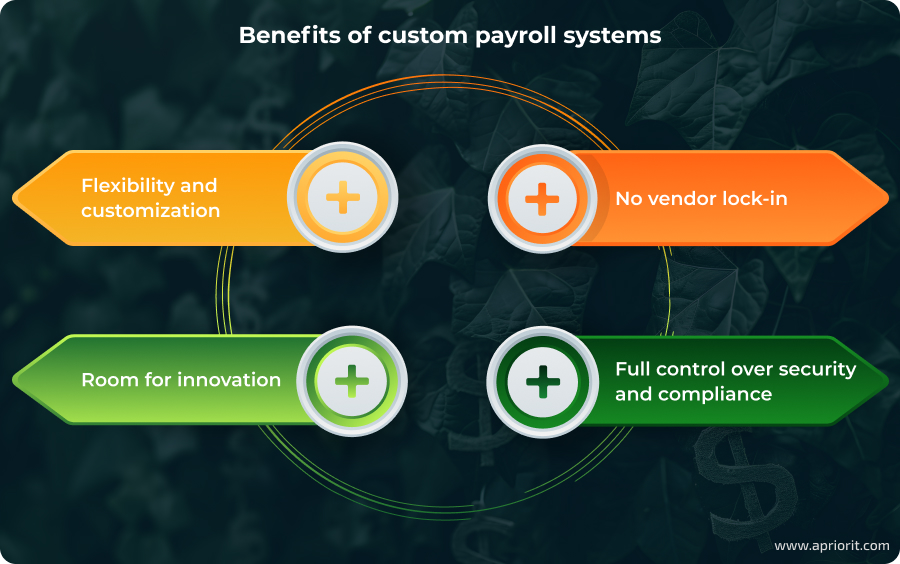
- Flexibility and customization. Every workflow, calculation, and report can be tailored to your processes and industry requirements. No more bending your operations to fit the software.
- No vendor lock-in. You own the system, control the roadmap, and can switch hosting, integrations, or support providers at any time.
- Room for innovation. Need to add AI-driven fraud detection, blockchain-based payroll verification, or advanced analytics? A custom platform makes it possible to integrate new features and technologies as your business evolves.
- Full control over security and compliance. You get to decide exactly how and where data is stored, how it’s encrypted, and how compliance rules are implemented. This is especially critical in regulated industries and for multinational operations.
While custom systems deliver unmatched flexibility and control, they do require significant time and monetary investment. Payroll software development can take months to over a year, depending on complexity, and requires close collaboration between your business, technical, and compliance teams. For organizations with long-term growth plans and unique needs, however, that’s often the only real downside.
When does it make sense to build a custom payroll system?
Сustom payroll system development may be the best option if your business:
- Operates across multiple states or countries with complex and changing compliance requirements
- Has unique payroll workflows that can’t easily be replicated or automated with off-the-shelf software
- Needs deep integrations with existing HR, ERP, time tracking, accounting, or tax filing systems
- Requires full control over data storage, security, and encryption to meet industry or regional compliance requirements
- Expects to scale significantly in headcount, locations, or markets in the coming years
- Faces vendor lock-in or escalating subscription costs with current providers
- Needs advanced functionality that requires technologies like AI or blockchain
- Plans to launch a SaaS payroll platform to offer payroll services to other businesses, requiring full ownership of the technology and brand
So, how can you build a custom payroll system? Let’s first discuss what components and features any payroll system consists of and what you can add to enhance your system’s effectiveness.
Key functionality of a custom payroll system
A well-designed payroll platform should help teams manage wages, taxes, insurance, and paid leaves, and it should keep those processes compliant with local laws and regulations. In this section, we discuss what features you need to implement in your custom payroll solution so it meets these business needs.
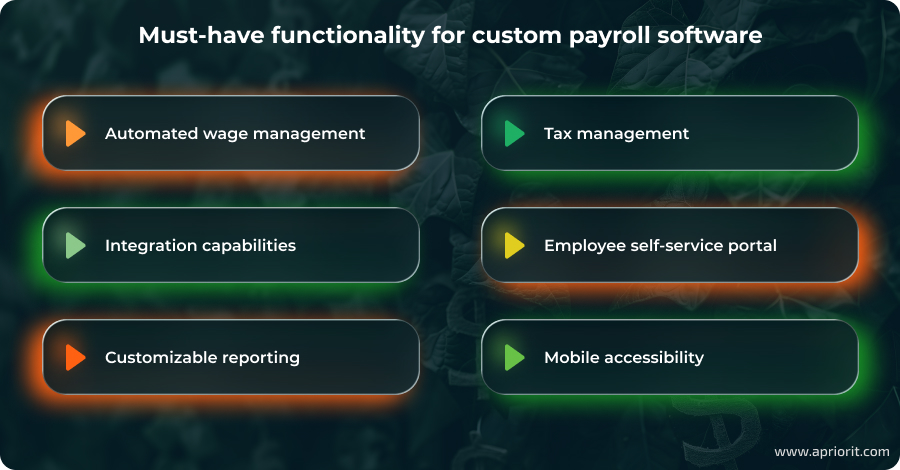
Automated wage management
Calculating wages is the core of any payroll management system. However, it’s not just a single feature, as it involves many different factors and separate processes, including:
- Salary payout schedule — can be weekly, bi-weekly, or monthly, and can be unique to individual employees depending on their contracts
- Attendance and leave — involves calculating working hours and leave payouts for each salary payout period
- Reimbursement — includes pay for overtime work and reimbursement for insurance, sport, and/or other benefits that a company provides
- Raises and bonuses — involves managing scheduled salary increases, performance-based bonuses, and one-time incentive payments
As you can see, a lot of factors are involved in calculating the final amount each employee will receive. Any mistake in these calculations can cost your company a lot, so this block of functionality has to be well-thought-out and well-tested.
Read also
Building a Custom HR SaaS Solution: Benefits, Key Features, Development Tips
Learn how to build a system that will empower HRs with process automation and reduce overhead. Explore the key types of HR systems and what features they require to bring true value.

Tax management
Filing and deducting taxes is one of the most challenging parts of any payroll software, and many off-the-shelf solutions don’t execute it well. This is especially true when dealing with multi-state or international tax rules.
A good tax management module has to automatically navigate different tax rates, benefits, overtime rules, and even languages across multiple regions. This means calculating the correct tax amounts for each jurisdiction, applying appropriate deductions, generating required tax forms, and ensuring timely submission to avoid penalties.
Integration capabilities
A payroll system is truly efficient if it effortlessly slots into an organization’s existing ecosystem. To make this happen, it must be able to integrate with other tools like HR platforms, time tracking tools, and tax filing and accounting systems.
This synergy reduces the risk of calculation errors and enables real-time payroll adjustments. To achieve it, you need to carefully pick a technology stack for your payroll system that is compatible with other software and prioritize API development and support for standardized data formats so data can be shared across systems.
Employee self-service portal
This module allows employees to view pay stubs, download tax forms, and update personal information like addresses and bank details without involving administrators or managers.
Employee self-service features take a massive workload off HR and payroll teams and make compensation transparent for employees.
Reporting
A strong reporting module in a payroll management system generates detailed, filterable reports on payroll costs, overtime, tax liabilities, and benefits use. This data provides insights on how the company’s finances are being distributed and how spending compares to relevant KPIs.
To make the reporting module more efficient and user-friendly, we advise you to add visualizations. Charts and trend lines can help managers spot anomalies and forecast future payroll budgets.
Mobile accessibility
Your payroll system should be mobile-friendly so that both administrators and employees can access the system from anywhere. This can be achieved by building a mobile-friendly web version of the interface, or by creating a separate mobile application with offline support for certain features.
Advanced capabilities
Custom development not only allows for flexibility and customization but also gives freedom to innovate. If you want to enhance your payroll system’s automation, you can consider integrating the following technologies.
Artificial intelligence
Artificial intelligence can take payroll automation to the next level. By learning from historical data, AI can:
- Detect anomalies before they cause costly errors. Anomalies may include duplicate entries, outlier payments, or missing records.
- Forecast payroll expenses based on hiring trends, seasonal changes, or policy updates, helping finance teams plan more accurately.
From a developer’s perspective, integrating AI means designing data pipelines that ensure clean, well-structured input and selecting models that can adapt to evolving payroll rules without manual reprogramming.
However, to integrate AI technology, you’ll need enough labeled data for model training, which can be challenging to collect and prepare.
Blockchain
A blockchain offers secure, immutable records of all payroll transactions. Blockchain technology allows for:
- Fast, transparent auditing that ensures every payment, deduction, and tax filing is verifiable
- Low-cost, near-instant international salary transfers without relying on multiple intermediaries, which can be a huge benefit for international teams
If you want to add blockchain functionality to your custom payroll system, you need to ensure it’s legally compliant in relevant jurisdictions. Implementing blockchain technology in payroll requires careful planning of consensus mechanisms, encryption standards, and integration with existing financial systems to ensure both compliance and scalability.
These capabilities not only streamline payroll operations but also future-proof the system, making it adaptable to emerging technologies and evolving business needs.
Now that we’ve discussed key features of a payroll system, let’s explore what technical system components and mechanisms are necessary to support them.
Read also
How to Build a Custom CRM Solution: Benefits, Types, and Development Considerations
Learn how to optimize the way you interact with the most important people for your business — your customers. In this article, we discuss core functionality of efficient CRM systems and what you need to consider during development.

Technical components of a custom payroll system
Custom payroll systems aren’t technically complex, but they still require carefully considered infrastructure, strong security mechanisms, and multiple layers for supporting business logic and integrations.
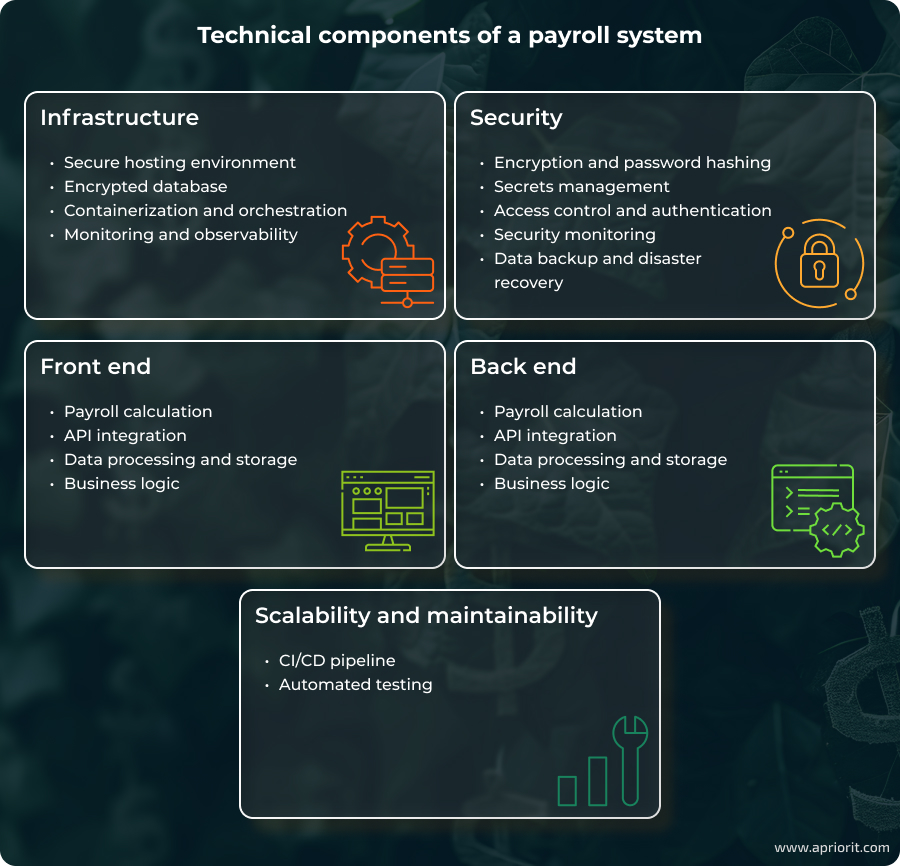
In this section, we discuss the core components of a payroll system, which we divide into five main categories: infrastructure, security, back- and front end functionality, and scalability and maintainability.
1. Infrastructure
The infrastructure is the backbone of your whole system. It directly affects your payroll system’s performance, availability, and compliance. The right setup ensures your system runs smoothly and that sensitive data is stored well for future scaling.
Secure hosting environment. Your system can be hosted in the cloud, on-premises, or with a mix of both. The best choice depends on your security and data privacy needs, which are usually dictated by industry or location. If you choose a cloud provider, ensure they have the relevant certifications for meeting requirements like the GDPR, CCPA, and ISO standards. For highly regulated industries, consider on-premises hosting with strong physical security.
Tip from Apriorit experts: Consider future growth, geographic employee distribution, and legal and regulatory requirements when choosing your approach. Cloud offers flexibility, while on-premises maximizes control. Hybrid is often a compromise to balance flexibility and control.
Database encryption. Your databases must support encryption at rest and in transit. PostgreSQL and MySQL are common choices. For high scale, consider managed solutions like Amazon RDS or Cloud SQL.
Containerization and orchestration. In SaaS payroll systems, containerization is vital for ensuring availability and easy rollouts. You can use Docker or Kubernetes to package applications and their dependencies into lightweight, portable containers.
Monitoring and observability. Your payroll system should be able to catch errors and detect failures during payroll runs so they don’t impact employees and your business. Use tools like Prometheus, Grafana, or Datadog to monitor your applications and infrastructure.
2. Security
Payroll data is sensitive, as it includes personal and financial information of employees and the business. Security should be integrated into every layer of your payroll system to protect it from fraud and cyber attacks. Here are the mechanisms and systems you need to protect your payroll system.
Encryption and password hashing. Always encrypt sensitive data and hash passwords. For this, you can use tools like bcrypt or Argon2.
Secrets management. Use vaults like HashiCorp Vault or Azure Key Vault for storing your system’s API keys, encryption keys, and bank credentials instead of storing them in code or configuration files.
Access control and authentication. Enforce multi-factor authentication (MFA) for admins and enable single sign-on for employees with providers like Okta or Auth0. Use role-based access control so that HR, finance, IT, and employees only see the data relevant to them. This will help you prevent insider risks.
Security monitoring. Combine real-time monitoring with IDS/IPS tools like AWS GuardDuty to spot unusual or unauthorized activity. Keep immutable logs using tools like Splunk to track events for audits and investigations.
Data backup and disaster recovery. If your infrastructure fails due to a cyber attack or other disruption, you need the ability to quickly restore operations. Set up automated backups and store them securely offsite to ensure payroll continuity even after unforeseen disasters.
Tip from Apriorit experts: Apply a secure SDLC at every stage — use secure coding practices, threat modeling, risk assessment, and security testing. Assign a security lead, perform regular audits, and continuously monitor the system to protect sensitive payroll data and ensure compliance.
Read also
How to Create a Reliable SaaS Accounting Solution: Core Characteristics, Architectural Components, and Features
Explore a complete guide to creating SaaS accounting software that ensures compliance, integrates with third-party tools, and enhances financial workflows for businesses. Learn from proven strategies and best practices.

3. Backend layer
The back end is the engine of your payroll system, responsible for processing data, enforcing business rules, and connecting to external services. It can be built using frameworks like Node.js, Java, or Python, depending on your system requirements.
Typical backend components include:
- Payroll calculation engine that automates salary, tax, and benefits calculations according to company rules and legal requirements.
- API integration modules that connect the payroll system with external services including banking, HR, accounting, and tax platforms like Plaid and MasterTax
- Data processing and storage to securely store employee and payroll data, ensuring compliance and supporting reporting
- Business logic layer that enforces company-specific rules, workflows, approvals, and compliance checks
4. Frontend layer
The front end is the user-facing layer of the payroll system, designed with role-based access to ensure security and usability. It typically includes:
- Admin panel for HR and finance teams to manage payroll runs, employee records, and compliance reporting
- Employee self-service portal that allows employees to access payslips, tax forms, and benefits, and to update personal details
- Manager dashboard that enables managers to review and approve timesheets, bonuses, or overtime
Tip from Apriorit experts: Usability is critical in payroll systems. They can be complex, so invest in a clear, intuitive interface to minimize confusion and errors. Test your user interface with focus groups or your own employees, and gather feedback to further enhance the user experience.
4. Scalability & maintainability
As your business or your SaaS clients’ businesses grow, so must the payroll system. To ensure its reliability over time, it has to be built with scaling in mind from the start. For this, you need to implement the following practices and components into your custom payroll software development process.
Continuous integration/continuous deployment (CI/CD) pipeline. This allows you to automate deployments while reducing risks during releases, ultimately making your product more reliable and resulting in fewer bugs. For this, you need to use tools like GitHub Actions, GitLab CI, or Jenkins.
Automated testing. Testing a payroll system exclusively with manual methods can be ineffective and risky. Use automated testing tools to run unit, UI, and security tests, and integrate them into your CI/CD pipeline.
Related project
Developing and Enhancing a Custom SaaS Platform for HR Management
Learn how we helped our client lower costs and get a 20% increase in new customers thanks to implementing new features in and improving the performance of their HR management system.

How Apriorit can help you build a custom payroll system
With over 20 years of experience, Apriorit has deep expertise in designing and developing custom HR and finance solutions.
Our large, skilled team can support you at every stage, from consulting on how to create a payroll system to building and supporting it after deployment. We follow a secure SDLC at every stage, ensuring that your payroll system is reliable, compliant, and tailored to your unique business needs. For your business, we can:
- Develop a custom payroll platform. Whether you want to build a solution for your own business or build a B2B SaaS platform, we will create a compliant, secure, and reliable system that supports your company’s processes and industry requirements.
- Modernize your legacy system. If you already have a payroll system but are struggling to scale or integrate it with modern software, Apriorit will help you modernize where it matters, without disturbing your operations.
- Develop secure APIs for third-party integrations. With us, you can connect your system with ERP, HR, accounting, and tax platforms via APIs and integrate it into your existing ecosystem.
- Secure your payroll system. Leverage our cybersecurity expertise to protect your company’s and your employees’ data with robust encryption, access control, and secure hosting. Our cybersecurity specialists can also provide you with regular security audits and penetration testing services so your payroll system stays secure over the years.
- Support and maintain your system long-term. Get ongoing maintenance, updates, and timely fixes to ensure your payroll system remains efficient.
Conclusion
Building a custom payroll system isn’t easy. But growing your business within the limitations of an off-the-shelf system can be even harder.
To create payroll software that will grow with your organization, scale effortlessly, and adapt to changing tax and labor laws across states and countries, you need a reliable team by your side.
Apriorit has experience building custom HR software for organizations and SaaS companies that want to provide outstanding service to their customers. With over 20 years of accumulated expertise, a large engineering team, and a secure SDLC at the core of our processes, we will help you design and implement a payroll system with custom logic tailored to your requirements and industry standards.
Whether you’re building a new payroll product or upgrading your current one, our team is ready to help you deliver a secure, scalable, and future-proof solution.
Looking for expert developers?
Leverage our 20+ years of experience delivering meaningful business results through reliable software!
FAQ
What are the benefits of a custom payroll system compared to off-the-shelf solutions?
<p>While off-the-shelf tools are quick to start with, they often limit you as your company grows or operates across different regions. A custom payroll system gives you control over calculation logic, reporting, and workflows so they match your unique processes.</p>
<p>Custom payroll systems are easier to scale, integrate with other platforms, and stay flexible as tax and labor laws change. Plus, you’re not stuck waiting for a vendor’s roadmap, as you can make changes to your product at any time as you see fit.</p>
How can a custom payroll system help my business stay compliant with labor and tax laws?
<p>With a custom payroll system, you can program tax rules for each jurisdiction you operate in, automate updates when laws and regulations change, and generate audit-ready reports. This reduces manual errors and makes compliance a natural part of payroll runs. If you expand globally, you can extend the system to cover new legal frameworks.</p>
What security measures should be implemented in a payroll system?
<p>Payroll data is highly sensitive, so security must be baked in from the start. Use strong encryption for data both at rest and in transit, role-based access control to limit who sees what, and secure hosting that meets compliance requirements (GDPR, ISO, SOC 2, etc.).</p>
<p>Regular <a href=”https://www.apriorit.com/rd-services/penetration-testing-services”>penetration testing</a>, <a href=”https://www.apriorit.com/rd-services/software-code-audit-services”>code reviews</a>, and monitoring for unusual activity can help you catch risks early. Also, make sure you back up your data and store it securely outside your main infrastructure in case of attacks or outages.</p>
How long does it take to build a custom payroll platform?
<p>The timeline depends on the platform’s complexity, but a typical custom payroll system can take 6 to 12 months for an MVP and longer if you need advanced features like multi-country compliance, complex integrations, or analytics dashboards.</p>
<p>A smart approach is to start small with core payroll features, then iterate based on user responses and immediate business needs. That way, you get a working system quickly while still being able to add features like self-service portals or advanced reporting down the line.</p>
Can custom payroll software integrate with existing HR, accounting, and banking systems?
<p>Yes, and it should. Payroll rarely works in isolation, so integration is key. With secure APIs, you can connect your payroll system to HR platforms for employee data, accounting systems for bookkeeping, and banking services for direct deposits.</p>
<p>This reduces manual data entry, prevents errors, and ensures everything stays in sync. If you’re replacing a legacy system, this will involve data migration. Our team can help you plan and test integrations and prepare your data for migration.</p>
What are the typical costs and challenges of developing a custom payroll system?
<p>Costs vary depending on the scope, but the biggest factors are compliance complexity, integration needs, and scalability requirements. Challenges often include migrating sensitive payroll data securely, complying with regional tax laws, and building the functionality itself.</p>
<p>While upfront investment is higher with a custom than with an off-the-shelf system, a custom payroll system will fit your business exactly and grow with you.</p>
What tech stack is best for building a payroll system?
<p>Your tech stack will depend on your scalability, performance, and integration needs. Typically, back ends for payroll systems are built with <a href=”https://www.apriorit.com/our-expertise/node-js-development-services”>Node.js</a>, Java, or <a href=”https://www.apriorit.com/our-expertise/python-development-services”>Python</a> for flexibility and performance.</p>
<p>Front ends typically use React or <a href=”https://www.apriorit.com/our-expertise/angular-development-services”>Angular</a> for smooth user experiences. For databases, PostgreSQL or MySQL handle structured data well. If scalability is your priority, consider using Kubernetes or Docker for containerization and using cloud platforms like AWS or Azure.</p>
Have a question?
Ask our expert!

Director of Global Markets Development



