

What is remote access?
Remote access is a technology that allows a user or system to connect to and interact with computers, servers, applications, or networks, without being physically present at the target location.
Connections can be established over the internet or another network. Remote access enables users to perform actions like viewing data, running applications, managing systems, and performing administrative tasks.
While often associated with remote and hybrid work, remote access is also a core component of modern IT operations. Organizations use it for system administration, vendor maintenance, cloud resource management, and technical support.
In practice, remote access is usually supported with authentication methods, security policies, monitoring, and management to prevent access rights misuse and sensitive data leaks.
Contents:
How does remote access work?
In broad terms, remote access generally involves three stages:
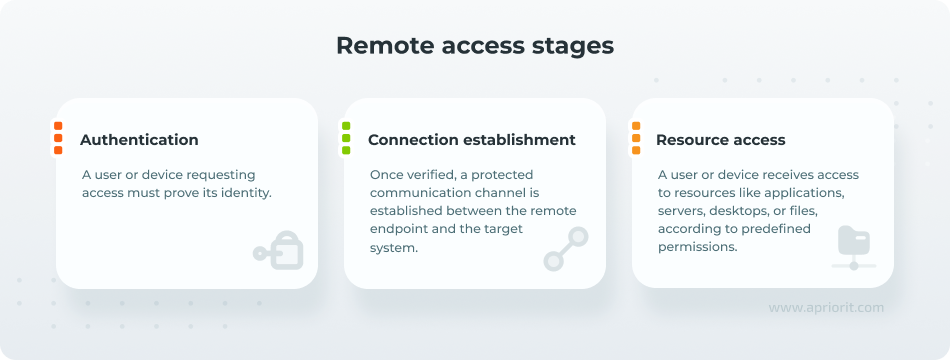
1. Authentication
The authentication step verifies the identity of the person or system requesting remote access.
The first layer of verification typically requires a username and password. However, since credentials can be stolen or obtained through phishing, organizations often strengthen remote access with multi-factor authentication (MFA).
Before initiating a session, remote access systems may also evaluate contextual signals, such as the requesting device or the resource being accessed.
2. Connection establishment
This step establishes a protected communication channel across an external network, such as the internet.
Since such connections must be secure, organizations typically use technologies like encryption to preserve the confidentiality and integrity of data exchanged during the session.
3. Resource access
Finally, once the connection has been authenticated and protected, the user can interact with the permitted resource.
Depending on the technology and access policy, this step may involve access to:
- Networks
- Desktops
- Servers
- Applications
Types of remote access technologies, methods, and solutions
Remote access is not a single technology. Organizations can implement remote connectivity using different methods depending on whether users need access to an entire network, a specific desktop, an individual application, or administrative resources.
Remote access types are often complemented by different security models and can be grouped into five categories:
1. VPN and tunneling technologies
Virtual Private Networks (VPNs) create an encrypted connection between a user’s device and an organization’s network, allowing remote users to access internal resources as though they were physically connected to the corporate environment.
- VPN technologies generally fall into two sub-categories:
- IPsec VPNs, which operate at the network layer and create encrypted tunnels between devices or networks.
SSL/TLS VPNs, which use web-based encryption technologies to secure access to internal resources through client applications or web browsers.
Another common tunneling technology is Secure Shell (SSH). While SSH is primarily designed for secure remote command-line administration, it can also create encrypted tunnels that forward traffic between systems.
2. Remote desktop and virtual workspace solutions
Remote desktop technologies allow users to interact directly with a remote computer’s graphical interface. These solutions deliver a desktop environment, keyboard and mouse control, and access to applications running on the remote system.
Two common examples are:
- Remote Desktop Protocol (RDP), Microsoft’s protocol for accessing Windows systems remotely.
- Virtual Network Computing (VNC), a platform-independent technology for remotely controlling another computer’s graphical desktop.
Larger organizations may also implement more advanced solutions like:
- Virtual Desktop Infrastructure (VDI), where virtual desktops are hosted centrally in a data center and delivered to users on demand.
- Desktop as a Service (DaaS), where instead of hosting virtual desktops internally, organizations consume cloud-hosted desktop environments from a service provider.
3. Application-based access methods
Application-based methods provide access only to specific applications and services that users need for their work rather than granting broad connectivity to internal infrastructure.
Common examples of application-based access methods are:
- Web portals and SSL portals
- Browser-based application access
- Software-as-a-Service (SaaS) applications
- Cloud-hosted business platforms
These solutions authenticate users through a portal, gateway, or cloud service and allow them to interact only with authorized resources.
4. Zero trust access models
Zero trust is a security model based on the principle of “never trust, always verify,” meaning that no user, device, or application is automatically trusted, even after it has been authenticated.
In the context of remote access, zero trust shifts the focus from securing the network perimeter to continuously validating each access request. Its principles have been used to develop several broader architectures:
- Zero Trust Network Access (ZTNA) grants users access only to authorized applications, services, or systems, rather than connecting them to an entire network.
- Security Service Edge (SSE) combines cloud-delivered security services such as secure web gateways, cloud access security brokers, and ZTNA into a unified platform.
- Secure Access Service Edge (SASE) extends SSE by integrating networking and security capabilities into a single architecture designed for distributed users, cloud services, and hybrid environments.
5. Specialized tools for administrative and privileged access
Certain remote access technologies are designed specifically for administrative, operational, or highly sensitive environments. These solutions typically offer additional controls to protect critical systems and privileged accounts.
Here are the three most common types of such specialized tools:
- Privileged Access Management (PAM) platforms help organizations control and monitor access to administrative accounts. Many PAM solutions include secure remote access capabilities that allow administrators to connect to critical systems without directly exposing privileged credentials.
- Remote Monitoring and Management (RMM) tools enable IT teams and managed service providers to monitor, troubleshoot, and maintain systems remotely. These platforms often combine remote access functionality with automation, patch management, inventory tracking, and device health monitoring.
- Bastion hosts and jump servers act as controlled entry points into restricted environments. Instead of connecting directly to production servers, administrators first connect to the jump host.
Why enable remote access? Use cases and examples
The key reason that organizations implement remote access capabilities is business continuity and disaster recovery. Even when normal working conditions are disrupted (severe weather events, power outages, cybersecurity incidents, pandemics, or other emergencies), employees and administrators can continue accessing critical systems from alternative locations.
Below are the most common use cases and examples of remote access usage, grouped by who is connecting and what activities they can handle.
Use case | Users | Enabled capabilities |
Remote and hybrid work | 🔶 Employees 🔶 Hybrid workers 🔶 Traveling staff | 🔷 Access to emails and business applications 🔷 Ability to work with file repositories, collaboration platforms, and internal services |
IT administration and infrastructure management | 🔶 System administrators 🔶 DevOps engineers 🔶 Network operations teams | 🔷 Server administration 🔷 Software deployment 🔷 System monitoring 🔷 Configuration changes 🔷 Troubleshooting 🔷 Patch management |
Technical support and help desk operations | 🔶 Help desk teams 🔶 Managed service providers (MSPs) 🔶 IT support specialists | 🔷 Problems diagnostics 🔷 App configuration 🔷 Updates installation 🔷 User guidance through troubleshooting procedures without an on-site visit |
Third-party and vendor access | 🔶 Contractors 🔶 Suppliers 🔶 Auditors 🔶 Consultants 🔶 Service providers | 🔷 Access to specific systems or resources without requiring permanent accounts or on-premises presence |
Access to cloud environments and virtual desktops | 🔶 Employees 🔶 Contractors | 🔷 Secure access to cloud-hosted applications, management consoles, and virtual desktop environments |
Remote device, IoT, and equipment management | 🔶 IoT and embedded systems engineers 🔶 OT and industrial automation teams 🔶 Field service technicians 🔶 Equipment operators | 🔷 Remote device monitoring and diagnostics 🔷 Device configuration and control 🔷 Firmware and software updates 🔷 Troubleshooting and maintenance 🔷 Equipment health and performance monitoring |
Remote access security risks
Because remote access extends connectivity beyond the traditional network perimeter, it also creates additional attack paths.
While the specific risks vary by technology, the most common risks include:
- Weak authentication. Reused and predictable passwords can allow attackers to gain access without exploiting any software vulnerabilities. This risk increases when organizations maintain dormant accounts for former employees or vendors, especially if those accounts lack MFA.
- Exposed RDP services. Systems that are directly exposed to the internet can be discovered and continuously probed for weak credentials or misconfigurations. Once attackers obtain access to an exposed remote desktop service, they may be able to move unseen through the environment and expand their control over additional systems.
- Stolen credentials. Credentials obtained through phishing campaigns, malware infections, data breaches, or dark-web marketplaces can be used to access corporate systems when additional safeguards are absent.
- Unpatched remote access software. Remote access platforms, VPN gateways, remote desktop services, and administration tools require regular security updates. Organizations that delay patching known vulnerabilities risk exposing critical infrastructure to publicly documented exploits.
- Excessive permissions. When users or administrators receive more permissions than their role requires, attackers gain greater opportunities for privilege escalation, lateral movement, and access to sensitive systems.
These risks highlight why remote access security depends on more than encrypted connections alone and requires remote access management.
What is remote access management?
Remote access management is a set of policies, processes, and technologies used to control, secure, and monitor how users connect to organizational resources from outside the network.
It determines:
- Who can access systems remotely
- What resources they can use
- Under which conditions access is granted
- How remote activity is tracked throughout a session
In practice, remote access management combines identity and access controls, remote connectivity technologies, and security monitoring capabilities into a single framework.
The goal is to provide authorized users with secure, reliable access to the resources they need while minimizing security risks associated with remote connectivity.
Solutions for remote access management typically include the following components:
- User provisioning and deprovisioning govern the lifecycle of remote access permissions. Provisioning involves creating accounts and granting users the appropriate level of access based on their roles and responsibilities. Deprovisioning removes or updates those permissions when employees change positions, projects end, or users leave the organization.
- Access policies define the rules that determine whether a remote access request is approved, restricted, or denied. These policies may enforce requirements such as MFA, least-privilege access, approved devices, location-based restrictions, and device compliance checks.
- Monitoring provides visibility into remote access activity, helping organizations track who is connecting, when connections occur, and which resources are being accessed.
- Auditing complements monitoring by maintaining records of access events for security investigations, compliance reporting, and internal reviews.
- Centralized administration allows IT and security teams to manage remote access from a single platform rather than using separate tools for different systems and users. This helps organizations consistently apply security policies, efficiently manage user permissions, and quickly respond to security incidents.
How Apriorit can help with secure remote access solutions
Effective remote access depends on more than encrypted connections alone.
Organizations need strong authentication, well-defined access policies, and continuous monitoring to ensure that users can work productively without unnecessarily expanding the attack surface.
At Apriorit, we have experience working on various projects related to remote access technologies. See, for example, how we successfully ported a VNC protocol from C to Rust.
Our experts help software vendors and enterprise organizations design, build, and strengthen remote access ecosystems by providing:
- Secure remote access solution development for desktop, cloud, and hybrid environments.
- Identity and access management (IAM) functionality development, including authentication, authorization, MFA, and zero trust capabilities.
- Cybersecurity engineering services focused on secure architecture, threat mitigation, and access governance.
Need to build or enhance a remote access solution?
Reach out to Apriorit. We’ll develop secure remote access technologies that support your business requirements and let you maintain strong security control.