



Companies working with AI and high-performance computing (HPC) are hitting the same wall: GPU capacity is expensive, scarce, and often poorly matched to production workloads. Neoclouds have emerged to solve this specific problem. They give companies fast access to GPU-first infrastructure.
For most teams, a neocloud becomes another layer in a hybrid or multi-cloud setup that they must integrate and manage correctly.
In this article, we break down what a neocloud actually is, when it makes sense to adopt one, and what engineering leaders should prepare for before adding GPU-focused cloud capacity to their infrastructure.
Contents:
What is a neocloud?
A neocloud is a cloud service that provides access to high-performance computing (HPC) resources built on GPUs. That’s why neoclouds are often called GPU as a service (GPUaaS).
Neoclouds emerged as an answer to the computing needs of companies that deliver AI-based software, simulations, and media production. These tasks require GPU-level computing power that traditional clouds and hyperscalers can’t meet because they bundle GPUs with other hardware and networking services. This slows down the GPUs and makes their usage too expensive for AI and HPC tasks.
Currently, the key providers on the neocloud market are:
Table 1. Key players on the neocloud market
Provider | Hardware | Key advantages |
CoreWeave | 10 GPU families of H100, B200, B300 | – Kubernetes-native – InfiniBand networking – Enterprise SLAs – Suitable for large-scale distributed training |
Lambda Labs | A100, H100 with pre-installed ML stack | – Developer-friendly: one-click clusters, no egress fees, no setup overhead – Early access to new chips |
Nebius | H100, Blackwell GB300 | – Inference as a service – HIPAA/SOC 2 compliant |
RunPod | A100, H100 | – Serverless GPU endpoints, autoscaling, simple – UI Popular with startups and researchers |
Compared to hyperscalers and regular cloud services, a neocloud:
- Provides access to a large pool of GPUs optimized for parallel workloads and HPC tasks.
- Offers better availability and pricing for GPU-heavy calculations.
- Facilitates faster data transfers needed for AI and HPC.
- Reduces the cost of AI adoption and training.
- Demands less management overhead with fewer infrastructure and security services.
These benefits allow neocloud providers to quickly partner with AI development companies and capture a large part of the AI cloud market. Gartner estimates that by 2030, neocloud providers will represent 20% of that market.
Popularization of neoclouds and affordable GPU computing is prompting some companies to start reshaping their cloud strategies.
Looking for efficient and secure ways to adopt neocloud?
Collaborate with Apriorit on your new cloud infrastructure. Leverage our expertise in cloud development and integration to build an environment that suits your needs.
Who can benefit from neocloud services?
While neocloud takes some areas of the IT market by storm, it shouldn’t be a part of everyone’s multi-cloud strategy.
For example, your company probably doesn’t need a neocloud if you:
- Provide a traditional SaaS application.
- Use cloud services mostly for databases, networking, or serverless tasks.
- Have a small-scale AI workload.
In such cases, adopting a neocloud would only lead to overspending on cloud subscriptions and create management overhead for the DevOps team.
On the other hand, companies that often work with HPC and AI can use neoclouds to optimize their cloud infrastructure and avoid building a private hardware farm.
Often, such organizations already have cloud or multi-cloud infrastructure. In this case, neocloud becomes an “engine” that does calculations while all other tasks (user-facing apps, integrations, data management, security mechanisms) are left to traditional cloud infrastructure.
This way, a neocloud doesn’t substitute anything in your existing cloud infrastructure unless you already run heavy computations in hyperscalers. For most companies, it only enhances the existing ecosystem.
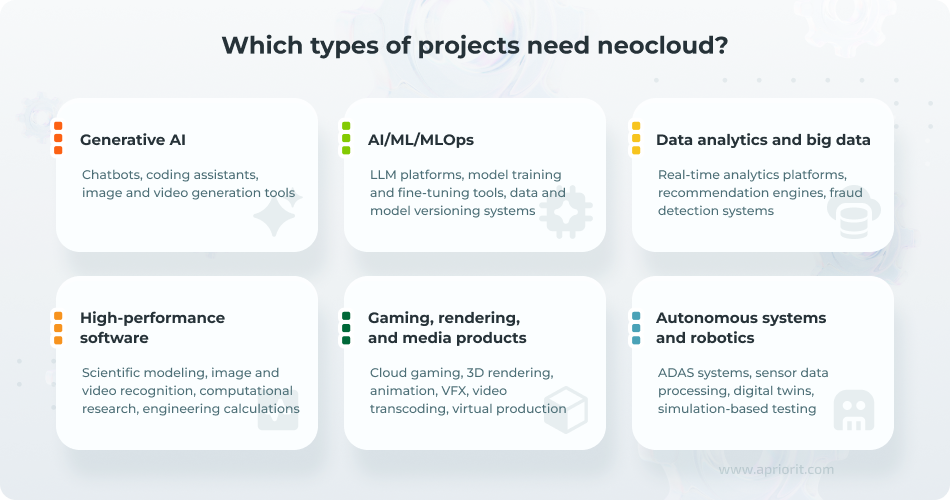
Companies get the following benefits from adding neocloud services to their cloud infrastructure:
- Faster task processing. Neoclouds provide faster processing and networking optimized for high bandwidth and utilization.
- Avoidance of GPU shortages. Since the beginning of the AI explosion, getting a private GPU fleet has become a challenge even for companies with nearly unlimited hardware budgets. Offloading HPC and AI tasks to a neocloud allows a company to avoid building its own GPU park.
- Reduced cost of cloud computing. If configured correctly, GPUaaS can be cheaper than traditional cloud computing, as it completes tasks quicker.
- Simplified AI delivery. Thanks to AI-focused optimization, neoclouds allow companies to train, customize, and ship their models faster and at a lower cost.
- Support for AI and HPC software out of the box. Traditional cloud providers, especially hyperscalers, cater to the widest possible audience of developers. Since neoclouds have a specific IT niche, they provide features like Kubernetes and Slurm support, AI-optimized storage, and localized AI infrastructure.
Read also
Multi-Cloud Security: What Challenges to Consider and How to Secure Multi-Cloud Infrastructure
Reconsider how you manage security across cloud providers and avoid blind spots that appear when responsibilities are split between platforms.

Which workloads are best done with neocloud?
Companies can use a neocloud either as a permanent AI infrastructure layer or as temporary GPU capacity for peak workloads. This flexibility makes neoclouds suitable for a wide range of AI and HPC applications, from long-term model development to short-term, compute-intensive tasks.
Neocloud is especially useful for:
- Large model training and fine-tuning — training LLMs, generative AI, or domain-specific models across multi-GPU clusters.
- Batch inference — processing large volumes of documents, images, embeddings, or logs for tasks that require large throughput and low latency.
- Computer vision processing — running GPU-heavy image and video tasks such as detection, segmentation, OCR, and medical or industrial imaging.
- Simulation and modeling — supporting scientific modeling, physical AI, synthetic data generation, and other compute-intensive workloads.
- Research and experimentation — giving teams that work with AI or HPC flexible access to advanced GPUs without committing to long-term hardware investments.
What should you consider when adding a neocloud to existing cloud infrastructure?
The main risk in adopting a neocloud service comes from using it without defined use cases and planned GPU workloads. Doing so leads to wasting money on an expensive service and creates overhead in cloud management.
Instead, it’s best to add a neocloud service as one layer of your multi-cloud infrastructure:
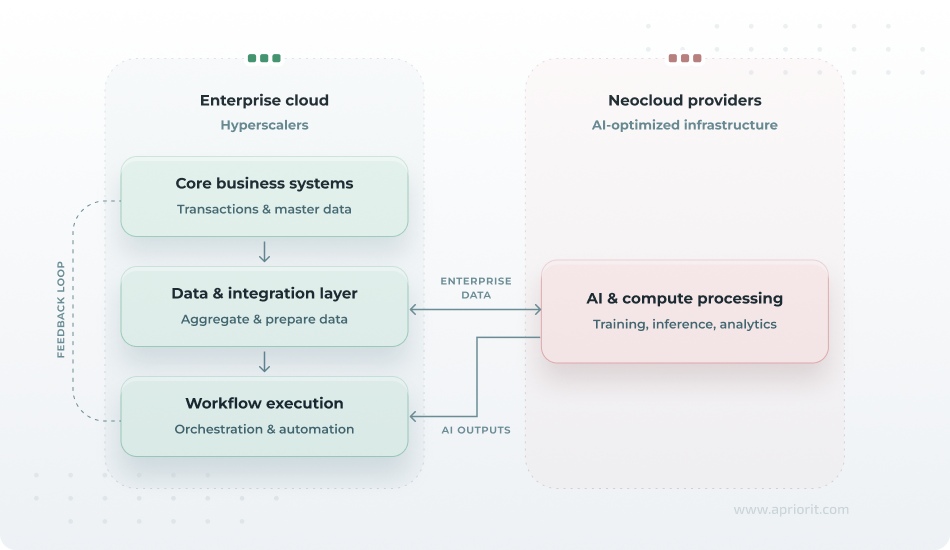
To use a neocloud efficiently, you should plan its adoption, load, and management before signing a contract. Consider these practices:
1. Distribute your workload between neoclouds and hyperscalers
Neoclouds are designed for a particular set of tasks discussed above. Though they’re more performant and quicker than traditional cloud services, running most of your tasks through a neocloud isn’t financially viable.
Instead, consider distributing tasks like this:
- For AI and HPC services, use neocloud computing.
- For most day-to-day tasks, use generic cloud services.
- For tasks that manage sensitive data, use private clouds or on-premises infrastructure.
This way, you’ll be able to balance cloud infrastructure cost, load, and cybersecurity efficiently.
If your cloud environment is already diverse or you have a multi-cloud strategy in place, consider moving to a modular architecture or containerization for different platforms. It helps integrate AI and HPC workloads into other systems.
2. Plan for GPU utilization and task scheduling
One of the key advantages of cloud services is paying only for the computing power you need. With neocloud services, resource utilization isn’t as straightforward.
Neocloud services run on Kubernetes and consider one GPU as one computing cluster. If a company has a limited pool of tasks for this GPU or uses a lightweight model, the GPU will remain idle for some time and the company will pay for unused resources.
To avoid this, GPU utilization should be planned before adopting a neocloud. Companies need to:
- Match GPU capabilities and instances to workload phase (use powerful GPUs for training, smaller or sliced GPUs for inference) and avoid over-provisioned reserved capacity.
- Centralize scheduling with an orchestration layer to manage training, inference, and batch workloads based on policy-driven controls.
- Mitigate stragglers with schedulers that detect slow nodes, rebalance workloads, and adapt mini batch sizes or checkpointing intervals dynamically.
- Align scheduling with cost and SLA goals by allocating resources dynamically and defining SLA-based policies for latency and completion time.
- Adopt monitoring and observability for utilization trends, straggler events, and preemption counts.
- Plan capacity based on sustained demand and reevaluate it when demand changes.
Read also
Data Management Based on SQL Server: On-Premises vs Cloud Database
Clarify trade‑offs between cloud and on‑premises SQL before scaling your system so that architecture decisions don’t limit future flexibility.

3. Establish neocloud management, monitoring, and optimization
Adding a neocloud service to an already complicated enterprise cloud environment adds another layer of complexity because each provider has its own tools, services, architectures, policies, and management interfaces.
Consider the following practices to manage your neocloud service:
- Define your neocloud environment using the infrastructure as code approach. Treat clusters, GPU nodes, and policies as code, with versioned repositories and CI/CD pipelines. IoC tools ensure repeatable, auditable deployments across multiple neoclouds and existing clouds. They also avoid ad-hoc manual configuration.
- Deploy a centralized control plane to manage GPU resources. Use a GPU orchestration platform (Kubernetes with GPU schedulers like Run:ai or vCluster) to coordinate scheduling, priority, and resource allocation. With this practice, you avoid fragmented, manual GPU allocation and create a single source of truth for GPU operations.
- Design comprehensive observability and fault management. Collect metrics on GPU performance, node health, storage performance, and network traffic. A monitoring system for this data will help you analyze events and detect anomalies. Use fault management to trigger automated remediation or alerts for those anomalies.
- Optimize neocloud storage. GPU workloads often require large datasets. To use storage efficiently, keep active training data on high-performance storage, and move older checkpoints and logs to cheaper tiers. Make snapshots before upgrades or migrations, but delete or move outdated volumes to on-premises storage.
4. Ensure data security, IP protection, and compliance for neocloud workloads
Because neocloud platforms are GPU-first, multi-tenant, and often operated by smaller providers, they often don’t offer the rich set of security features companies expect from a cloud provider. At the same time, AI and HPC tasks often require sensitive data processing or are based on proprietary algorithms and pipelines.
Companies should treat neoclouds as an additional risk layer. Neoclouds introduce risks such as:
- Multi-tenant GPU isolation failures
- Interconnect and side-channel leaks
- IP ownership and model leakage
- Contractual gaps on IP transit and scalability
- Model poisoning and firmware integrity
- Lack of audit rights and sovereign certifications
- Networking and interconnection gaps
These risks can influence both a company’s data security and compliance with cybersecurity regulations. To prepare for neocloud adoption:
- Check whether a neocloud provider supports relevant frameworks such as SOC 2, ISO 27001, GDPR, HIPAA, or industry-specific requirements.
- Request from the vendor independent security audits or penetration test reports, especially for GPU isolation, firmware, and network layers.
- Encrypt data at rest on all storage and in transit between your systems and the neocloud.
- Deploy network segmentation to separate training, inference, and management networks.
- Implement a SOAR (Security Orchestration, Automation, and Response) system for automated responses to anomalies.
- Conduct regular security audits and penetration testing on the whole cloud stack, including GPU access points and management interfaces.
Incorporate neocloud into your cloud strategy with Apriorit
Adopting a neocloud is more challenging than just choosing a provider with the lowest price and available GPUs. You also need to consider workload distribution, data flows, orchestration, security controls, and integration with existing cloud or on‑premises infrastructure.
Apriorit helps teams evaluate the current state of their cloud infrastructure and assist with architectural challenges behind neocloud adoption.
Our key services include:
- Cloud infrastructure management. We design hybrid and multi-cloud AI-ready architectures that work smoothly with neocloud. We also configure GPU environments and deploy management and observability systems for your workloads.
- Cybersecurity development. Apriorit’s 20+ years of expertise in data security is a great foundation for your cybersecurity strategy regarding GPUaaS. We’ll help you ensure protection of data that is shared with neocloud providers, as well as compliance with security requirements.
- DevOps for AI workloads. We build CI/CD and MLOps pipelines, automate deployment, configure autoscaling, and improve resource utilization across GPU workloads.
- Custom API development and integration. Connecting different types of cloud services while keeping their performance consistent is a challenge. Apriorit helps design custom integrations when needed and verify reliability and security of third-party integrations.
Add GPUaaS to your cloud without breaking your infrastructure
We’ll ensure smooth integration and optimized GPU use for your AI and HPC tasks.
FAQ
What are the key neocloud services on the market now?
<p>Today’s neocloud market centers on a relatively small set of GPU‑focused providers. Each delivers similar core functionality, but they differ in pricing models, management layers, and target use cases.</p>
<p>Here are the most relevant service providers:</p>
<ul class=apriorit-list-markers-green>
<li>CoreWeave. Large-scale GPU clusters, fast provisioning, and strong enterprise adoption for LLM training and inference.</li>
<li>Lambda Labs. Developer-friendly GPU cloud with integrated ML tooling, often used for model development and experimentation.</li>
<li>RunPod. Flexible GPU “pods” with fast startup and autoscaling; popular for startups and teams that need quick iteration cycles.</li>
<li>Nebius. High-performance infrastructure with strong backing and a focus on enterprise-grade AI workloads and large-scale training.</li>
<li>Vast.ai. A marketplace model for low-cost GPU access; trades predictability for significantly lower pricing.</li>
</ul>
Can a neocloud replace AWS, Azure, or Google Cloud?
<p>No, neoclouds aren’t designed to replace full cloud ecosystems. They typically lack managed databases, enterprise integration services, mature IAM, compliance and governance tooling, etc.</p>
<p>It’s best to use them as a specialized compute layer within a broader architecture where a hyperscaler runs the application layer, integrations, and data services, while a neocloud is used for AI training and HPC workloads.</p>
<p>This hybrid approach is consistent with how most organizations evolve their infrastructure.</p>
What are the main risks of adopting a neocloud?
<p>From a business standpoint, the most common mistake is adopting a neocloud without a clearly defined workload and ROI model. It can lead to:</p>
<ul class=apriorit-list-markers-green>
<li>Underutilized GPUs leading to wasted spending.</li>
<li>Fragmented infrastructure and operational overhead.</li>
<li>Weak built-in security and compliance features.</li>
<li>Locking in with an immature or unreliable GPUaaS vendor.</li>
</ul>
<p>You can prevent these risks by preparing your cloud infrastructure for neocloud adoption and consulting with cloud infrastructure experts to figure out your use cases, goals, and constraints for neocloud.</p>
Is neocloud cheaper than traditional cloud services?
<p>Not necessarily. Neocloud can be cheaper per unit of compute, especially for GPU-heavy workloads. However, the total cost depends on:</p>
<ul class=apriorit-list-markers-green>
<li>GPU utilization rates</li>
<li>Workload scheduling efficiency</li>
<li>Data transfer and storage architecture</li>
<li>Integration overhead </li>
</ul>
<p>If GPUs sit idle or workloads are poorly scheduled, overall costs can quickly exceed expectations.</p>
Is vendor lock-in possible with neocloud?
<p>Yes, but it’s a different risk compared to traditional cloud. While hyperscalers lock you into managed services, neoclouds can lock you into:</p>
<ul class=apriorit-list-markers-green>
<li>Specific GPU architectures (e.g., NVIDIA stack dependencies).</li>
<li>Proprietary orchestration or scheduling layers.</li>
<li>Data localities due to the high cost of moving a dataset.</li>
</ul>
<p>To reduce this risk, design neocloud integration based on containerized workloads, infrastructure as code, and abstraction layers for scheduling and storage.</p>
What skills or expertise are required to operate a neocloud environment?
<p>Compared to hyperscalers, neocloud environments typically require more hands-on expertise. Teams should be comfortable with:</p>
<ul class=apriorit-list-markers-green>
<li>Container orchestration (e.g., Kubernetes-based workflows).</li>
<li>Workload scheduling and queueing systems.</li>
<li>Performance tuning for GPU workloads.</li>
<li>Storage optimization for large datasets.</li>
</ul>
<p>If your organization relies heavily on managed services today, there will be a noticeable engineering gap to close.</p>