
 Skip to main content

Key takeaways:
- The .NET 10 release gives enterprises a stable, secure baseline for long‑term modernization, but migration timing must be driven by business value, not version hype.
- The real impact of .NET 10 lies in efficiency, lower cloud costs, stronger security, and better support for distributed and AI‑enabled architectures.
- Businesses should upgrade when performance, security, compliance, and operational bottlenecks outweigh the cost of staying on older runtimes.
- Modernization must be gradual and guided by a thorough plan to mitigate risks caused by legacy dependencies and reflection‑heavy architectures.
Yearly .NET releases can make CTOs, product owners, and tech leads feel as if they’re chasing a constantly moving target. Though the latest .NET updates may look beneficial, you might lack clear answers to critical questions:
→ Which changes truly matter?
→ What can safely wait?
→ How can you modernize without breaking production or slowing down the roadmap?
To help you get answers, our specialists prepared this guide based on Apriorit’s hands-on experience modernizing complex .NET infrastructures.
Below, we explain what .NET 10 migration actually changes for your systems and business, and how to decide whether to do it now or postpone. You’ll also find tips on how to migrate with predictable, low-risk steps.
Contents:
Key business drivers for migration to .NET 10
Why consider upgrading your .NET system?
Since Microsoft delivers a new .NET release every year, organizations regularly face the question of whether and when to upgrade.
In our experience at Apriorit, this decision is usually driven by a few common factors, especially when it comes to LTS releases like .NET 10:
- Growing security exposure and compliance pressure. Older .NET versions accumulate unpatched CVEs, rely on deprecated cryptography, and lack modern hardening features, increasing security risks.
- Rising maintenance costs and dependency issues. Legacy libraries, outdated frameworks, unmaintained third-party components, and Windows‑bound workloads slow development and drain engineering budgets.
- Cloud cost inefficiencies. Modern .NET versions deliver major runtime and memory optimizations, smaller container images, better networking stacks, and more efficient resource use, allowing companies to consolidate infrastructure and save money.
- Scalability and performance limitations. High‑load systems often hit throughput ceilings on older runtimes. Older .NET versions often lack capabilities to align with growing enterprise needs.
- Need for cloud‑native and distributed architectures. As more organizations adopt Kubernetes, microservices, and event‑driven designs, older .NET versions become increasingly difficult to operate in modern cloud environments. Earlier runtimes often lack the efficiency, container‑friendliness, and tooling needed to support scalable distributed systems.
- Developer productivity bottlenecks. Older .NET versions may slow down development due to outdated language features, limited tooling, and less effective debugging. Newer releases usually introduce cleaner syntax, more efficient patterns, improved compiler capabilities, and significantly upgraded IDE support — all of which reduce implementation time and ongoing maintenance effort.
The latest release at the moment of writing is .NET 10. But before deciding whether to update, it’s crucial to understand what the latest version offers and how exactly your business can take advantage of the updates.
Need experts to modernize your legacy .NET systems?
Work with our engineers to upgrade your applications, improve performance, and ensure long-term scalability with minimal to zero disruption.
.NET 10 trends: What benefits can businesses actually expect from migration?
What’s new in .NET 10?
When announcing .NET 10, Microsoft called it the most productive, modern, secure, intelligent, and performant .NET version yet.
But what changes will matter for your project?
To help you understand how the latest updates can meaningfully affect your products, we’ve summarized key .NET 10 trends, focusing on those that have a tangible business impact:
| .NET 10 trend | Business impact |
|---|---|
| 1. Extended capabilities for AI development → | → Smart features for competitive advantage |
| 2. Enhanced performance capabilities compared to previous versions → | → Faster apps and lower memory use |
| 3. Significant library updates → | → Improved app security and efficiency |
| 4. Aspire 13 for an enhanced development workflow → | → Production-ready distributed apps |
| 5. ASP.NET Core improvements → | → Secure, high-performance web apps and APIs → Simplified app monitoring and troubleshooting |
| 6. .NET MAUI updates for efficient development → | → Native cross-platform apps |
| 7. Entity Framework Core 10 → | → Advanced data access, including AI-ready vector search |
| 8. New scripting capabilities → | → Faster prototyping → Cheaper automation → Higher developer productivity |
| 9. C# 14 improvements → | → Cleaner and more maintainable code |
| 10. F# 10 improvements → | → Better clarity, consistency, and performance |
1. Extended capabilities for AI development. To keep your product ready for AI adoption, it’s crucial to enable intelligent automation, decision support systems, and personalized user experiences.
.NET 10 provides the following technical capabilities:
- Microsoft Agent Framework for building intelligent multi‑agent systems
- Microsoft.Extensions.AI for unified building blocks for AI applications
- Model Context Protocol for extending AI agents with tools and services
2. Enhanced performance capabilities compared to previous versions. The .NET 10 platform reduces latency, cuts memory use, and improves execution efficiency. For businesses scaling quickly and facing high traffic volumes, this means fewer servers, lower cloud costs, and smoother user experiences.
The main technical improvements in .NET 10 include:
- JIT compiler enhancements
- Hardware acceleration
- Runtime optimizations
3. Significant library updates. .NET 10 library updates include:
- Expanded post‑quantum cryptography support
- Networking improvements
- JSON enhancements
- Cryptography updates
These enhancements reduce vulnerability exposure, which is especially critical for regulated industries and applications handling sensitive data.
4. Aspire 13 improvements. Aspire 13 makes it easier for businesses to build, test, and operate cloud‑native applications at scale by allowing engineering teams to deliver features faster while maintaining system resilience. These updates are vital for systems requiring consistent observability, reliable orchestration, and predictable deployments.
Key Aspire improvements include:
- Ability to orchestrate front ends, APIs, containers, and databases
- Seamless integration with services written in Python, JavaScript, and other languages
- Ability to develop apps with built-in telemetry, service discovery, and cloud integrations
5. ASP.NET Core improvements. .NET 10 enhances ASP.NET Core with measurable gains in security, performance, and observability, helping teams build more resilient web applications and APIs with lower operational overhead.
Technical additions include:
- Automatic memory pool eviction
- Web authentication (passkey) support
- Native ahead-of-time (AOT) enhancements
- OpenAPI and Minimal API enhancements
- New built-in metrics, improved Blazor tracing, and Blazor WebAssembly diagnostic tools
6. .NET MAUI updates. The latest .NET MAUI updates simplify cross‑platform development by improving platform support, UI controls, and XAML tooling, reducing fragmentation across mobile and desktop environments.
The most noticeable updates include:
- Platform updates (Android 16, iOS 26.0)
- Control enhancements (HybridWebView, MediaPicker, etc.)
- XAML improvements (global and implicit XML namespaces, new XAML source generator)
7. Entity Framework Core 10. EF Core 10 improves performance and flexibility for data‑driven applications by expanding support for modern database features, advanced querying, and AI‑ready workloads, without requiring major schema changes.
Key EF Core 10 enhancements include:
- Azure SQL and SQL Server (vector search support, JSON data type, etc.)
- Azure Cosmos DB (full-text search, hybrid search, vector search GA)
- Complex types & JSON (optional complex types, JSON mapping, etc.)
- LINQ & query Improvements (better parameterized collections,
LeftJoinandRightJoinsupport, etc.)
8. New scripting capabilities. .NET 10 introduces file‑based apps (dotnet run app.cs) that allow developers to run a single C# file directly from the command line. This makes C# behave like a scripting language while preserving the performance, safety, and tooling of the full .NET ecosystem. Businesses benefit because engineers can move significantly faster, accelerating project development.
Key changes to scripting capabilities include:
- Inline NuGet package references via the
#:packagedirective - File-level configuration for SDKs and MSBuild properties
- Cross‑platform execution on any OS with the .NET 10 SDK
9. C# 14 improvements. Cleaner, more expressive C# 14 syntax enables teams to write maintainable code faster, reducing cognitive load and long-term maintenance costs.
Key C# 14 updates include:
- Field‑backed properties
- New span conversions
- Null‑conditional assignment operator
- Collection expression extensions
10. F# 10 improvements. F# 10 focuses on clarity, predictability, and maintainability of functional components. These improvements support businesses that rely on data‑heavy or analytic workloads and are looking to strengthen software performance.
Key F# 10 updates include:
- Scoped warning controls
- Improved property accessors
- Struct‑based optional parameters
- Preview of parallel compilation
Read also
Modernizing Legacy Software without Refactoring Code Using .NET Standard
Learn how to transform legacy software into flexible, maintainable solutions that align with current business needs and evolving technical requirements.

When to migrate to .NET 10 (and when postponing makes sense)
.NET 10 is an LTS release supported until November 2028. Such a long support window provides organizations with stability and a long runway for modernization. But not every team needs to migrate immediately — especially if your technical prerequisites aren’t in place.
At Apriorit, we carefully analyze each project before advising our clients on what will be best for their systems. Below, we offer generalized recommendations based on our team’s experience:
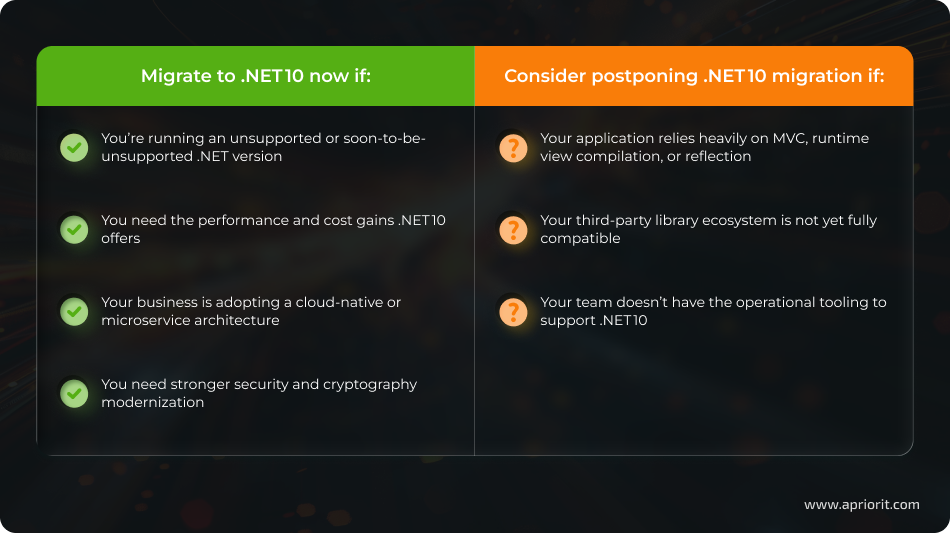
Migrating to .NET 10 is the right choice when your current .NET version is unsupported or close to losing support, exposing your organization to security and compliance risks. Teams dealing with escalating cloud costs or performance bottlenecks can also benefit from .NET 10’s more efficient runtime and reduced resource consumption.
Additionally, organizations shifting toward microservices, event‑driven architectures, or Kubernetes gain more reliable and predictable behavior by standardizing on the newest LTS runtime. If you want to accelerate development velocity through modern language features and improved tooling, .NET 10 also makes sense. Finally, if your system’s stability, scalability, or security posture already shows weaknesses, upgrading provides a stronger long‑term baseline.
Overall, a move to .NET 10 delivers meaningful value when the cost of maintaining older versions outweighs the migration effort.
Postponing migration may be necessary if your application relies heavily on MVC, reflection, or runtime view generation, since these patterns aren’t yet aligned with trimming and AOT constraints. Additionally, organizations depending on third‑party libraries that haven’t been updated for newer .NET versions should wait until the ecosystem matures to avoid breaking critical components.
If your CI/CD pipelines, observability stack, or container infrastructure aren’t prepared for .NET 10, migrating prematurely could increase production risk. A slower, planned transition also makes sense when major refactoring would be required to support new runtime behavior.
Read also
How to Test REST API Services on the .NET Platform
Find out how to implement comprehensive API testing practices that reduce downtime risks, enhance performance, and support the continuous delivery of reliable software solutions.
Best practices for safely migrating to .NET 10
How can you minimize production risk during migration?
Migrating to .NET 10 requires careful planning. Its tighter trimming rules, expanded AOT capabilities, and more opinionated runtime behavior can surface issues early if the migration isn’t structured correctly.
Here are a few practices from the Apriorit team that you can use as a .NET 10 migration guide to help your team reduce disruption, control risk, and migrate in a predictable way:
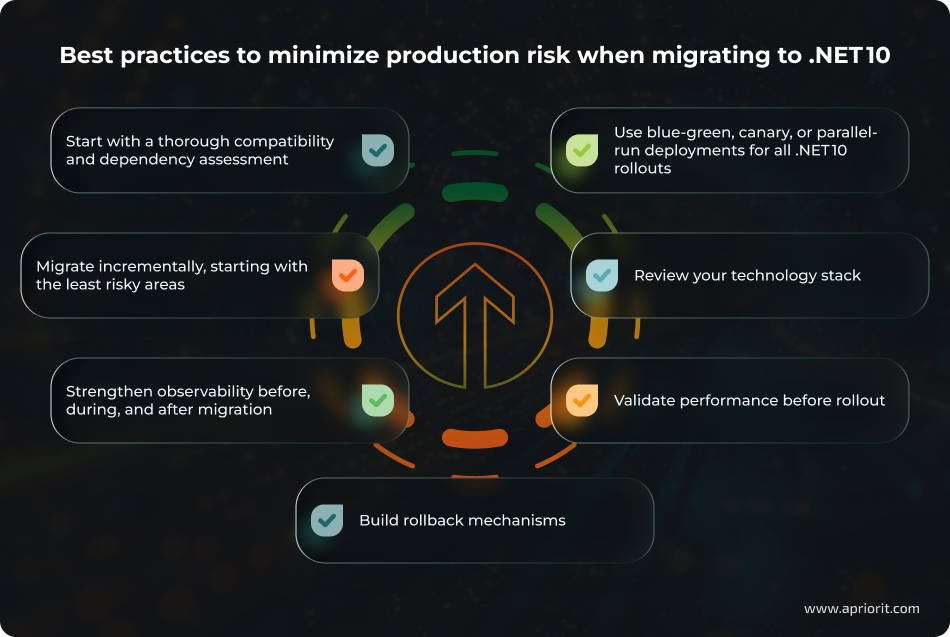
1. Begin with a deep compatibility and dependency analysis
Before making any production changes, your team should conduct a full assessment of components that rely heavily on reflection, legacy libraries, or features known to conflict with .NET 10. Pay attention to trimming and AOT constraints.
Early detection of reflection-heavy code paths and incompatible packages is crucial because these are the primary sources of runtime failure during modernization. By beginning with a deep compatibility and dependency analysis, your team can avoid unpredictable breakages later in the migration and build a clear roadmap of what requires refactoring vs. direct upgrade.
2. Migrate incrementally, not all at once
Plan migration service by service, starting with the least risky services. This aligns with Microsoft’s recommendation to modernize gradually.
Even if a subsystem introduces breaking changes, the impact surface remains limited and controllable, preventing platform-wide outages.
3. Strengthen observability across the migration lifecycle
As .NET 10 extends the observability enhancements introduced in .NET 8, it’s crucial to prepare your monitoring stack before upgrading.
Best practices include:
- Enabling extended monitoring traces before migration so you can compare behaviors pre‑ and post‑upgrade
- Tracking dependency performance, latency, and resource use after migrating services
Robust observability minimizes blind spots, accelerates regression detection, and shortens recovery times during rollout.
4. Use controlled release deployment strategies
The most commonly used deployment patterns are:
- Canary releases 一 Direct a controlled percentage of traffic to the .NET 10 version.
- Blue‑green deployments 一 Keep the previous version on one environment and .NET 10 on another, switching gradually.
- Parallel-run 一 Run both versions simultaneously to confirm behavioral parity.
These patterns provide predictable rollback paths and allow your team to validate functional behavior and performance in real traffic conditions. Engineers gain real-time validation with full reversibility, reducing the likelihood of production-wide impact from regressions.
5. Modernize your technology stack for .NET 10 requirements
You might need to modernize CI/CD pipelines to support .NET 10 requirements.
Here’s an example of what a tech stack for a smooth .NET 10 migration can include:
- .NET 10 SDK and Visual Studio 2026
- ASP.NET Core 10
- Entity Framework 10
- ASP.NET Zero for modular business applications
- .NET Aspire 13
- Container-first workflow (Docker + Linux base images)
- Monitoring tools for metrics, logs, and tracing (OpenTelemetry or others)
- Azure DevOps, GitHub Actions, or GitLab CI/CD
- Cloud platform support (Azure, AWS, GCP)
By reviewing and improving the tech stack, your team can ensure deterministic builds, avoid environment drift, and reduce runtime inconsistencies across staging and production.
6. Validate performance under realistic conditions
Although .NET 10 delivers improvements in JIT performance, networking, databases, JSON handling, and hardware acceleration, your team should verify these gains in practice.
Your team can confirm actual performance improvements and detect regressions by establishing baselines on the current runtime and comparing them against .NET 10 before production traffic hits the system.
To fully validate that a solution works as intended, it’s also crucial to pay attention to testing. Load testing under realistic conditions is essential to ensure trimming or AOT hasn’t removed critical execution paths and to detect differences in memory allocation or garbage collector behavior.
7. Build rollback mechanisms
Pair every upgrade step with comprehensive regression suites and database snapshotting. This aligns with modern enterprise migration practices that emphasize test-first approaches for system modernization.
If anything behaves unexpectedly, your team can roll back instantly and restore the prior working state.
The key principle for .NET 10 migration is to make it iterative, observable, and reversible. Begin with a high‑level compatibility and dependency assessment. Strengthen observability before the first service migrates. Modernize step by step.
From Apriorit’s experience, we recommend designing a safe migration roadmap, preparing your CI/CD and observability pipelines, and ensuring each step of the migration is low‑risk, fully validated, and aligned with your business constraints.
Alexander, Development Leader at Apriorit
How Apriorit can help you with .NET development and migration
Apriorit is your trusted partner for both modernizing large .NET infrastructures and adopting .NET 10. Leverage our deep .NET engineering expertise to design a safe, step-by-step path to modernization.
Why choose Apriorit?
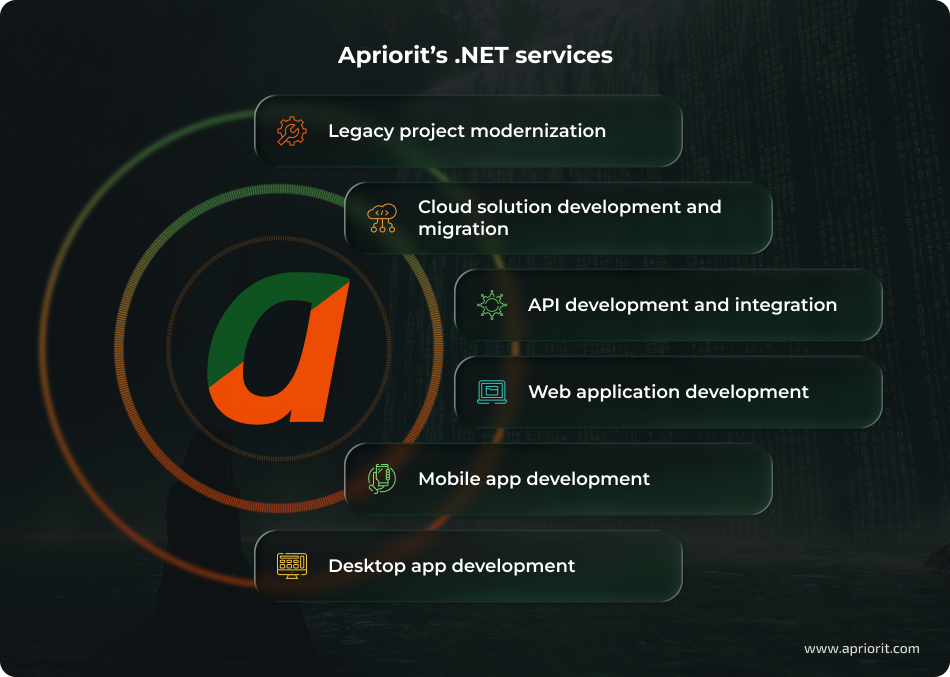
- Strong .NET engineering across the stack. Our teams handle a wide range of .NET engineering tasks, from backend design and API development and integration to performance tuning, cross‑platform modernization, and long-term support.
- Security-first delivery. We embed secure SDLC practices, threat modeling, and safe deployment procedures into every project. By leveraging our cybersecurity experience, you can ensure your migration goes safely.
- Gradual modernization with minimal disruption. Our architects design modernization strategies using safe, staged approaches. This helps us keep your system running while progressively upgrading runtimes, libraries, and architectural components.
- Cloud-ready architecture. We design and migrate .NET solutions for Azure, AWS, GCP, hybrid, and on‑premises environments. This includes containerization, cloud-native patterns, Kubernetes adoption, and leveraging .NET 10 features like improved AOT, Aspire-based orchestration, and observability.
- Experience in regulated and high-risk domains. We’re used to building software where uptime, security, compliance, and data protection are non-negotiable. Whether you need help with web development, SaaS products, or any other type of software, our teams make sure your data remains protected.
- Flexible engagement models. Choose the cooperation approach that best fits your workflow, tools, and governance model: a dedicated team or a few specialists to strengthen your in-house team during the project.
Apriorit helps companies make evidence‑based decisions about when to adopt .NET 10 — and when not to. Each of our recommendations is based on the architecture, lifecycle, performance profile, and regulatory requirements of each product.
Planning to scale your product with powerful .NET technologies?
Let our specialists help you design and implement flexible, cross-platform solutions that support growth, enhance performance, and meet evolving user demands.
FAQ
When is it best to use .NET for my projects?
<p>.NET is an excellent fit when your product strategy depends on security, long-term stability, and enterprise‑grade engineering.</p>
<p>You should consider .NET when your project involves:</p>
<ul class=apriorit-list-markers-green>
<li>Modern web apps and APIs</li>
<li>AI‑powered features</li>
<li>A strong Microsoft stack or existing .NET codebase</li>
<li>Cloud‑native or high‑load architecture, especially Azure</li>
<li>Cross‑platform desktop and mobile solutions</li>
<li>Security, compliance, and enterprise-specific requirements</li>
</ul>
What’s new in recent .NET releases?
<p>Recent .NET releases — from .NET 8 (LTS) through .NET 9 (STS) and now .NET 10 (LTS) — deliver major changes:</p>
<ul class=apriorit-list-markers-green>
<li>Performance improvements. .NET 8 introduced major API throughput gains and routing/serialization optimizations, while performance improvements in .NET 10 add further runtime and JIT enhancements for faster apps and lower memory use.</li>
<li>Cloud‑native support. .NET 8 added production‑ready AOT and strong support for gRPC and Minimal APIs .NET 10 extends orchestration and observability capabilities through updated ASP.NET Core and runtime tooling.</li>
<li>Security enhancements. New cryptography features, networking improvements, and updated libraries strengthen application hardening across modern .NET versions.</li>
<li>Developer productivity. C# 12/.NET 8 and C# 14/.NET 10 introduce cleaner syntax, faster builds, and source‑generation improvements.</li>
<li>Containerization and Native AOT. Native AOT became production‑ready in .NET 8 and continues improving in .NET 10, reducing cold start latency and container size for microservices.</li>
</ul>
What are the main modernization strategies for .NET applications?
<p>The right approach to modernizing a legacy .NET system depends on your system’s architecture, business constraints, and long-term goals. Most organizations combine several strategies to avoid unnecessary rewrites.</p>
<p><a href=”https://www.apriorit.com/dev-blog/modernizing-legacy-systems”>Common modernization strategies</a> include:</p>
<ul class=apriorit-list-markers-green>
<li>Rehost (“lift and shift”): Move as-is to modern infrastructure with minimal code changes</li>
<li>Refactor / replatform: Update frameworks, improve performance, and remove obsolete components</li>
<li>Re‑architect: Redesign into scalable, modular services or adopt cloud-native patterns</li>
<li>Rewrite: Rebuild when legacy code is too costly or risky to maintain</li>
<li>Strangler fig pattern: Gradually replace parts of the system without disrupting production</li>
<li>Modularization: Break monoliths into well-defined, maintainable components</li>
</ul>
Should I migrate to .NET 10 or wait for the .NET 11 release?
<p>.NET 11 is still in preview, with the final release expected in November 2026.</p>
<p>.NET 10 is already a released LTS version, supported until November 2028. This gives you a guaranteed three‑year support window, making it the safer choice for production workloads that require stability, security updates, and predictable maintenance cycles.</p>
<p>How to decide:</p>
<ul class=apriorit-list-markers-green>
<li>Migrate to .NET 10 If your organization is currently on an unsupported or soon‑to‑be‑unsupported version, or if you need the performance and security improvements available today.</li>
<li>Monitor .NET 11’s progression through previews if your systems are already on .NET 8 LTS and stable. But note that most businesses should avoid planning around a release that hasn’t yet finalized its support policy.</li>
</ul>
Why can’t I stay on older .NET versions?
<p>Staying on older .NET versions exposes systems to security risks like:</p>
<ul class=apriorit-list-markers-green>
<li>Unpatched common vulnerabilities and exposures (CVEs)</li>
<li>Runtime weaknesses</li>
<li>Compliance failures</li>
<li>Remote code execution (RCE)</li>
<li>Feature bypass flaws</li>
<li>Harvest now, decrypt later threats</li>
<li>Abandoned dependencies</li>
</ul>
Have a question?
Ask our expert!

Director of Global Markets Development



